This is an interactive notebook. You can run it locally or use the following links:
Import traces from third-party systems
This notebook shows you how to import historical conversation traces from a CSV file into W&B Weave so you can analyze them, compare model behavior, and run evaluations on data that was generated outside of a Weave-instrumented application.
Sometimes you can’t instrument your Python or JavaScript code with the Weave integration to obtain real-time traces of your GenAI application. Often, these traces are available to you later in CSV or JSON format.
This notebook uses the lower-level Weave Python API to extract data from a CSV file and import it into Weave so you can analyze and evaluate it.
The sample dataset assumed in this cookbook has the following structure:
conversation_id,turn_index,start_time,user_input,ground_truth,answer_text
1234,1,2024-09-04 13:05:39,This is the beginning, ['This was the beginning'], That was the beginning
1235,1,2024-09-04 13:02:11,This is another trace,, That was another trace
1235,2,2024-09-04 13:04:19,This is the next turn,, That was the next turn
1236,1,2024-09-04 13:02:10,This is a 3 turn conversation,, Woah thats a lot of turns
1236,2,2024-09-04 13:02:30,This is the second turn, ['That was definitely the second turn'], You are correct
1236,3,2024-09-04 13:02:53,This is the end,, Well good riddance!
To understand the decisions for import in this notebook, remember that Weave traces have parent-child relationships that are 1:Many and continuous. A single parent can have multiple children, and that parent can itself be a child of another parent.
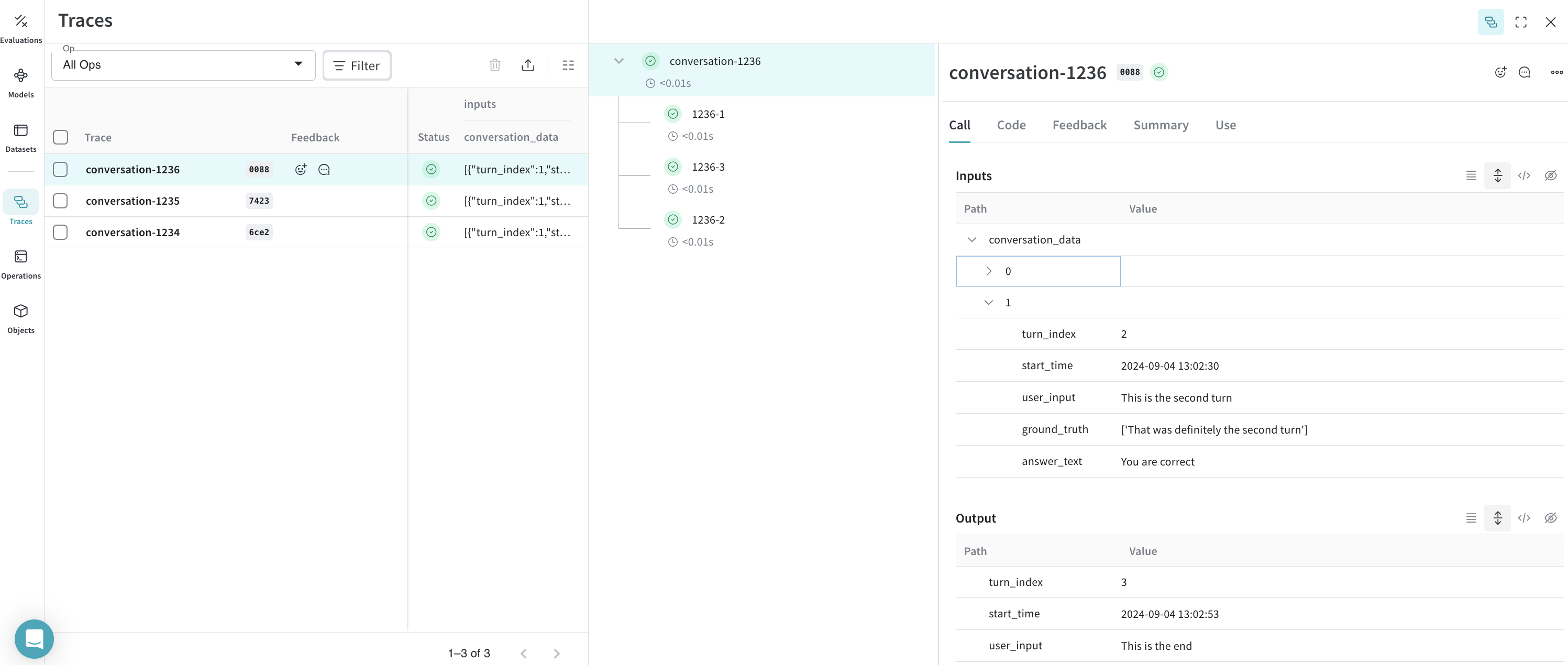
This notebook uses conversation_id as the parent identifier and turn_index as the child identifier to provide complete conversation logging.
You must modify the variables in the following sections to match your own dataset, file paths, and W&B project.
Set up the environment
Install and import all needed packages.
Set WANDB_API_KEY in your environment so that you can log in with wandb.login() (provide this to Colab as a secret).
Set the name of the file you upload to Colab in name_of_file, and set the W&B project you want to log into in name_of_wandb_project.
name_of_wandb_project can also be in the format [TEAM_NAME]/[PROJECT_NAME] to specify a team to log the traces into.
Then, fetch a Weave client by calling weave.init().
%pip install wandb weave pandas datetime --quiet
python
import os
import pandas as pd
import wandb
from google.colab import userdata
import weave
## Write samples file to disk
with open("/content/import_cookbook_data.csv", "w") as f:
f.write(
"conversation_id,turn_index,start_time,user_input,ground_truth,answer_text\n"
)
f.write(
'1234,1,2024-09-04 13:05:39,This is the beginning, ["This was the beginning"], That was the beginning\n'
)
f.write(
"1235,1,2024-09-04 13:02:11,This is another trace,, That was another trace\n"
)
f.write(
"1235,2,2024-09-04 13:04:19,This is the next turn,, That was the next turn\n"
)
f.write(
"1236,1,2024-09-04 13:02:10,This is a 3 turn conversation,, Woah thats a lot of turns\n"
)
f.write(
'1236,2,2024-09-04 13:02:30,This is the second turn, ["That was definitely the second turn"], You are correct\n'
)
f.write("1236,3,2024-09-04 13:02:53,This is the end,, Well good riddance!\n")
os.environ["WANDB_API_KEY"] = userdata.get("WANDB_API_KEY")
name_of_file = "/content/import_cookbook_data.csv"
name_of_wandb_project = "import-weave-traces-cookbook"
wandb.login()
python
weave_client = weave.init(name_of_wandb_project)
Load the data
With the environment ready, you can load and shape the CSV data so that it matches the parent-child structure that Weave expects.
Load the data into a pandas DataFrame, and sort it by conversation_id and turn_index to ensure the parents and children are correctly ordered.
This results in a two-column pandas DataFrame with the conversation turns as an array under conversation_data.
## Load data and shape it
df = pd.read_csv(name_of_file)
sorted_df = df.sort_values(["conversation_id", "turn_index"])
# Function to create an array of dictionaries for each conversation
def create_conversation_dict_array(group):
return group.drop("conversation_id", axis=1).to_dict("records")
# Group the dataframe by conversation_id and apply the aggregation
result_df = (
sorted_df.groupby("conversation_id")
.apply(create_conversation_dict_array)
.reset_index()
)
result_df.columns = ["conversation_id", "conversation_data"]
# Show how our aggregation looks
result_df.head()
Log the traces to Weave
With the data shaped into conversations and turns, the next step is to write those records into Weave as parent and child calls.
Iterate through the pandas DataFrame:
- Create a parent call for every
conversation_id.
- Iterate through the turn array to create child calls sorted by their
turn_index.
Important concepts of the lower-level Python API:
- A Weave call is equivalent to a Weave trace. This call can have a parent or children associated with it.
- A Weave call can have other things associated with it, such as feedback and metadata. This example only associates inputs and outputs, but you can add these other items in your import if the data provides them.
- A Weave call is
created and finished because these are meant to be tracked in real time. Because this is an after-the-fact import, you create and finish once the objects are defined and tied to one another.
- The
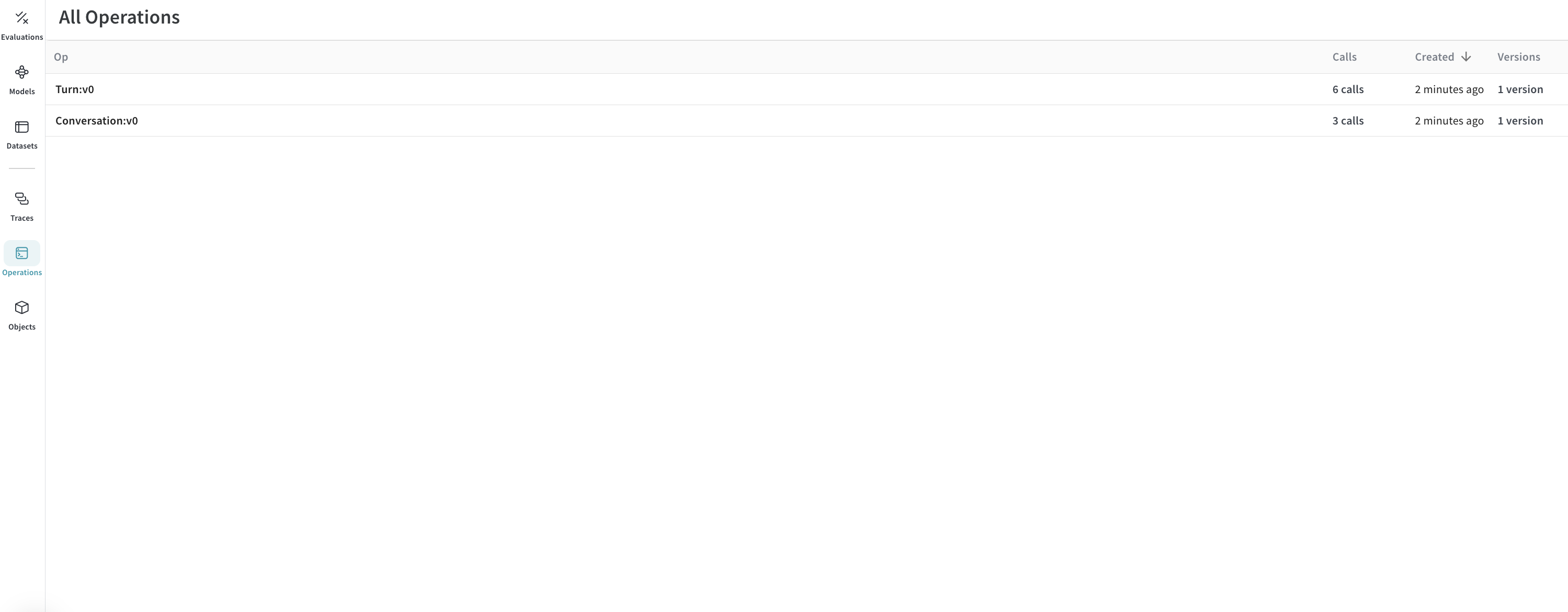
op value of a call is how Weave categorizes calls of the same makeup. In this example, all parent calls are of Conversation type, and all child calls are of Turn type. You can modify this as you see fit.
- A call can have
inputs and output. inputs are defined at creation, and output is defined when the call is finished.
# Log traces to weave
# Iterate through our aggregated conversations
for _, row in result_df.iterrows():
# Define our conversation parent,
# we are now creating a "call" with the weave_client we defined before
parent_call = weave_client.create_call(
# The Op value will register this as a Weave Op, which will allow us to retrieve these as a group easily in the future
op="Conversation",
# We set the inputs of our high level conversation as all the turns under it
inputs={
"conversation_data": row["conversation_data"][:-1]
if len(row["conversation_data"]) > 1
else row["conversation_data"]
},
# Our Conversation parent does not have a further parent
parent=None,
# The name of how this specific conversation will appear in the UI
display_name=f"conversation-{row['conversation_id']}",
)
# We set the output of the parent to be the last trace in the conversation
parent_output = row["conversation_data"][len(row["conversation_data"]) - 1]
# We now iterate through all the conversation turns for the parent
# and log them as children of the conversation
for item in row["conversation_data"]:
item_id = f"{row['conversation_id']}-{item['turn_index']}"
# We create a call again here to be categorized under the conversation
call = weave_client.create_call(
# We qualify a single conversation trace as a "Turn"
op="Turn",
# We provide all inputs of the turn, including RAG 'ground_truth'
inputs={
"turn_index": item["turn_index"],
"start_time": item["start_time"],
"user_input": item["user_input"],
"ground_truth": item["ground_truth"],
},
# We set this to be a child of the parent we defined
parent=parent_call,
# We provide it a name to be id'ed by in Weave
display_name=item_id,
)
# We set the output of the call as the answer
output = {
"answer_text": item["answer_text"],
}
# Because these are traces that already happened, we finish the single turn call
weave_client.finish_call(call=call, output=output)
# Now that we have logged all its children, we also finish the parent call
weave_client.finish_call(call=parent_call, output=parent_output)
Result: traces logged to Weave
At this point, your CSV data has been imported into Weave. You can now browse the conversations and their turns in the Weave UI, grouped under the Conversation and Turn operations you defined.
Traces:
Operations:
Optional: export your traces to run evaluations
Once the traces are in Weave and you understand how the conversations look, you can export them to another process to run Weave Evaluations.
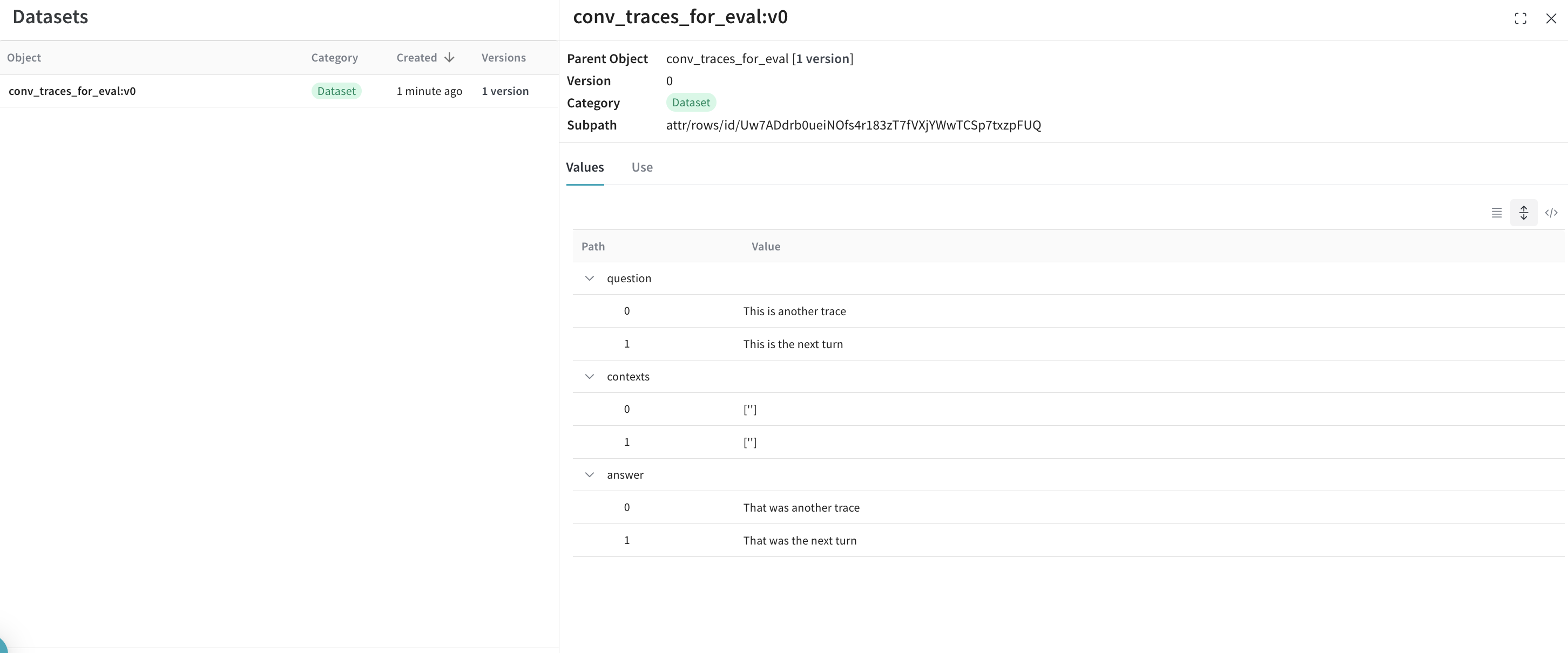
To do this, fetch all conversations from W&B through the query API and create a dataset from them.
## This cell does not run by default, comment the below line to execute this script
%%script false --no-raise-error
## Get all Conversation traces for evaluation and prepare dataset for eval
# We create a query filter that brings us all our Conversation objects
# The ref shown below is specific to your project, and you can obtain it by
# going into your project's Operations in the UI, clicking on the "Conversations"
# object, then the "Use" tab in the side panel.
weave_ref_for_conversation_op = "weave://wandb-smle/import-weave-traces-cookbook/op/Conversation:tzUhDyzVm5bqQsuqh5RT4axEXSosyLIYZn9zbRyenaw"
filter = weave.trace_server.trace_server_interface.CallsFilter(
op_names=[weave_ref_for_conversation_op],
)
# We execute the query
conversation_traces = weave_client.get_calls(filter=filter)
rows = []
# We go through our conversation traces and construct dataset rows from it
for single_conv in conversation_traces:
# In this example, we may only care for conversations that utilized our RAG
# pipeline, so we filter for such types of conversations
is_rag = False
for single_trace in single_conv.inputs['conversation_data']:
if single_trace['ground_truth'] is not None:
is_rag = True
break
if single_conv.output['ground_truth'] is not None:
is_rag = True
# Once we've identified a converation to have used RAG, we add it to our dataset
if is_rag:
inputs = []
ground_truths = []
answers = []
# We go through every turn in the conversation
for turn in single_conv.inputs['conversation_data']:
inputs.append(turn.get('user_input', ''))
ground_truths.append(turn.get('ground_truth', ''))
answers.append(turn.get('answer_text', ''))
## Account for when conversations are a single turn
if len(single_conv.inputs) != 1 or single_conv.inputs['conversation_data'][0].get('turn_index') != single_conv.output.get('turn_index'):
inputs.append(single_conv.output.get('user_input', ''))
ground_truths.append(single_conv.output.get('ground_truth', ''))
answers.append(single_conv.output.get('answer_text', ''))
data = {
'question': inputs,
'contexts': ground_truths,
'answer': answers
}
rows.append(data)
# With our dataset rows created, we create the Dataset object and
# publish it back to Weave for later retrieval
dset = weave.Dataset(name = "conv_traces_for_eval", rows=rows)
weave.publish(dset)
Result
The exported dataset is now published back to Weave and is ready to use as input for an evaluation.
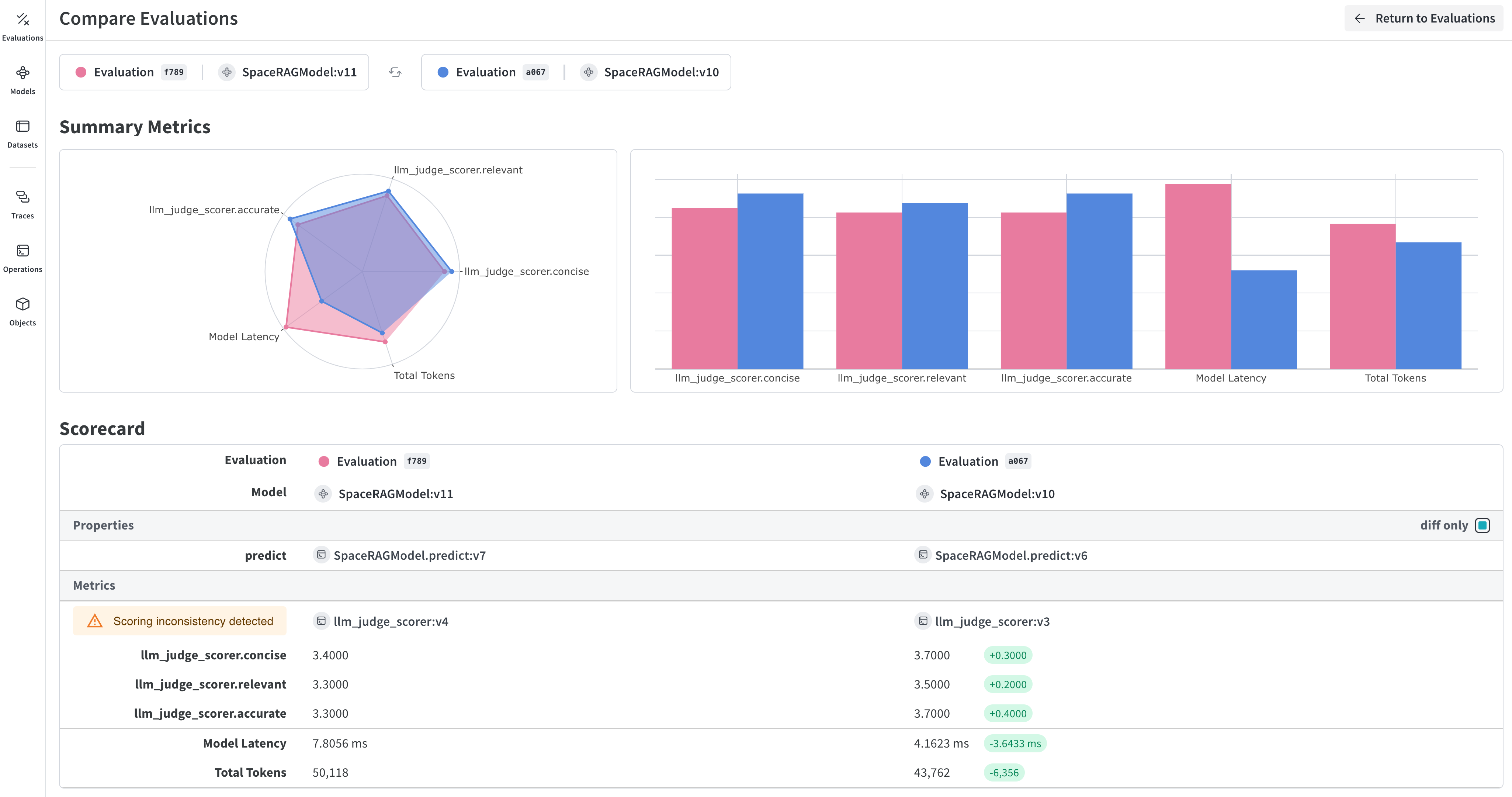
To learn more about evaluations, see the Quickstart on using your newly created dataset to evaluate your RAG application.