

weave.publish, W&B Weave creates an immutable version. You can reference each version by name and version, retrieve it in code with weave.ref(...).get(), and view it in the Weave UI.
Prompt versions
Weave stores prompts as versioned objects. This lets you safely iterate on prompts while ensuring that evaluations, experiments, and production systems can reference the exact prompt version they ran with. You access prompt versions using Weave object references. This page explains how Weave creates prompt versions, how to retrieve a specific version in code, and how to inspect and compare versions in the Weave UI.How prompt versions are created
Weave automatically tracks every version of your prompts, creating a complete history of how your prompts evolve. This versioning system is important for prompt engineering workflows. It lets you experiment safely, track what changes improved or hurt performance, and roll back to previous versions if needed. Each time you publish a prompt with the same name but different content, Weave creates a new version while preserving all previous versions. Each version is immutable. Once created, the contents of that version cannot be changed. If you update a prompt and publish it again, Weave creates a new version while preserving previous versions. Versioning enables you to:- Reproduce past experiments.
- Safely iterate on prompt changes.
- Roll out prompt updates in a controlled way.
Construct a fully qualified ref URI
Before retrieving a prompt version in code, it helps to understand how Weave identifies stored objects. A fully qualified ref URI uniquely identifies a Weave object. A fully qualified Weave object ref URI looks like this:your-team-name: W&B entity (username or team name)your-project-name: W&B projectobject_name: object nameobject_version: either a version hash, a version index likev0orv1, or an alias like:latestor:production. All objects have the:latestalias.
Retrieve a prompt version in code
To retrieve a prompt, create a reference to its name and version, then call.get() to load it. A ref points to a stored object; .get() fetches that object so you can use it in your application.
You can construct refs with a few different styles:
weave.ref(<name>): Retrieves the:latestversion of a prompt. Requires callingweave.init(...).weave.ref(<name>:<alias_or_version>): Retrieves a prompt by alias, version hash, or version index. Requires callingweave.init(...).weave.ref(<fully_qualified_ref_uri>): Retrieves the prompt located at the specified fully qualified ref URI. Does not require callingweave.init(...).
support_prompt:v3 version so you can use it in your application:
Use prompts in production
When deploying prompts in production systems, use an alias likeproduction rather than a version index or the latest version. In your production application, load the prompt with weave.ref(<name>:<alias>).get().
Using an alias keeps production behavior stable and predictable. When you’re ready to promote a new version, move the alias to that version. All consumers then automatically pick up the change.
A common workflow looks like this:
- Develop and test a new prompt version.
- Evaluate the new prompt against datasets or evaluation suites.
- Move the
productionalias to the new version withclient.set_aliases(new_ref, "production").
View and compare prompt versions
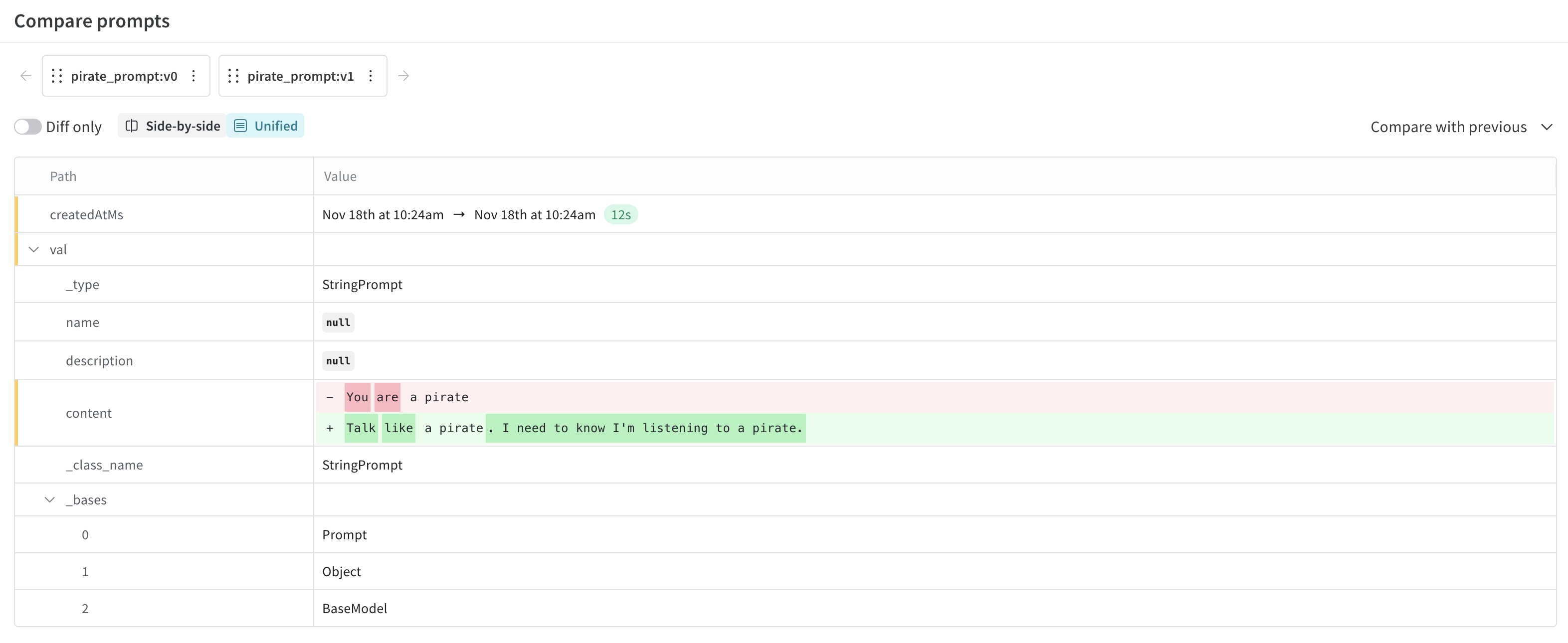
The Weave UI lets you browse all versions of a prompt and view side-by-side diffs between them, which is useful for reviewing how a prompt has evolved. To view versions of the prompt in the UI:- Navigate to wandb.ai and select your project.
- In the Weave project sidebar, click Assets. This opens the Assets page.
- In the Assets page, click Prompts. This opens the Prompts page where your project’s prompts are listed.
- Under the Versions column, click (x) Versions for the prompt you want to view. This opens a list of prompt versions.
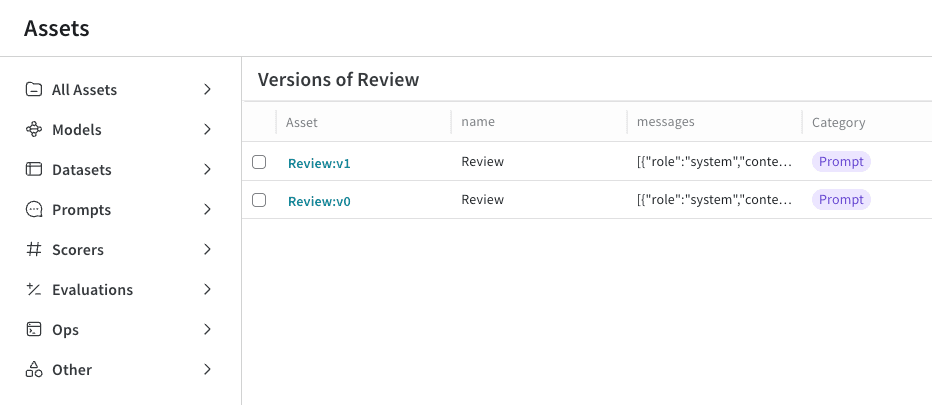
- (Optional) To compare versions of prompts, click the checkboxes beside the listed prompts and then click the Compare button in the table toolbar. This lets you see the diff between your prompts.
Add prompt tags and aliases
You can organize prompt versions using aliases and tags. These labels help you identify and reference specific versions across development, evaluation, and production workflows.- Alias: A unique name that resolves to a single prompt version. You can move an alias to point to a different version at any time, making it useful for stable references like
productionorstaging. - Tag: A descriptive label you attach to a version. A version can have multiple tags. Use tags to categorize and filter versions, such as
reviewedorpassed-eval.
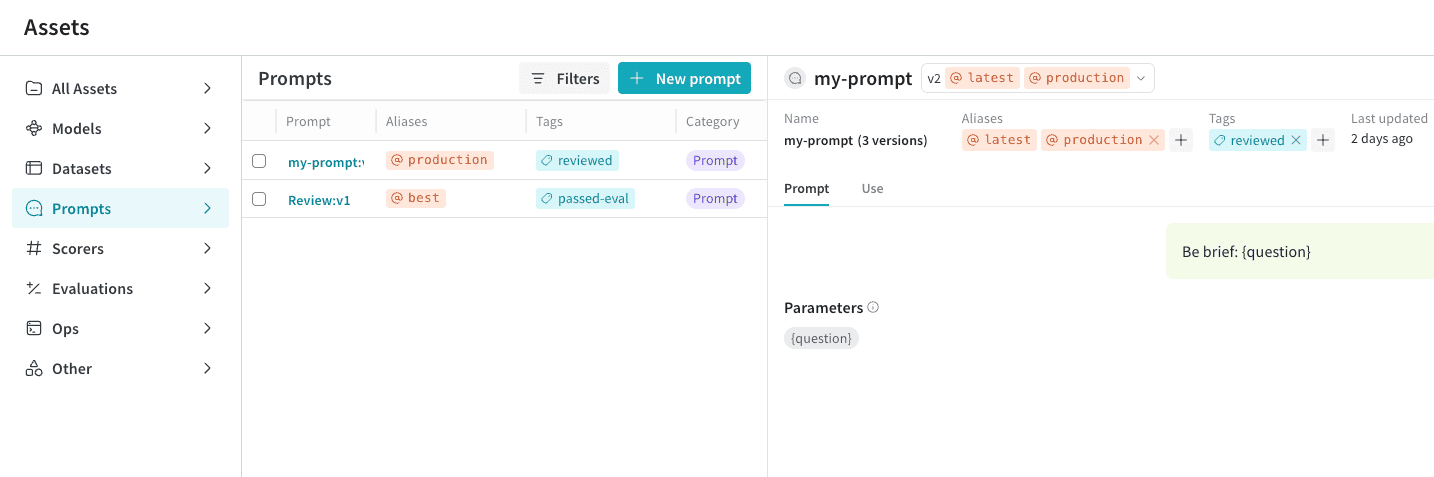
- In the Weave project sidebar, click Assets. This opens the Assets page.
- In the Assets page, click Prompts. Note that you can view assigned Aliases and Tags in the table.
- In the Prompts table, click the link of the prompt you want to change.
- In the prompt detail panel for your selected prompt, the title bar displays the name of the prompt and a specific version. Choose the version of the prompt you want to update.
- In the panel toolbar, use the controls to add and remove assigned aliases and tags to this specific version.
Modify tags and aliases in code
You can also manage tags and aliases in code, for tasks such as:- Publishing prompts with tags and aliases inline.
- Pointing aliases at specific versions and resolving them to load prompts.
- Adding, removing, or listing tags and aliases on versions.
my-prompt to your project with three versions, each having various tags and aliases. Update 'your-team-name/your-project-name' accordingly for your project.