메인 콘텐츠로 건너뛰기
이것은 인터랙티브 노트북입니다. 로컬에서 실행하거나 아래 링크를 사용할 수 있습니다:

PII 데이터와 함께 Weave를 사용하는 방법

이 가이드에서는 개인 식별 정보 (PII) 데이터의 프라이버시를 유지하면서 W&B Weave를 사용하는 방법을 배웁니다. 이 가이드는 PII 데이터를 식별, 비식별화 및 익명화하기 위한 다음 메소드들을 시연합니다:
  1. PII 데이터를 식별하고 비식별화하기 위한 정규 표현식.
  2. Python 기반 데이터 보호 SDK인 Microsoft의 Presidio. 이 툴은 비식별화 및 대체 기능을 제공합니다.
  3. 가짜 데이터를 생성하는 Python 라이브러리인 **Faker**를 Presidio와 결합하여 PII 데이터를 익명화합니다.
또한, weave.op 입력/출력 로그 커스터마이징 및 _autopatch_settings_를 사용하여 PII 비식별화 및 익명화를 워크플로우에 통합하는 방법을 배웁니다. 자세한 내용은 로그된 입력 및 출력 커스터마이징을 참조하세요. 시작하려면 다음을 수행하세요:
  1. 개요 섹션을 검토합니다.
  2. 사전 요구 사항을 완료합니다.
  3. PII 데이터를 식별, 비식별화 및 익명화하기 위해 사용 가능한 메소드를 검토합니다.
  4. Weave 호출에 메소드 적용을 수행합니다.

개요

다음 섹션은 weave.op를 사용한 입력 및 출력 로그에 대한 개요와 Weave에서 PII 데이터를 다루기 위한 모범 사례를 제공합니다.

weave.op를 사용하여 입력 및 출력 로그 커스터마이징

Weave Ops를 사용하면 입력 및 출력 후처리 함수를 정의할 수 있습니다. 이 함수들을 사용하여 LLM 호출에 전달되거나 Weave에 로그되는 데이터를 수정할 수 있습니다. 다음 예제에서는 두 개의 후처리 함수가 정의되어 weave.op()의 인수로 전달됩니다.
from dataclasses import dataclass
from typing import Any

import weave

# 입력 래퍼 클래스
@dataclass
class CustomObject:
    x: int
    secret_password: str

# 먼저 입력 및 출력 후처리를 위한 함수를 정의합니다:
def postprocess_inputs(inputs: dict[str, Any]) -> dict[str, Any]:
    return {k:v for k,v in inputs.items() if k != "hide_me"}

def postprocess_output(output: CustomObject) -> CustomObject:
    return CustomObject(x=output.x, secret_password="REDACTED")

# 그런 다음, @weave.op 데코레이터를 사용할 때 이 처리 함수들을 데코레이터의 인수로 전달합니다:
@weave.op(
    postprocess_inputs=postprocess_inputs,
    postprocess_output=postprocess_output,
)
def some_llm_call(a: int, hide_me: str) -> CustomObject:
    return CustomObject(x=a, secret_password=hide_me)

PII 데이터와 함께 Weave를 사용하기 위한 모범 사례

PII 데이터와 함께 Weave를 사용하기 전에, PII 데이터와 함께 Weave를 사용하기 위한 모범 사례를 검토하세요.

테스트 중

  • PII 탐지를 확인하기 위해 익명화된 데이터를 로그합니다.
  • Weave Traces로 PII 처리 프로세스를 추적합니다.
  • 실제 PII를 노출하지 않고 익명화 성능을 측정합니다.

프로덕션에서

  • 원시 PII를 절대 로그하지 마세요.
  • 로그하기 전에 민감한 필드를 암호화하세요.

암호화 팁

  • 나중에 복호화해야 하는 데이터에는 복구 가능한 암호화를 사용하세요.
  • 복구할 필요가 없는 고유 ID에는 단방향 해싱을 적용하세요.
  • 암호화된 상태로 분석해야 하는 데이터에는 전문화된 암호화를 고려하세요.

사전 요구 사항

  1. 먼저 필요한 패키지를 설치합니다.
%%capture
# @title 필요한 python 패키지:
!pip install cryptography
!pip install presidio_analyzer
!pip install presidio_anonymizer
!python -m spacy download en_core_web_lg    # Presidio는 spacy NLP 엔진을 사용합니다
!pip install Faker                          # Faker를 사용하여 PII 데이터를 가짜 데이터로 대체합니다
!pip install weave                          # Traces를 활용하기 위해 설치합니다
!pip install set-env-colab-kaggle-dotenv -q # 환경 변수 설정을 위해 설치합니다
!pip install anthropic                      # sonnet을 사용하기 위해 설치합니다
!pip install cryptography                   # 데이터를 암호화하기 위해 설치합니다
  1. 다음에서 API 키를 생성합니다:
%%capture
# @title API 키를 올바르게 설정하세요
# 사용법은 https://pypi.org/project/set-env-colab-kaggle-dotenv/ 를 참조하세요.

from set_env import set_env

_ = set_env("ANTHROPIC_API_KEY")
_ = set_env("WANDB_API_KEY")
  1. Weave 프로젝트를 초기화합니다.
import weave

# 새 Weave 프로젝트 시작
WEAVE_PROJECT = "pii_cookbook"
weave.init(WEAVE_PROJECT)
  1. 10개의 텍스트 블록이 포함된 데모 PII 데이터셋을 로드합니다.
import requests

url = "https://raw.githubusercontent.com/wandb/weave/master/docs/notebooks/10_pii_data.json"
response = requests.get(url)
pii_data = response.json()

print('PII 데이터 첫 번째 샘플: "' + pii_data[0]["text"] + '"')

비식별화 메소드 개요

설정을 완료하면 다음을 수행할 수 있습니다. PII 데이터를 탐지하고 보호하기 위해, 다음 메소드들을 사용하여 PII 데이터를 식별 및 비식별화하고 선택적으로 익명화할 것입니다:
  1. PII 데이터를 식별하고 비식별화하기 위한 정규 표현식.
  2. 비식별화 및 대체 기능을 제공하는 Python 기반 데이터 보호 SDK인 Microsoft Presidio.
  3. 가짜 데이터를 생성하기 위한 Python 라이브러리인 Faker.

메소드 1: 정규 표현식을 사용한 필터링

정규 표현식 (regex)은 PII 데이터를 식별하고 비식별화하는 가장 간단한 메소드입니다. Regex를 사용하면 전화번호, 이메일 주소, 주민등록번호와 같은 다양한 형식의 민감한 정보와 일치하는 패턴을 정의할 수 있습니다. Regex를 사용하면 복잡한 NLP 기술 없이도 대량의 텍스트를 스캔하고 정보를 대체하거나 비식별화할 수 있습니다.
import re

# regex를 사용하여 PII 데이터를 클리닝하는 함수 정의
def redact_with_regex(text):
    # 전화번호 패턴
    # \b         : 단어 경계
    # \d{3}      : 정확히 3자리 숫자
    # [-.]?      : 선택적 하이픈 또는 점
    # \d{3}      : 또 다른 3자리 숫자
    # [-.]?      : 선택적 하이픈 또는 점
    # \d{4}      : 정확히 4자리 숫자
    # \b         : 단어 경계
    text = re.sub(r"\b\d{3}[-.]?\d{3}[-.]?\d{4}\b", "<PHONE>", text)

    # 이메일 패턴
    # \b         : 단어 경계
    # [A-Za-z0-9._%+-]+ : 이메일 사용자 이름에 들어갈 수 있는 하나 이상의 문자
    # @          : 리터럴 @ 기호
    # [A-Za-z0-9.-]+ : 도메인 이름에 들어갈 수 있는 하나 이상의 문자
    # \.         : 리터럴 점
    # [A-Z|a-z]{2,} : 두 글자 이상의 대소문자 (TLD)
    # \b         : 단어 경계
    text = re.sub(
        r"\b[A-Za-z0-9._%+-]+@[A-Za-z0-9.-]+\.[A-Z|a-z]{2,}\b", "<EMAIL>", text
    )

    # SSN 패턴
    # \b         : 단어 경계
    # \d{3}      : 정확히 3자리 숫자
    # -          : 리터럴 하이픈
    # \d{2}      : 정확히 2자리 숫자
    # -          : 리터럴 하이픈
    # \d{4}      : 정확히 4자리 숫자
    # \b         : 단어 경계
    text = re.sub(r"\b\d{3}-\d{2}-\d{4}\b", "<SSN>", text)

    # 간단한 이름 패턴 (포괄적이지 않음)
    # \b         : 단어 경계
    # [A-Z]      : 대문자 한 개
    # [a-z]+     : 소문자 한 개 이상
    # \s         : 공백 문자 한 개
    # [A-Z]      : 대문자 한 개
    # [a-z]+     : 소문자 한 개 이상
    # \b         : 단어 경계
    text = re.sub(r"\b[A-Z][a-z]+ [A-Z][a-z]+\b", "<NAME>", text)

    return text
샘플 텍스트로 함수를 테스트해 보겠습니다:
# 함수 테스트
test_text = "My name is John Doe, my email is [email protected], my phone is 123-456-7890, and my SSN is 123-45-6789."
cleaned_text = redact_with_regex(test_text)
print(f"원시 텍스트:\n\t{test_text}")
print(f"비식별화된 텍스트:\n\t{cleaned_text}")

메소드 2: Microsoft Presidio를 사용하여 비식별화

다음 메소드는 Microsoft Presidio를 사용하여 PII 데이터를 완전히 제거하는 것과 관련이 있습니다. Presidio는 PII를 비식별화하고 이를 PII 유형을 나타내는 플레이스홀더로 대체합니다. 예를 들어, Presidio는 "My name is Alex"에서 Alex<PERSON>으로 대체합니다. Presidio는 공통 엔티티에 대한 빌트인 지원을 제공합니다. 아래 예제에서는 PHONE_NUMBER, PERSON, LOCATION, EMAIL_ADDRESS 또는 US_SSN인 모든 엔티티를 비식별화합니다. Presidio 프로세스는 함수로 캡슐화됩니다.
from presidio_analyzer import AnalyzerEngine
from presidio_anonymizer import AnonymizerEngine

# NLP 모듈(기본적으로 spaCy 모델) 및 기타 PII 인식기를 로드하는 Analyzer 설정
analyzer = AnalyzerEngine()

# 분석기 결과를 사용하여 텍스트를 익명화할 Anonymizer 설정
anonymizer = AnonymizerEngine()

# Presidio 비식별화 프로세스를 함수로 캡슐화
def redact_with_presidio(text):
    # PII 데이터를 식별하기 위해 텍스트 분석
    results = analyzer.analyze(
        text=text,
        entities=["PHONE_NUMBER", "PERSON", "LOCATION", "EMAIL_ADDRESS", "US_SSN"],
        language="en",
    )
    # 식별된 PII 데이터를 익명화
    anonymized_text = anonymizer.anonymize(text=text, analyzer_results=results)
    return anonymized_text.text
샘플 텍스트로 함수를 테스트해 보겠습니다:
text = "My phone number is 212-555-5555 and my name is alex"

# 함수 테스트
anonymized_text = redact_with_presidio(text)

print(f"원시 텍스트:\n\t{text}")
print(f"비식별화된 텍스트:\n\t{anonymized_text}")

메소드 3: Faker 및 Presidio를 사용하여 대체 익명화

텍스트를 비식별화하는 대신, Faker Python 라이브러리를 사용하여 생성된 가짜 데이터로 이름이나 전화번호와 같은 PII를 교체하여 익명화할 수 있습니다. 예를 들어, 다음과 같은 데이터가 있다고 가정해 보겠습니다: "My name is Raphael and I like to fish. My phone number is 212-555-5555" Presidio와 Faker를 사용하여 데이터를 처리하고 나면 다음과 같이 보일 수 있습니다: "My name is Katherine Dixon and I like to fish. My phone number is 667.431.7379" Presidio와 Faker를 효과적으로 함께 사용하려면 커스텀 연산자에 대한 참조를 제공해야 합니다. 이 연산자들은 Presidio에 PII를 가짜 데이터로 교체하는 역할을 하는 Faker 함수를 안내합니다.
from faker import Faker
from presidio_anonymizer import AnonymizerEngine
from presidio_anonymizer.entities import OperatorConfig

fake = Faker()

# faker 함수 생성 (값을 받아야 함을 유의)
def fake_name(x):
    return fake.name()

def fake_number(x):
    return fake.phone_number()

# PERSON 및 PHONE_NUMBER 엔티티를 위한 커스텀 연산자 생성
operators = {
    "PERSON": OperatorConfig("custom", {"lambda": fake_name}),
    "PHONE_NUMBER": OperatorConfig("custom", {"lambda": fake_number}),
}

text_to_anonymize = (
    "My name is Raphael and I like to fish. My phone number is 212-555-5555"
)

# 분석기 출력
analyzer_results = analyzer.analyze(
    text=text_to_anonymize, entities=["PHONE_NUMBER", "PERSON"], language="en"
)

anonymizer = AnonymizerEngine()

# 위에서 만든 연산자를 익명화 도구에 전달하는 것을 잊지 마세요
anonymized_results = anonymizer.anonymize(
    text=text_to_anonymize, analyzer_results=analyzer_results, operators=operators
)

print(f"원시 텍스트:\n\t{text_to_anonymize}")
print(f"익명화된 텍스트:\n\t{anonymized_results.text}")
코드를 단일 클래스로 통합하고 엔티티 목록을 확장하여 이전에 식별된 추가 엔티티들을 포함해 보겠습니다.
from typing import ClassVar

from faker import Faker
from presidio_anonymizer import AnonymizerEngine
from presidio_anonymizer.entities import OperatorConfig

# Faker를 확장하여 가짜 데이터를 생성하는 커스텀 클래스
class MyFaker(Faker):
    # faker 함수 생성 (값을 받아야 함을 유의)
    def fake_address(self):
        return fake.address()

    def fake_ssn(self):
        return fake.ssn()

    def fake_name(self):
        return fake.name()

    def fake_number(self):
        return fake.phone_number()

    def fake_email(self):
        return fake.email()

    # 엔티티를 위한 커스텀 연산자 생성
    operators: ClassVar[dict[str, OperatorConfig]] = {
        "PERSON": OperatorConfig("custom", {"lambda": fake_name}),
        "PHONE_NUMBER": OperatorConfig("custom", {"lambda": fake_number}),
        "EMAIL_ADDRESS": OperatorConfig("custom", {"lambda": fake_email}),
        "LOCATION": OperatorConfig("custom", {"lambda": fake_address}),
        "US_SSN": OperatorConfig("custom", {"lambda": fake_ssn}),
    }

    def redact_and_anonymize_with_faker(self, text):
        anonymizer = AnonymizerEngine()
        analyzer_results = analyzer.analyze(
            text=text,
            entities=["PHONE_NUMBER", "PERSON", "LOCATION", "EMAIL_ADDRESS", "US_SSN"],
            language="en",
        )
        anonymized_results = anonymizer.anonymize(
            text=text, analyzer_results=analyzer_results, operators=self.operators
        )
        return anonymized_results.text
샘플 텍스트로 함수를 테스트해 보겠습니다:
faker = MyFaker()
text_to_anonymize = (
    "My name is Raphael and I like to fish. My phone number is 212-555-5555"
)
anonymized_text = faker.redact_and_anonymize_with_faker(text_to_anonymize)

print(f"원시 텍스트:\n\t{text_to_anonymize}")
print(f"익명화된 텍스트:\n\t{anonymized_text}")

메소드 4: autopatch_settings 사용

autopatch_settings를 사용하여 하나 이상의 지원되는 LLM 인테그레이션에 대해 초기화 중에 PII 처리를 직접 설정할 수 있습니다. 이 메소드의 장점은 다음과 같습니다:
  1. PII 처리 로직이 초기화 시점에 중앙 집중화되고 스코프가 지정되어, 분산된 커스텀 로직의 필요성을 줄여줍니다.
  2. 특정 인테그레이션에 대해 PII 처리 워크플로우를 커스터마이징하거나 완전히 비활성화할 수 있습니다.
autopatch_settings를 사용하여 PII 처리를 설정하려면, 지원되는 LLM 인테그레이션 중 어느 하나에 대해 op_settings에서 postprocess_inputs 및/또는 postprocess_output을 정의하세요.

def postprocess(inputs: dict) -> dict:
    if "SENSITIVE_KEY" in inputs:
        inputs["SENSITIVE_KEY"] = "REDACTED"
    return inputs

client = weave.init(
    ...,
    autopatch_settings={
        "openai": {
            "op_settings": {
                "postprocess_inputs": postprocess,
                "postprocess_output": ...,
            }
        },
        "anthropic": {
            "op_settings": {
                "postprocess_inputs": ...,
                "postprocess_output": ...,
            }
        }
    },
)

Weave 호출에 메소드 적용

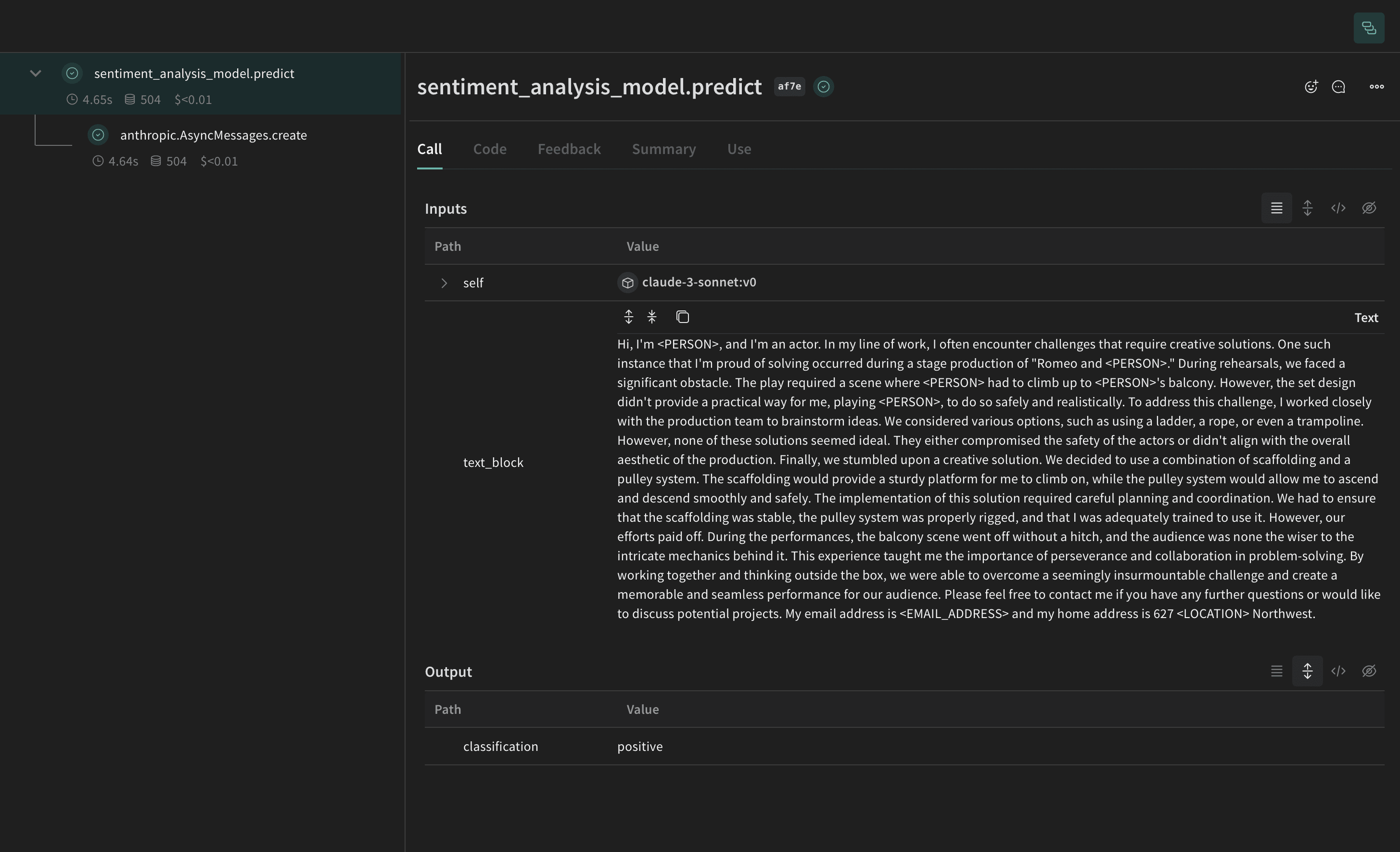
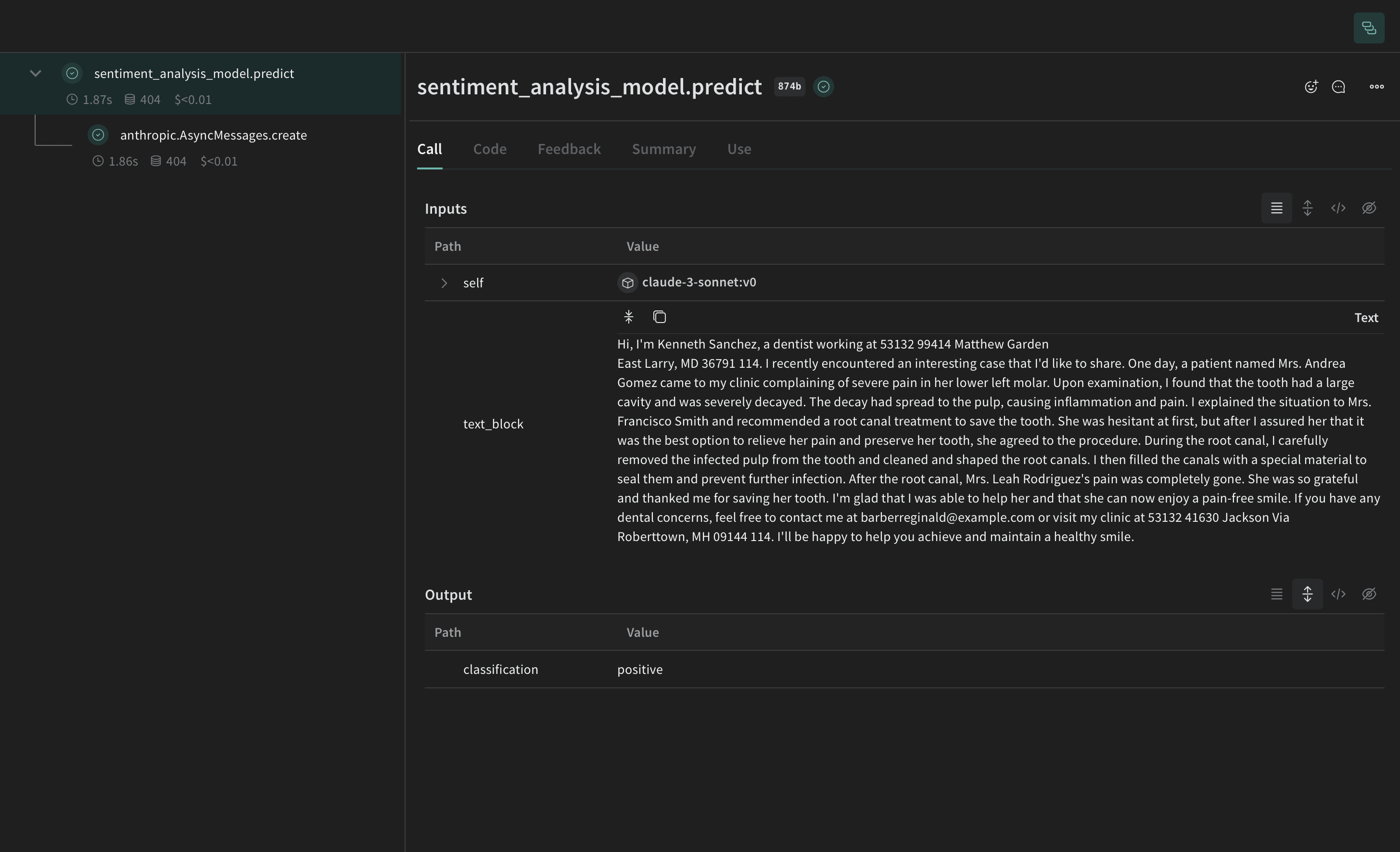
다음 예제에서는 PII 비식별화 및 익명화 메소드를 Weave Models에 통합하고 Weave Traces에서 결과를 미리 확인해 보겠습니다. 먼저, Weave Model을 생성합니다. Weave Model은 설정 설정, 모델 가중치 및 모델의 작동 방식을 정의하는 코드와 같은 정보의 조합입니다. 우리의 모델에는 Anthropic API가 호출되는 predict 함수를 포함할 것입니다. Anthropic의 Claude Sonnet은 Traces를 사용하여 LLM 호출을 추적하면서 감정 분석을 수행하는 데 사용됩니다. Claude Sonnet은 텍스트 블록을 받아 positive, negative, 또는 neutral 중 하나의 감정 분류를 출력합니다. 또한, PII 데이터가 LLM으로 전송되기 전에 비식별화 또는 익명화되도록 후처리 함수를 포함할 것입니다. 이 코드를 실행하면 Weave 프로젝트 페이지와 실행한 특정 trace(LLM 호출)에 대한 링크를 받게 됩니다.

Regex 메소드

가장 간단한 경우로, regex를 사용하여 원본 텍스트에서 PII 데이터를 식별하고 비식별화할 수 있습니다.
import json
from typing import Any

import anthropic

import weave

# 모델 예측 Weave Op을 위해 regex 비식별화를 적용하는 입력 후처리 함수 정의
def postprocess_inputs_regex(inputs: dict[str, Any]) -> dict:
    inputs["text_block"] = redact_with_regex(inputs["text_block"])
    return inputs

# Weave 모델 / predict 함수
class SentimentAnalysisRegexPiiModel(weave.Model):
    model_name: str
    system_prompt: str
    temperature: int

    @weave.op(
        postprocess_inputs=postprocess_inputs_regex,
    )
    async def predict(self, text_block: str) -> dict:
        client = anthropic.AsyncAnthropic()
        response = await client.messages.create(
            max_tokens=1024,
            model=self.model_name,
            system=self.system_prompt,
            messages=[
                {"role": "user", "content": [{"type": "text", "text": text_block}]}
            ],
        )
        result = response.content[0].text
        if result is None:
            raise ValueError("모델로부터 응답이 없습니다")
        parsed = json.loads(result)
        return parsed
python
# 시스템 프롬프트가 포함된 LLM 모델 생성
model = SentimentAnalysisRegexPiiModel(
    name="claude-3-sonnet",
    model_name="claude-3-5-sonnet-20240620",
    system_prompt='You are a Sentiment Analysis classifier. You will be classifying text based on their sentiment. Your input will be a block of text. You will answer with one the following rating option["positive", "negative", "neutral"]. Your answer should be one word in json format: {classification}. Ensure that it is valid JSON.',
    temperature=0,
)

print("모델: ", model)
# 모든 텍스트 블록에 대해 먼저 익명화한 다음 예측 수행
for entry in pii_data:
    await model.predict(entry["text"])

Presidio 비식별화 메소드

다음으로, Presidio를 사용하여 원본 텍스트에서 PII 데이터를 식별하고 비식별화하겠습니다.
from typing import Any

import weave

# 모델 예측 Weave Op을 위해 Presidio 비식별화를 적용하는 입력 후처리 함수 정의
def postprocess_inputs_presidio(inputs: dict[str, Any]) -> dict:
    inputs["text_block"] = redact_with_presidio(inputs["text_block"])
    return inputs

# Weave 모델 / predict 함수
class SentimentAnalysisPresidioPiiModel(weave.Model):
    model_name: str
    system_prompt: str
    temperature: int

    @weave.op(
        postprocess_inputs=postprocess_inputs_presidio,
    )
    async def predict(self, text_block: str) -> dict:
        client = anthropic.AsyncAnthropic()
        response = await client.messages.create(
            max_tokens=1024,
            model=self.model_name,
            system=self.system_prompt,
            messages=[
                {"role": "user", "content": [{"type": "text", "text": text_block}]}
            ],
        )
        result = response.content[0].text
        if result is None:
            raise ValueError("모델로부터 응답이 없습니다")
        parsed = json.loads(result)
        return parsed
python
# 시스템 프롬프트가 포함된 LLM 모델 생성
model = SentimentAnalysisPresidioPiiModel(
    name="claude-3-sonnet",
    model_name="claude-3-5-sonnet-20240620",
    system_prompt='You are a Sentiment Analysis classifier. You will be classifying text based on their sentiment. Your input will be a block of text. You will answer with one the following rating option["positive", "negative", "neutral"]. Your answer should be one word in json format: {classification}. Ensure that it is valid JSON.',
    temperature=0,
)

print("모델: ", model)
# 모든 텍스트 블록에 대해 먼저 익명화한 다음 예측 수행
for entry in pii_data:
    await model.predict(entry["text"])

Faker 및 Presidio 대체 메소드

이 예제에서는 Faker를 사용하여 익명화된 대체 PII 데이터를 생성하고 Presidio를 사용하여 원본 텍스트의 PII 데이터를 식별하고 대체합니다.
from typing import Any

import weave

# 모델 예측 Weave Op을 위해 Faker 익명화 및 Presidio 비식별화를 적용하는 입력 후처리 함수 정의
faker = MyFaker()

def postprocess_inputs_faker(inputs: dict[str, Any]) -> dict:
    inputs["text_block"] = faker.redact_and_anonymize_with_faker(inputs["text_block"])
    return inputs

# Weave 모델 / predict 함수
class SentimentAnalysisFakerPiiModel(weave.Model):
    model_name: str
    system_prompt: str
    temperature: int

    @weave.op(
        postprocess_inputs=postprocess_inputs_faker,
    )
    async def predict(self, text_block: str) -> dict:
        client = anthropic.AsyncAnthropic()
        response = await client.messages.create(
            max_tokens=1024,
            model=self.model_name,
            system=self.system_prompt,
            messages=[
                {"role": "user", "content": [{"type": "text", "text": text_block}]}
            ],
        )
        result = response.content[0].text
        if result is None:
            raise ValueError("모델로부터 응답이 없습니다")
        parsed = json.loads(result)
        return parsed
python
# 시스템 프롬프트가 포함된 LLM 모델 생성
model = SentimentAnalysisFakerPiiModel(
    name="claude-3-sonnet",
    model_name="claude-3-5-sonnet-20240620",
    system_prompt='You are a Sentiment Analysis classifier. You will be classifying text based on their sentiment. Your input will be a block of text. You will answer with one the following rating option["positive", "negative", "neutral"]. Your answer should be one word in json format: {classification}. Ensure that it is valid JSON.',
    temperature=0,
)

print("모델: ", model)
# 모든 텍스트 블록에 대해 먼저 익명화한 다음 예측 수행
for entry in pii_data:
    await model.predict(entry["text"])

autopatch_settings 메소드

다음 예제에서는 초기화 시 anthropic에 대한 postprocess_inputspostprocess_inputs_regex() 함수로 설정합니다. postprocess_inputs_regex 함수는 메소드 1: 정규 표현식 필터링에서 정의된 redact_with_regex 메소드를 적용합니다. 이제 모든 anthropic 모델의 모든 입력에 redact_with_regex가 적용됩니다.
from typing import Any

import weave

client = weave.init(
    ...,
    autopatch_settings={
        "anthropic": {
            "op_settings": {
                "postprocess_inputs": postprocess_inputs_regex,
            }
        }
    },
)

# 모델 예측 Weave Op을 위해 regex 비식별화를 적용하는 입력 후처리 함수 정의
def postprocess_inputs_regex(inputs: dict[str, Any]) -> dict:
    inputs["text_block"] = redact_with_regex(inputs["text_block"])
    return inputs

# Weave 모델 / predict 함수
class SentimentAnalysisRegexPiiModel(weave.Model):
    model_name: str
    system_prompt: str
    temperature: int

    async def predict(self, text_block: str) -> dict:
        client = anthropic.AsyncAnthropic()
        response = await client.messages.create(
            max_tokens=1024,
            model=self.model_name,
            system=self.system_prompt,
            messages=[
                {"role": "user", "content": [{"type": "text", "text": text_block}]}
            ],
        )
        result = response.content[0].text
        if result is None:
            raise ValueError("모델로부터 응답이 없습니다")
        parsed = json.loads(result)
        return parsed
python
# 시스템 프롬프트가 포함된 LLM 모델 생성
model = SentimentAnalysisRegexPiiModel(
    name="claude-3-sonnet",
    model_name="claude-3-5-sonnet-20240620",
    system_prompt='You are a Sentiment Analysis classifier. You will be classifying text based on their sentiment. Your input will be a block of text. You will answer with one the following rating option["positive", "negative", "neutral"]. Your answer should be one word in json format: {classification}. Ensure that it is valid JSON.',
    temperature=0,
)

print("모델: ", model)
# 모든 텍스트 블록에 대해 먼저 익명화한 다음 예측 수행
for entry in pii_data:
    await model.predict(entry["text"])

(선택 사항) 데이터 암호화

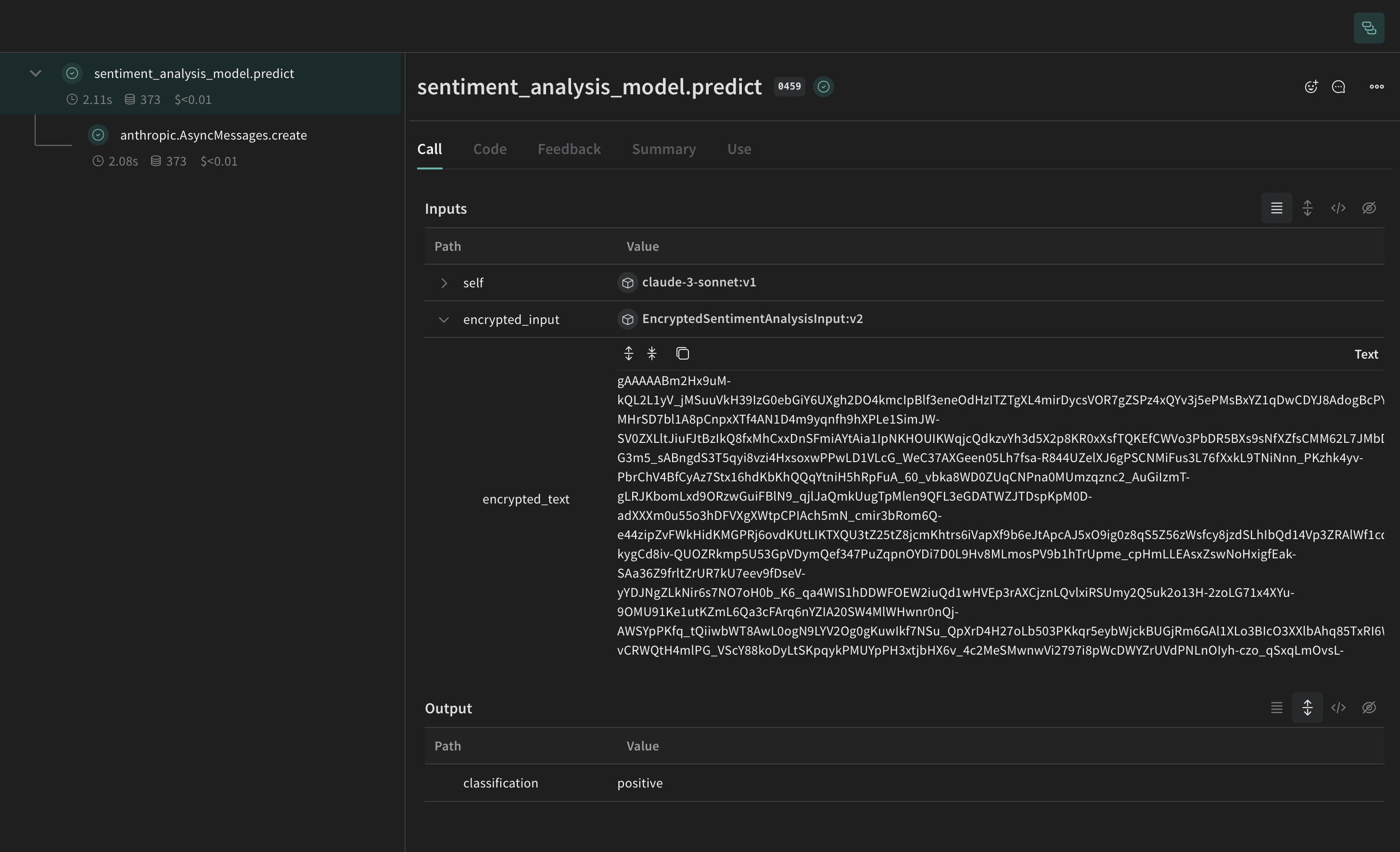
PII 익명화 외에도 cryptography 라이브러리의 Fernet 대칭 암호화를 사용하여 데이터를 암호화함으로써 보안 계층을 추가할 수 있습니다. 이 접근 방식은 익명화된 데이터가 가로채어지더라도 암호화 키 없이는 읽을 수 없도록 보장합니다.
import os
from cryptography.fernet import Fernet
from pydantic import BaseModel, ValidationInfo, model_validator

def get_fernet_key():
    # 환경 변수에 키가 존재하는지 확인
    key = os.environ.get('FERNET_KEY')

    if key is None:
        # 키가 존재하지 않으면 새로 생성
        key = Fernet.generate_key()
        # 키를 환경 변수에 저장
        os.environ['FERNET_KEY'] = key.decode()
    else:
        # 키가 존재하면 바이트 형식인지 확인
        key = key.encode()

    return key

cipher_suite = Fernet(get_fernet_key())

class EncryptedSentimentAnalysisInput(BaseModel):
    encrypted_text: str = None

    @model_validator(mode="before")
    def encrypt_fields(cls, values):
        if "text" in values and values["text"] is not None:
            values["encrypted_text"] = cipher_suite.encrypt(values["text"].encode()).decode()
            del values["text"]
        return values

    @property
    def text(self):
        if self.encrypted_text:
            return cipher_suite.decrypt(self.encrypted_text.encode()).decode()
        return None

    @text.setter
    def text(self, value):
        self.encrypted_text = cipher_suite.encrypt(str(value).encode()).decode()

    @classmethod
    def encrypt(cls, text: str):
        return cls(text=text)

    def decrypt(self):
        return self.text

# 새로운 EncryptedSentimentAnalysisInput을 사용하도록 수정된 sentiment_analysis_model
class sentiment_analysis_model(weave.Model):
    model_name: str
    system_prompt: str
    temperature: int

    @weave.op()
    async def predict(self, encrypted_input: EncryptedSentimentAnalysisInput) -> dict:
        client = AsyncAnthropic()

        decrypted_text = encrypted_input.decrypt() # 커스텀 클래스를 사용하여 텍스트 복호화

        response = await client.messages.create(
            max_tokens=1024,
            model=self.model_name,
            system=self.system_prompt,
            messages=[
                {   "role": "user",
                    "content":[
                        {
                            "type": "text",
                            "text": decrypted_text
                        }
                    ]
                }
            ]
        )
        result = response.content[0].text
        if result is None:
            raise ValueError("모델로부터 응답이 없습니다")
        parsed = json.loads(result)
        return parsed

model = sentiment_analysis_model(
    name="claude-3-sonnet",
    model_name="claude-3-5-sonnet-20240620",
    system_prompt="You are a Sentiment Analysis classifier. You will be classifying text based on their sentiment. Your input will be a block of text. You will answer with one the following rating option[\"positive\", \"negative\", \"neutral\"]. Your answer should one word in json format dict where the key is classification.",
    temperature=0
)

for entry in pii_data:
    encrypted_input = EncryptedSentimentAnalysisInput.encrypt(entry["text"])
    await model.predict(encrypted_input)