This is an interactive notebook. You can run it locally or use the following links:
This tutorial demonstrates how to build a multi-agent system that uses OpenAI’s structured outputs feature, and how to trace agent interactions with Weave. By the end, you have a four-agent data analysis pipeline whose intermediate inputs and outputs are visible in the Weave UI. OpenAI released Structured Outputs so the model always generates responses that adhere to your supplied JSON Schema without strongly worded prompts. With Structured Outputs, you don’t need to validate or retry incorrectly formatted responses. By using the parameter strict: true, you can guarantee the response abides by a provided schema. Structured outputs in a multi-agent system produce consistent, predictably processed data between agents. They also support explicit refusals and remove the need for retries or response validation.
Source: This cookbook is based on sample code from OpenAI’s structured outputs, with some modifications added for improved visualization using Weave.

Install the dependencies

First, install the libraries the tutorial depends on. This tutorial uses the following libraries:
  • OpenAI to create the multi-agent system.
  • Weave to track the LLM workflow and evaluate prompting strategies.
!pip install -qU openai weave wandb
python
%%capture
# Temporary workaround to fix bug in openai:
# TypeError: Client.__init__() got an unexpected keyword argument 'proxies'
# See https://community.openai.com/t/error-with-openai-1-56-0-client-init-got-an-unexpected-keyword-argument-proxies/1040332/15
!pip install "httpx<0.28"
Next, configure credentials and initialize Weave so traces are logged to your W&B project. Set WANDB_API_KEY in your environment so you can log in with wandb.login(). Provide this to Colab as a secret. Set the W&B project to log into in name_of_wandb_project.
name_of_wandb_project may also be in the format of [YOUR-TEAM]/[YOUR-PROJECT] to specify a team to log the traces into.
Then fetch a Weave client by calling weave.init(). Because this tutorial uses the OpenAI API, you also need an OpenAI API key. Sign up on the OpenAI platform to get your own API key. Provide this to Colab as a secret too.
import base64
import json
import os
from io import BytesIO, StringIO

import matplotlib.pyplot as plt
import numpy as np
import pandas as pd
import wandb
from google.colab import userdata
from openai import OpenAI

import weave
python
os.environ["WANDB_API_KEY"] = userdata.get("WANDB_API_KEY")
os.environ["OPENAI_API_KEY"] = userdata.get("OPENAI_API_KEY")

wandb.login()
name_of_wandb_project = "multi-agent-structured-output"
weave.init(name_of_wandb_project)

client = OpenAI()
MODEL = "gpt-4o-2024-08-06"

Set up the agents

With Weave initialized, define the agents that make up the system. The use case for this tutorial is a data analysis task. First, set up the four-agent system:
  • Triaging agent: Decides which agents to call.
  • Data pre-processing agent: Prepares data for analysis, for example by cleaning it up.
  • Data analysis agent: Performs analysis on the data.
  • Data visualization agent: Visualizes the output of the analysis to extract insights.
Start by defining the system prompts for each of these agents. These prompts establish each agent’s role and the tools it’s allowed to call.
triaging_system_prompt = """You are a Triaging Agent. Your role is to assess the user's query and route it to the relevant agents. The agents available are:
- Data Processing Agent: Cleans, transforms, and aggregates data.
- Analysis Agent: Performs statistical, correlation, and regression analysis.
- Visualization Agent: Creates bar charts, line charts, and pie charts.

Use the send_query_to_agents tool to forward the user's query to the relevant agents. Also, use the speak_to_user tool to get more information from the user if needed."""

processing_system_prompt = """You are a Data Processing Agent. Your role is to clean, transform, and aggregate data using the following tools:
- clean_data
- transform_data
- aggregate_data"""

analysis_system_prompt = """You are an Analysis Agent. Your role is to perform statistical, correlation, and regression analysis using the following tools:
- stat_analysis
- correlation_analysis
- regression_analysis"""

visualization_system_prompt = """You are a Visualization Agent. Your role is to create bar charts, line charts, and pie charts using the following tools:
- create_bar_chart
- create_line_chart
- create_pie_chart"""
Next, define the tools for each agent. Apart from the triaging agent, each agent has tools specific to its role: Data pre-processing agent: Clean data, transform data, and aggregate data. Data analysis agent: Statistical analysis, correlation analysis, and regression analysis. Data visualization agent: Create bar chart, create line chart, and create pie chart.
triage_tools = [
    {
        "type": "function",
        "function": {
            "name": "send_query_to_agents",
            "description": "Sends the user query to relevant agents based on their capabilities.",
            "parameters": {
                "type": "object",
                "properties": {
                    "agents": {
                        "type": "array",
                        "items": {"type": "string"},
                        "description": "An array of agent names to send the query to.",
                    },
                    "query": {
                        "type": "string",
                        "description": "The user query to send.",
                    },
                },
                "required": ["agents", "query"],
            },
        },
        "strict": True,
    }
]

preprocess_tools = [
    {
        "type": "function",
        "function": {
            "name": "clean_data",
            "description": "Cleans the provided data by removing duplicates and handling missing values.",
            "parameters": {
                "type": "object",
                "properties": {
                    "data": {
                        "type": "string",
                        "description": "The dataset to clean. Should be in a suitable format such as JSON or CSV.",
                    }
                },
                "required": ["data"],
                "additionalProperties": False,
            },
        },
        "strict": True,
    },
    {
        "type": "function",
        "function": {
            "name": "transform_data",
            "description": "Transforms data based on specified rules.",
            "parameters": {
                "type": "object",
                "properties": {
                    "data": {
                        "type": "string",
                        "description": "The data to transform. Should be in a suitable format such as JSON or CSV.",
                    },
                    "rules": {
                        "type": "string",
                        "description": "Transformation rules to apply, specified in a structured format.",
                    },
                },
                "required": ["data", "rules"],
                "additionalProperties": False,
            },
        },
        "strict": True,
    },
    {
        "type": "function",
        "function": {
            "name": "aggregate_data",
            "description": "Aggregates data by specified columns and operations.",
            "parameters": {
                "type": "object",
                "properties": {
                    "data": {
                        "type": "string",
                        "description": "The data to aggregate. Should be in a suitable format such as JSON or CSV.",
                    },
                    "group_by": {
                        "type": "array",
                        "items": {"type": "string"},
                        "description": "Columns to group by.",
                    },
                    "operations": {
                        "type": "string",
                        "description": "Aggregation operations to perform, specified in a structured format.",
                    },
                },
                "required": ["data", "group_by", "operations"],
                "additionalProperties": False,
            },
        },
        "strict": True,
    },
]

analysis_tools = [
    {
        "type": "function",
        "function": {
            "name": "stat_analysis",
            "description": "Performs statistical analysis on the given dataset.",
            "parameters": {
                "type": "object",
                "properties": {
                    "data": {
                        "type": "string",
                        "description": "The dataset to analyze. Should be in a suitable format such as JSON or CSV.",
                    }
                },
                "required": ["data"],
                "additionalProperties": False,
            },
        },
        "strict": True,
    },
    {
        "type": "function",
        "function": {
            "name": "correlation_analysis",
            "description": "Calculates correlation coefficients between variables in the dataset.",
            "parameters": {
                "type": "object",
                "properties": {
                    "data": {
                        "type": "string",
                        "description": "The dataset to analyze. Should be in a suitable format such as JSON or CSV.",
                    },
                    "variables": {
                        "type": "array",
                        "items": {"type": "string"},
                        "description": "List of variables to calculate correlations for.",
                    },
                },
                "required": ["data", "variables"],
                "additionalProperties": False,
            },
        },
        "strict": True,
    },
    {
        "type": "function",
        "function": {
            "name": "regression_analysis",
            "description": "Performs regression analysis on the dataset.",
            "parameters": {
                "type": "object",
                "properties": {
                    "data": {
                        "type": "string",
                        "description": "The dataset to analyze. Should be in a suitable format such as JSON or CSV.",
                    },
                    "dependent_var": {
                        "type": "string",
                        "description": "The dependent variable for regression.",
                    },
                    "independent_vars": {
                        "type": "array",
                        "items": {"type": "string"},
                        "description": "List of independent variables.",
                    },
                },
                "required": ["data", "dependent_var", "independent_vars"],
                "additionalProperties": False,
            },
        },
        "strict": True,
    },
]

visualization_tools = [
    {
        "type": "function",
        "function": {
            "name": "create_bar_chart",
            "description": "Creates a bar chart from the provided data.",
            "parameters": {
                "type": "object",
                "properties": {
                    "data": {
                        "type": "string",
                        "description": "The data for the bar chart. Should be in a suitable format such as JSON or CSV.",
                    },
                    "x": {"type": "string", "description": "Column for the x-axis."},
                    "y": {"type": "string", "description": "Column for the y-axis."},
                },
                "required": ["data", "x", "y"],
                "additionalProperties": False,
            },
        },
        "strict": True,
    },
    {
        "type": "function",
        "function": {
            "name": "create_line_chart",
            "description": "Creates a line chart from the provided data.",
            "parameters": {
                "type": "object",
                "properties": {
                    "data": {
                        "type": "string",
                        "description": "The data for the line chart. Should be in a suitable format such as JSON or CSV.",
                    },
                    "x": {"type": "string", "description": "Column for the x-axis."},
                    "y": {"type": "string", "description": "Column for the y-axis."},
                },
                "required": ["data", "x", "y"],
                "additionalProperties": False,
            },
        },
        "strict": True,
    },
    {
        "type": "function",
        "function": {
            "name": "create_pie_chart",
            "description": "Creates a pie chart from the provided data.",
            "parameters": {
                "type": "object",
                "properties": {
                    "data": {
                        "type": "string",
                        "description": "The data for the pie chart. Should be in a suitable format such as JSON or CSV.",
                    },
                    "labels": {
                        "type": "string",
                        "description": "Column for the labels.",
                    },
                    "values": {
                        "type": "string",
                        "description": "Column for the values.",
                    },
                },
                "required": ["data", "labels", "values"],
                "additionalProperties": False,
            },
        },
        "strict": True,
    },
]

Enable multi-agent tracking with Weave

With the agents and their tools defined, the next step is to wire them together and enable Weave tracing. Write the code logic to:
  • Handle passing the user query to the multi-agent system.
  • Handle the internal workings of the multi-agent system.
  • Execute the tool calls.
# Example query

user_query = """
Below is some data. I want you to first remove the duplicates then analyze the statistics of the data as well as plot a line chart.

house_size (m3), house_price ($)
90, 100
80, 90
100, 120
90, 100
"""
From the user query, you can infer that the tools to call are clean_data, start_analysis, and use_line_chart. Begin by defining the execution function responsible for running tool calls. By decorating Python functions with @weave.op(), you can log and debug language model inputs, outputs, and traces. A multi-agent system involves many functions, but it’s sufficient to add @weave.op() on top of each one.
@weave.op()
def clean_data(data):
    data_io = StringIO(data)
    df = pd.read_csv(data_io, sep=",")
    df_deduplicated = df.drop_duplicates()
    return df_deduplicated

@weave.op()
def stat_analysis(data):
    data_io = StringIO(data)
    df = pd.read_csv(data_io, sep=",")
    return df.describe()

@weave.op()
def plot_line_chart(data):
    data_io = StringIO(data)
    df = pd.read_csv(data_io, sep=",")

    x = df.iloc[:, 0]
    y = df.iloc[:, 1]

    coefficients = np.polyfit(x, y, 1)
    polynomial = np.poly1d(coefficients)
    y_fit = polynomial(x)

    plt.figure(figsize=(10, 6))
    plt.plot(x, y, "o", label="Data Points")
    plt.plot(x, y_fit, "-", label="Best Fit Line")
    plt.title("Line Chart with Best Fit Line")
    plt.xlabel(df.columns[0])
    plt.ylabel(df.columns[1])
    plt.legend()
    plt.grid(True)

    # Save the plot to a BytesIO buffer before showing it
    buf = BytesIO()
    plt.savefig(buf, format="png")
    buf.seek(0)

    # Display the plot
    plt.show()

    # Encode the image in base64 for the data URL
    image_data = buf.getvalue()
    base64_encoded_data = base64.b64encode(image_data)
    base64_string = base64_encoded_data.decode("utf-8")
    data_url = f"data:image/png;base64,{base64_string}"

    return data_url

# Define the function to execute the tools
@weave.op()
def execute_tool(tool_calls, messages):
    for tool_call in tool_calls:
        tool_name = tool_call.function.name
        tool_arguments = json.loads(tool_call.function.arguments)

        if tool_name == "clean_data":
            # Simulate data cleaning
            cleaned_df = clean_data(tool_arguments["data"])
            cleaned_data = {"cleaned_data": cleaned_df.to_dict()}
            messages.append(
                {"role": "tool", "name": tool_name, "content": json.dumps(cleaned_data)}
            )
            print("Cleaned data: ", cleaned_df)
        elif tool_name == "transform_data":
            # Simulate data transformation
            transformed_data = {"transformed_data": "sample_transformed_data"}
            messages.append(
                {
                    "role": "tool",
                    "name": tool_name,
                    "content": json.dumps(transformed_data),
                }
            )
        elif tool_name == "aggregate_data":
            # Simulate data aggregation
            aggregated_data = {"aggregated_data": "sample_aggregated_data"}
            messages.append(
                {
                    "role": "tool",
                    "name": tool_name,
                    "content": json.dumps(aggregated_data),
                }
            )
        elif tool_name == "stat_analysis":
            # Simulate statistical analysis
            stats_df = stat_analysis(tool_arguments["data"])
            stats = {"stats": stats_df.to_dict()}
            messages.append(
                {"role": "tool", "name": tool_name, "content": json.dumps(stats)}
            )
            print("Statistical Analysis: ", stats_df)
        elif tool_name == "correlation_analysis":
            # Simulate correlation analysis
            correlations = {"correlations": "sample_correlations"}
            messages.append(
                {"role": "tool", "name": tool_name, "content": json.dumps(correlations)}
            )
        elif tool_name == "regression_analysis":
            # Simulate regression analysis
            regression_results = {"regression_results": "sample_regression_results"}
            messages.append(
                {
                    "role": "tool",
                    "name": tool_name,
                    "content": json.dumps(regression_results),
                }
            )
        elif tool_name == "create_bar_chart":
            # Simulate bar chart creation
            bar_chart = {"bar_chart": "sample_bar_chart"}
            messages.append(
                {"role": "tool", "name": tool_name, "content": json.dumps(bar_chart)}
            )
        elif tool_name == "create_line_chart":
            # Simulate line chart creation
            line_chart = {"line_chart": plot_line_chart(tool_arguments["data"])}
            messages.append(
                {"role": "tool", "name": tool_name, "content": json.dumps(line_chart)}
            )
        elif tool_name == "create_pie_chart":
            # Simulate pie chart creation
            pie_chart = {"pie_chart": "sample_pie_chart"}
            messages.append(
                {"role": "tool", "name": tool_name, "content": json.dumps(pie_chart)}
            )
    return messages
Next, create the tool handlers for each of the sub-agents. These have a unique prompt and tool set passed to the model. The output is then passed to an execution function that runs the tool calls.
# Define the functions to handle each agent's processing
@weave.op()
def handle_data_processing_agent(query, conversation_messages):
    messages = [{"role": "system", "content": processing_system_prompt}]
    messages.append({"role": "user", "content": query})

    response = client.chat.completions.create(
        model=MODEL,
        messages=messages,
        temperature=0,
        tools=preprocess_tools,
    )

    conversation_messages.append(
        [tool_call.function for tool_call in response.choices[0].message.tool_calls]
    )
    execute_tool(response.choices[0].message.tool_calls, conversation_messages)

@weave.op()
def handle_analysis_agent(query, conversation_messages):
    messages = [{"role": "system", "content": analysis_system_prompt}]
    messages.append({"role": "user", "content": query})

    response = client.chat.completions.create(
        model=MODEL,
        messages=messages,
        temperature=0,
        tools=analysis_tools,
    )

    conversation_messages.append(
        [tool_call.function for tool_call in response.choices[0].message.tool_calls]
    )
    execute_tool(response.choices[0].message.tool_calls, conversation_messages)

@weave.op()
def handle_visualization_agent(query, conversation_messages):
    messages = [{"role": "system", "content": visualization_system_prompt}]
    messages.append({"role": "user", "content": query})

    response = client.chat.completions.create(
        model=MODEL,
        messages=messages,
        temperature=0,
        tools=visualization_tools,
    )

    conversation_messages.append(
        [tool_call.function for tool_call in response.choices[0].message.tool_calls]
    )
    execute_tool(response.choices[0].message.tool_calls, conversation_messages)
Finally, create the overarching tool to handle processing the user query. This function takes the user query, gets a response from the model, and passes it to the other agents to execute.
# Function to handle user input and triaging
@weave.op()
def handle_user_message(user_query, conversation_messages=None):
    if conversation_messages is None:
        conversation_messages = []
    user_message = {"role": "user", "content": user_query}
    conversation_messages.append(user_message)

    messages = [{"role": "system", "content": triaging_system_prompt}]
    messages.extend(conversation_messages)

    response = client.chat.completions.create(
        model=MODEL,
        messages=messages,
        temperature=0,
        tools=triage_tools,
    )

    conversation_messages.append(
        [tool_call.function for tool_call in response.choices[0].message.tool_calls]
    )

    for tool_call in response.choices[0].message.tool_calls:
        if tool_call.function.name == "send_query_to_agents":
            agents = json.loads(tool_call.function.arguments)["agents"]
            query = json.loads(tool_call.function.arguments)["query"]
            for agent in agents:
                if agent == "Data Processing Agent":
                    handle_data_processing_agent(query, conversation_messages)
                elif agent == "Analysis Agent":
                    handle_analysis_agent(query, conversation_messages)
                elif agent == "Visualization Agent":
                    handle_visualization_agent(query, conversation_messages)

    outputs = extract_tool_contents(conversation_messages)

    return outputs

functions = [
    "clean_data",
    "transform_data",
    "stat_analysis",
    "aggregate_data",
    "correlation_analysis",
    "regression_analysis",
    "create_bar_chart",
    "create_line_chart",
    "create_pie_chart",
]

@weave.op()
def extract_tool_contents(data):
    contents = {}
    contents["all"] = data
    for element in data:
        if (
            isinstance(element, dict)
            and element.get("role") == "tool"
            and element.get("name") in functions
        ):
            name = element["name"]
            content_str = element["content"]
            try:
                content_json = json.loads(content_str)
                if "chart" not in element.get("name"):
                    contents[name] = [content_json]
                else:
                    first_key = next(iter(content_json))
                    second_level = content_json[first_key]
                    if isinstance(second_level, dict):
                        second_key = next(iter(second_level))
                        contents[name] = second_level[second_key]
                    else:
                        contents[name] = second_level
            except json.JSONDecodeError:
                print(f"Error decoding JSON for {name}")
                contents[name] = None

    return contents

Execute the multi-agent system and visualize in Weave

With every agent, tool, and handler in place, the system is ready to run. Finally, execute the primary handle_user_message function using the user’s input and observe the results.
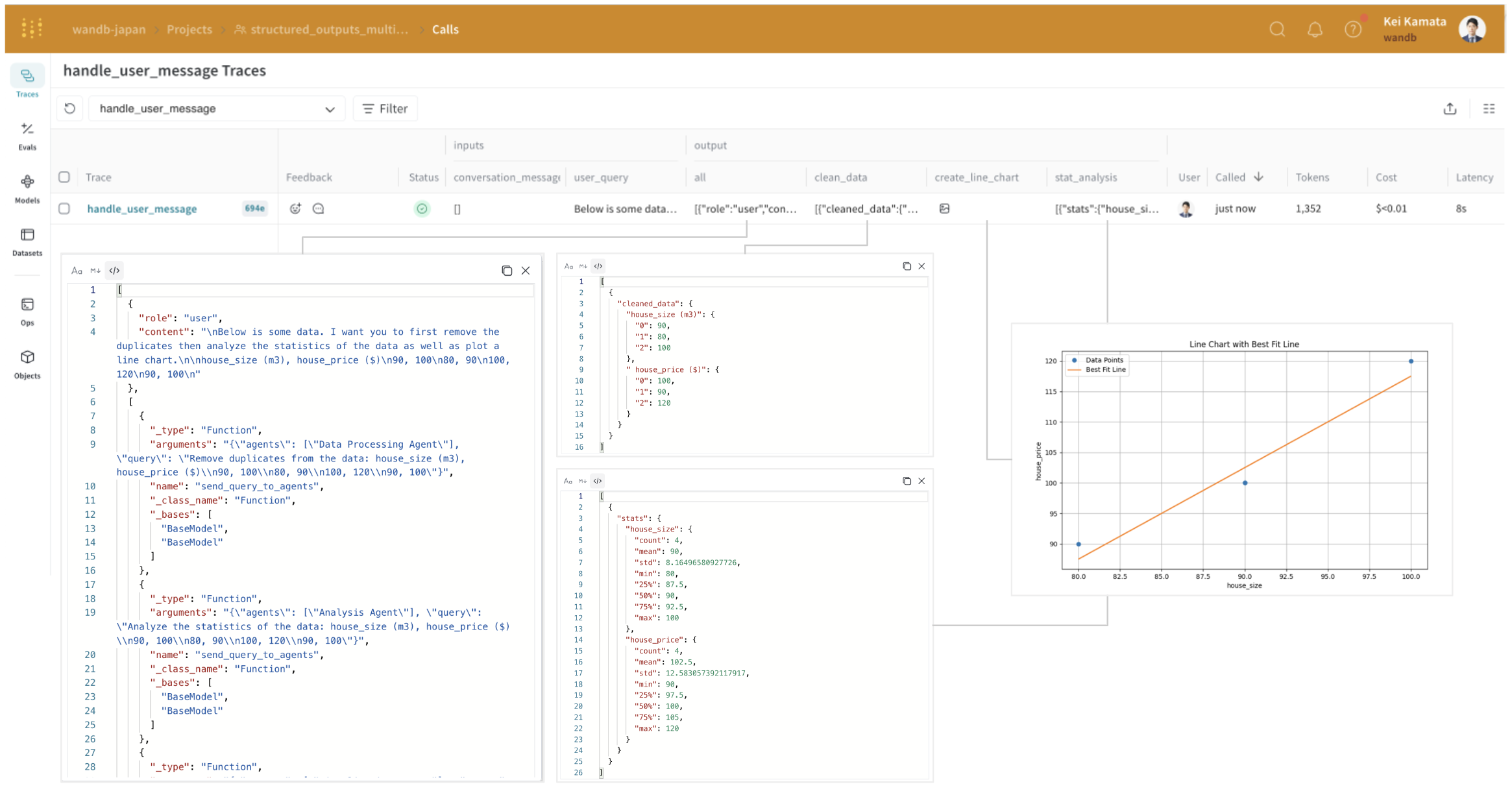
handle_user_message(user_query)
When you click the Weave URL, you can see the execution trace. On the Traces page, you can check the input and output. For clarity, the diagram includes screenshots of the results displayed when you click each output. Weave integrates with the OpenAI API and automatically calculates costs. Cost and latency are also displayed alongside each trace. Weave Traces page showing the multi-agent execution with cost and latency Click a line to see the intermediate processes that ran within the multi-agent system. For example, the input and output of the analysis_agent appear in a structured output format. OpenAI’s structured outputs help agents collaborate, but as the system grows more complex, the format of these interactions becomes harder to follow. Weave lets you inspect these intermediate processes and their inputs and outputs in detail.
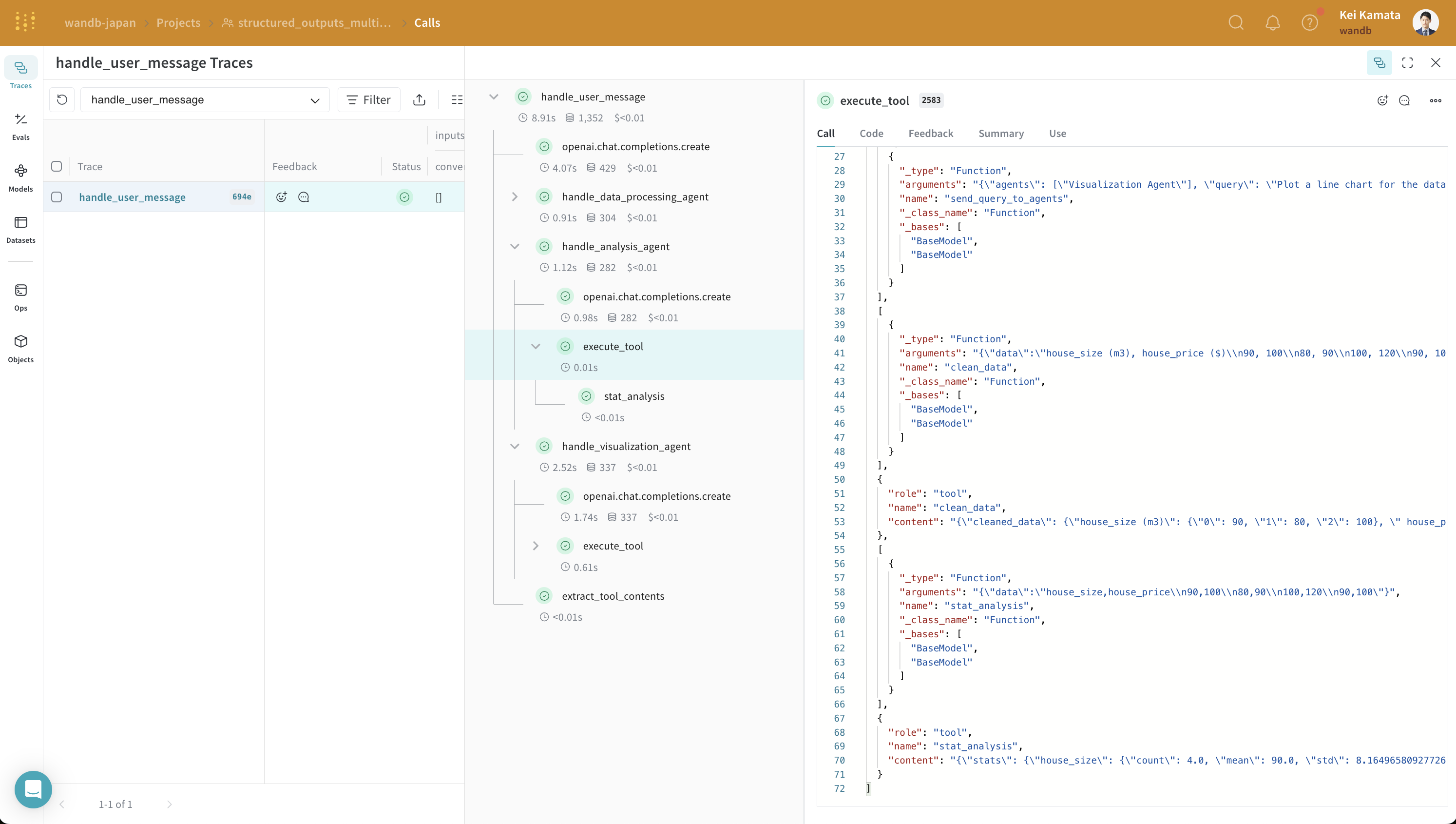
Weave trace detail showing the analysis agent's structured input and output
Take a closer look at how tracing is handled in Weave.

Conclusion

In this tutorial, you learned how to develop a multi-agent system using OpenAI’s structured output and Weave for tracking inputs, final outputs, and intermediate output formats. You now have a working example you can extend with additional agents, tools, or structured response schemas.