This is an interactive notebook. You can run it locally or use the following links:
This notebook demonstrates how to use Weave with Not Diamond’s custom routing to route LLM prompts to the most appropriate model based on evaluation results. By the end, you have trained a custom router for coding prompts, used it to select a target model for a new prompt, and evaluated its performance against the best individual model.

Routing prompts

This section explains why custom routing is useful when working with multiple LLMs. When building complex LLM workflows, you may need to prompt different models according to accuracy, cost, or call latency. You can use Not Diamond to route prompts in these workflows to the right model for your needs, helping maximize accuracy while saving on model costs. For any given distribution of data, rarely does a single model outperform every other model on every query. By combining multiple models into a “meta-model” that learns when to call each LLM, you can beat every individual model’s performance and even drive down costs and latency.

Custom routing

The following inputs are required to train a custom router for your prompts:
  1. A set of LLM prompts: Prompts must be strings and should be representative of the prompts used in your application.
  2. LLM responses: The responses from candidate LLMs for each input. Candidate LLMs can include both supported LLMs and your own custom models.
  3. Evaluation scores for responses to the inputs from candidate LLMs: Scores are numbers, and can be any metric that fits your needs.
By submitting these to the Not Diamond API, you can then train a custom router tuned to each of your workflows.

Set up the training data

In this section, you prepare the training and test data that the custom router learns from. In practice, you use your own Evaluations to train a custom router. For this example notebook, however, you use LLM responses for the HumanEval dataset to train a custom router for coding tasks. Start by downloading the dataset prepared for this example, then parse LLM responses into EvaluationResults for each model. This split of training and test data is used in later sections to train the router and to evaluate its out-of-sample performance.
!curl -L "https://drive.google.com/uc?export=download&id=1q1zNZHioy9B7M-WRjsJPkfvFosfaHX38" -o humaneval.csv
python
import random

import weave
from weave.flow.dataset import Dataset
from weave.flow.eval import EvaluationResults
from weave.integrations.notdiamond.util import get_model_evals

pct_train = 0.8
pct_test = 1 - pct_train

# In practice, you will build an Evaluation on your dataset and call
# `evaluation.get_eval_results(model)`
model_evals = get_model_evals("./humaneval.csv")
model_train = {}
model_test = {}
for model, evaluation_results in model_evals.items():
    n_results = len(evaluation_results.rows)
    all_idxs = list(range(n_results))
    train_idxs = random.sample(all_idxs, k=int(n_results * pct_train))
    test_idxs = [idx for idx in all_idxs if idx not in train_idxs]

    model_train[model] = EvaluationResults(
        rows=weave.Table([evaluation_results.rows[idx] for idx in train_idxs])
    )
    model_test[model] = Dataset(
        rows=weave.Table([evaluation_results.rows[idx] for idx in test_idxs])
    )
    print(
        f"Found {len(train_idxs)} train rows and {len(test_idxs)} test rows for {model}."
    )

Train a custom router

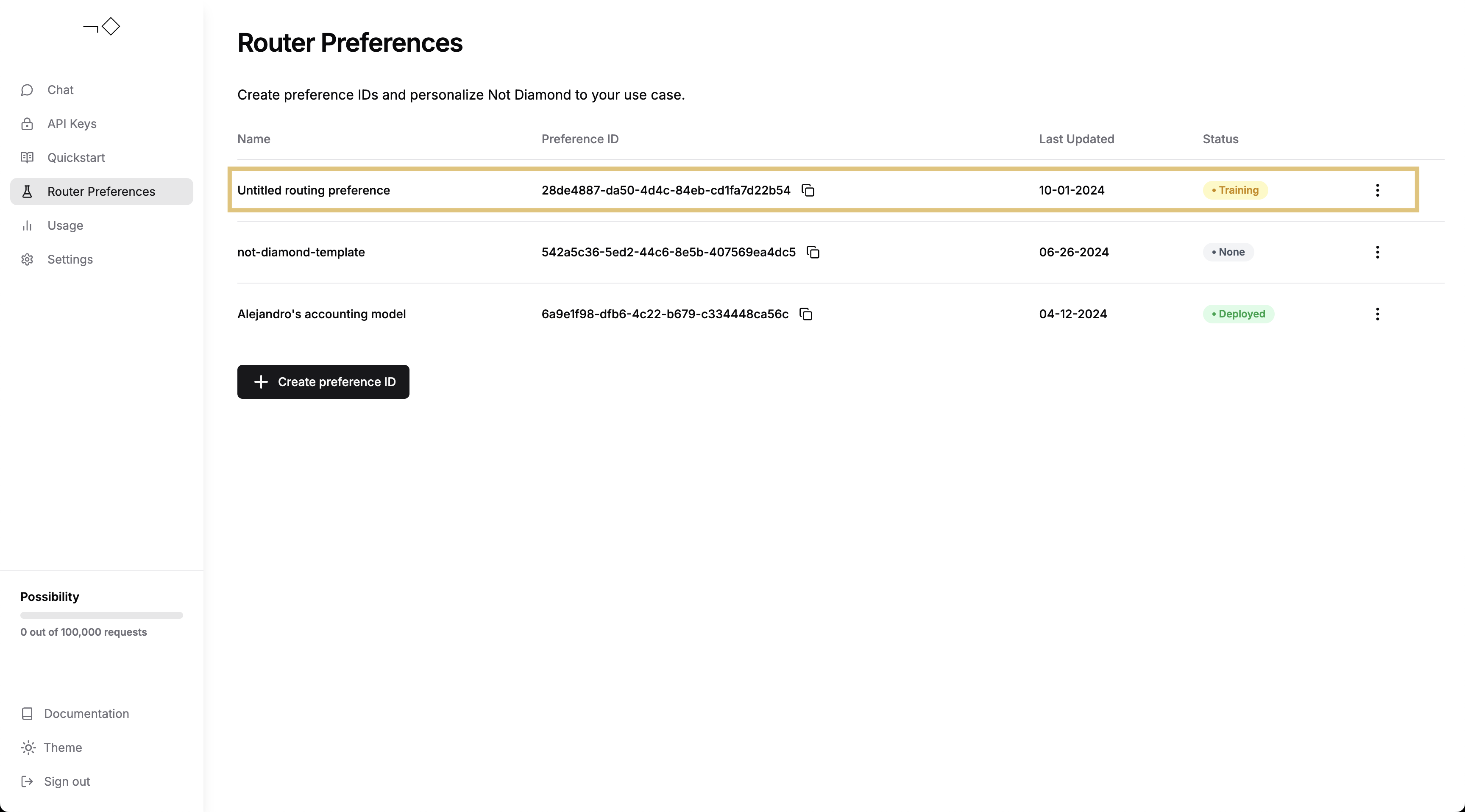
With the EvaluationResults prepared, you can now submit them to Not Diamond to train a custom router. Make sure you have created an account and generated an API key, then insert your API key in the following code. The API key authenticates the training request.
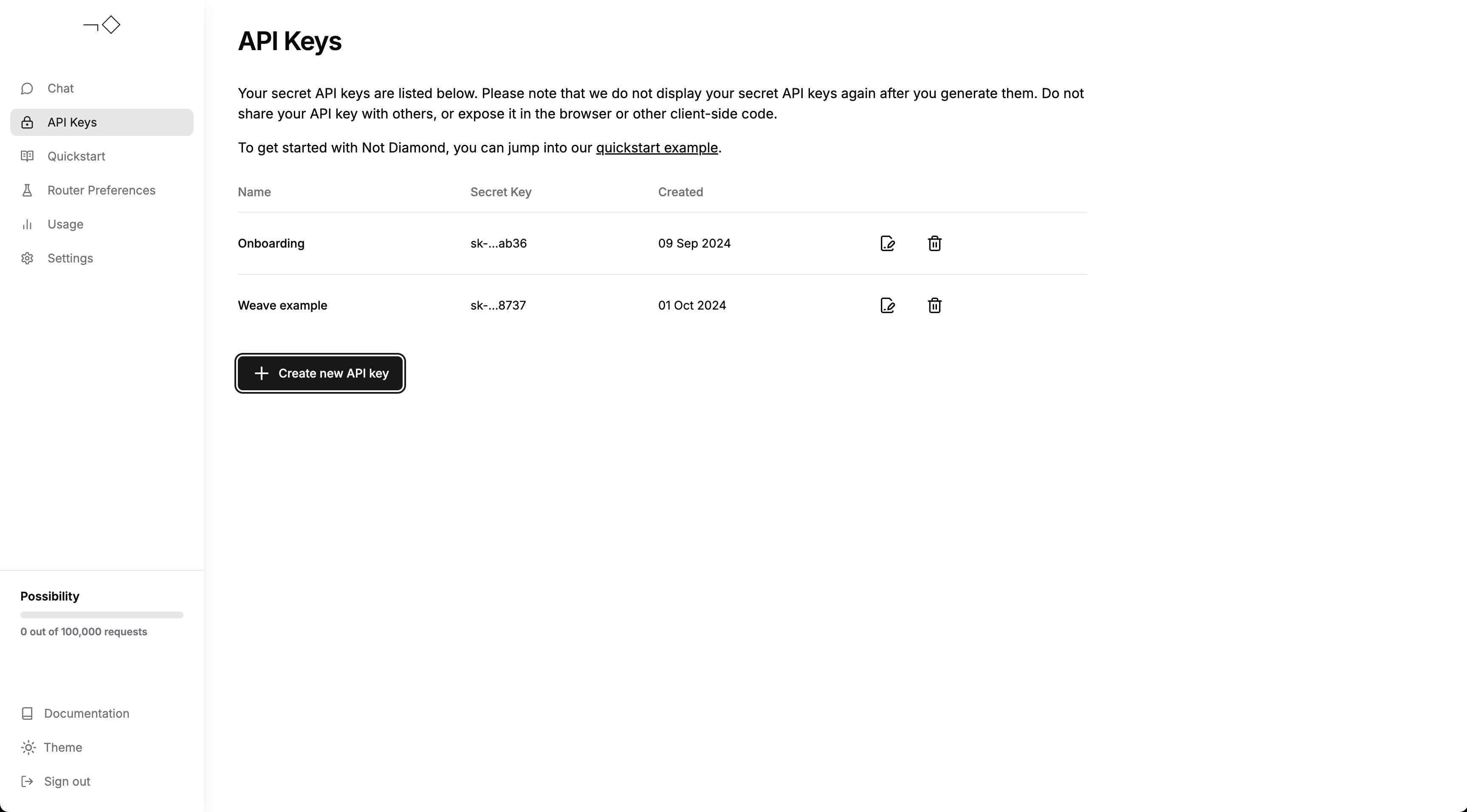
Create an API key
import os

from weave.integrations.notdiamond.custom_router import train_router

api_key = os.getenv("NOTDIAMOND_API_KEY", "<YOUR_API_KEY>")

preference_id = train_router(
    model_evals=model_train,
    prompt_column="prompt",
    response_column="actual",
    language="en",
    maximize=True,
    api_key=api_key,
    # Leave this commented out to train your first custom router
    # Uncomment this to retrain your custom router in place
    # preference_id=preference_id,
)
You can then follow the training process for your custom router through the Not Diamond app.
Check on router training progress
Once your custom router has finished training, you can use it to route your prompts.
from notdiamond import NotDiamond

import weave

weave.init("notdiamond-quickstart")

llm_configs = [
    "anthropic/claude-3-5-sonnet-20240620",
    "openai/gpt-4o-2024-05-13",
    "google/gemini-1.5-pro-latest",
    "openai/gpt-4-turbo-2024-04-09",
    "anthropic/claude-3-opus-20240229",
]
client = NotDiamond(api_key=api_key, llm_configs=llm_configs)

new_prompt = (
    """
You are a helpful coding assistant. Using the provided function signature, write the implementation for the function
in Python. Write only the function. Do not include any other text.

from typing import List

def has_close_elements(numbers: List[float], threshold: float) -> bool:
    """
    """ Check if in given list of numbers, are any two numbers closer to each other than
    given threshold.
    >>> has_close_elements([1.0, 2.0, 3.0], 0.5)
    False
    >>> has_close_elements([1.0, 2.8, 3.0, 4.0, 5.0, 2.0], 0.3)
    True
    """
    """
"""
)
session_id, routing_target_model = client.model_select(
    messages=[{"role": "user", "content": new_prompt}],
    preference_id=preference_id,
)

print(f"Session ID: {session_id}")
print(f"Target Model: {routing_target_model}")
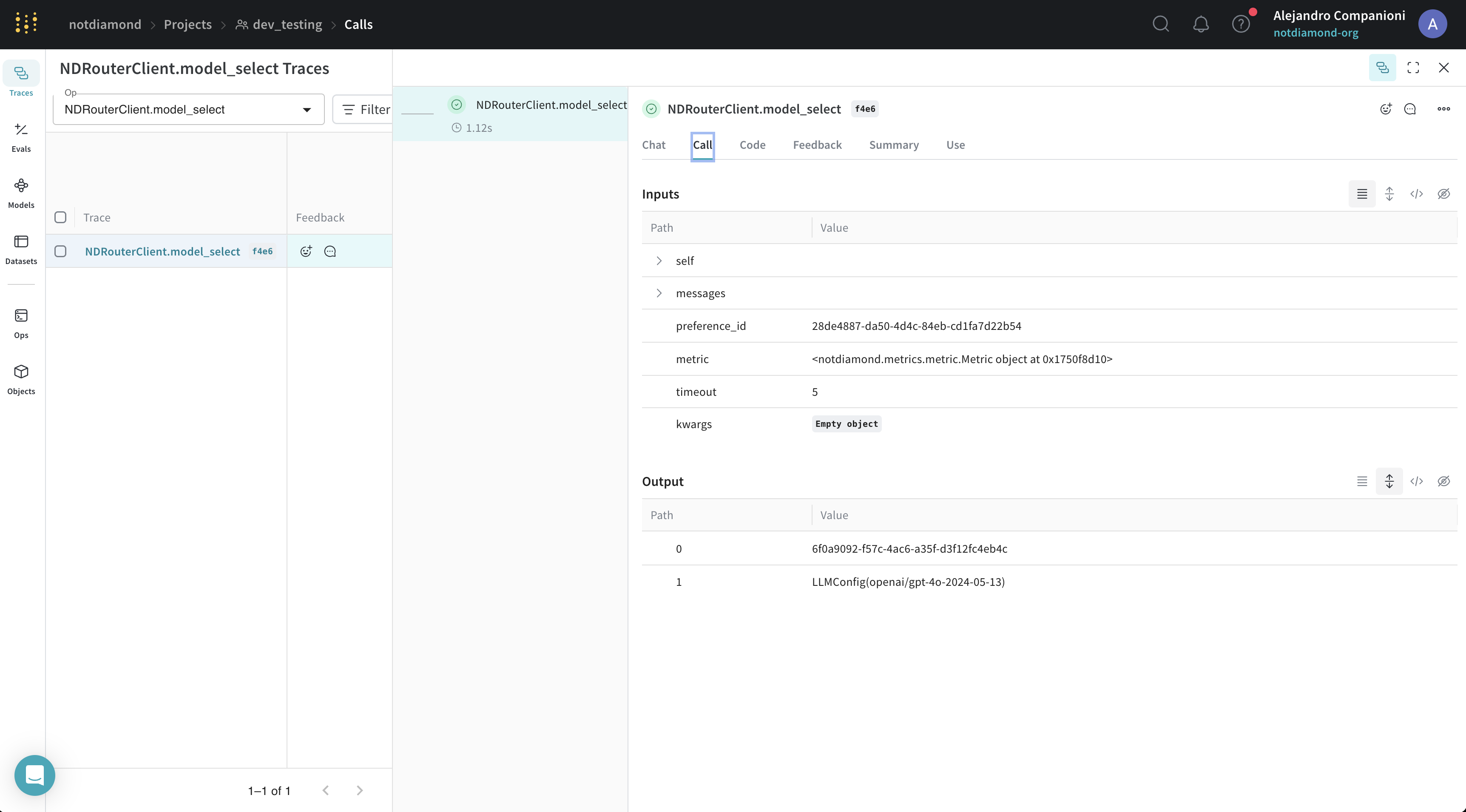
This example also used Not Diamond’s compatibility with Weave autotracing. You can see the results in the Weave UI. Weave UI for custom routing

Evaluate your custom router

This section shows how to measure whether the custom router improves on the best individual model. Once you’ve trained your custom router, you can evaluate its performance in one of the following ways:
  • In-sample performance by submitting the training prompts.
  • Out-of-sample performance by submitting new or held-out prompts.
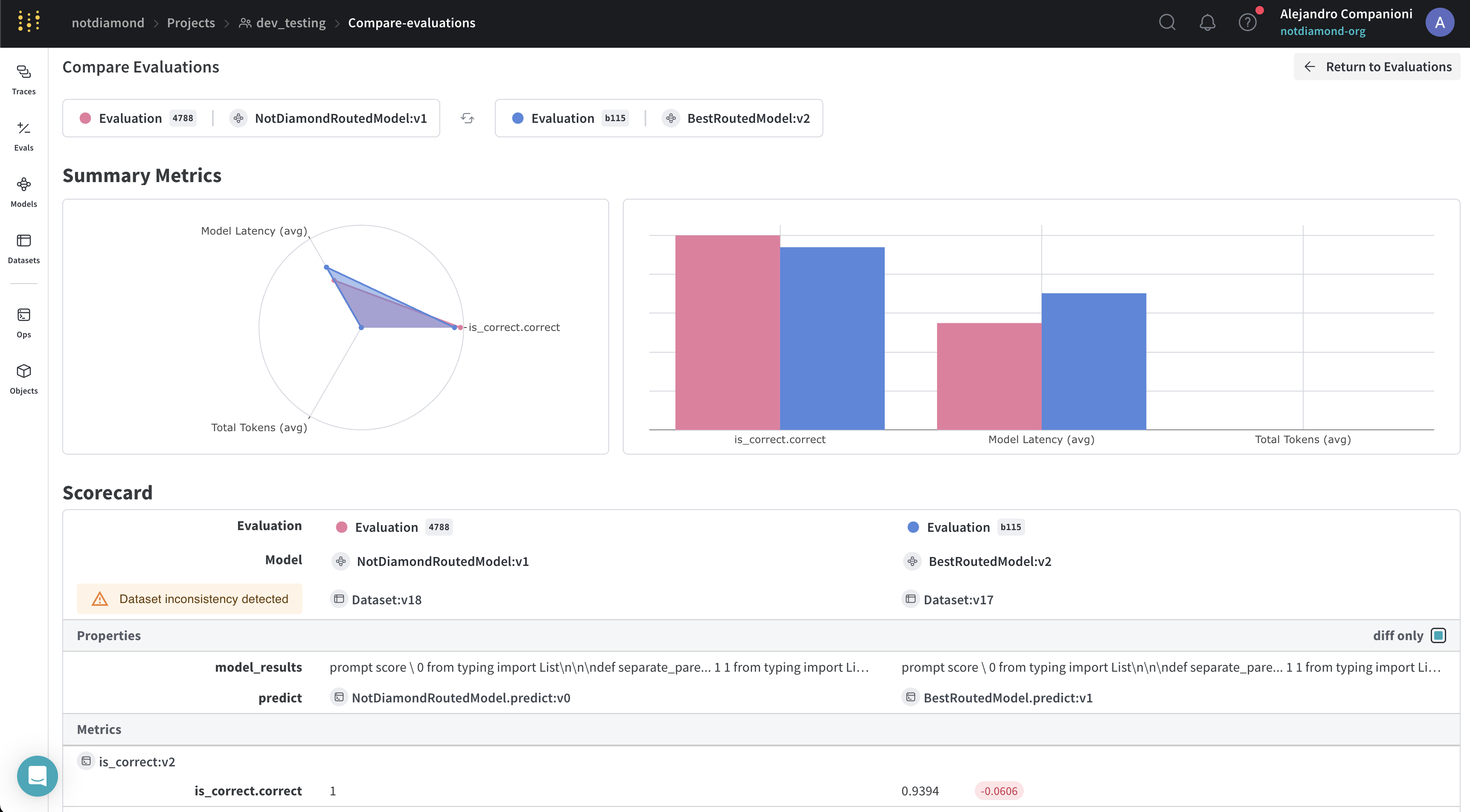
In the following example, you submit the test set to the custom router to evaluate its performance.
from weave.integrations.notdiamond.custom_router import evaluate_router

eval_prompt_column = "prompt"
eval_response_column = "actual"

best_provider_model, nd_model = evaluate_router(
    model_datasets=model_test,
    prompt_column=eval_prompt_column,
    response_column=eval_response_column,
    api_key=api_key,
    preference_id=preference_id,
)
python
@weave.op()
def is_correct(score: int, output: dict) -> dict:
    # We hack score, since we already have model responses
    return {"correct": score}

best_provider_eval = weave.Evaluation(
    dataset=best_provider_model.model_results.to_dict(orient="records"),
    scorers=[is_correct],
)
await best_provider_eval.evaluate(best_provider_model)

nd_eval = weave.Evaluation(
    dataset=nd_model.model_results.to_dict(orient="records"), scorers=[is_correct]
)
await nd_eval.evaluate(nd_model)
In this instance, the Not Diamond “meta-model” routes prompts across several different models. Training the custom router through Weave also runs evaluations and uploads results to the Weave UI. Once the custom router process completes, you can review the results in the Weave UI. In the UI, you can see that the Not Diamond “meta-model” outperforms the best-performing model by routing prompts to other models with higher likelihood of answering the prompt accurately.
Evaluating Not Diamond