This is an interactive notebook. You can run it locally or use the following links:
The BIG-bench (Beyond the Imitation Game Benchmark) is a collaborative benchmark that probes large language models and extrapolates their future capabilities across more than 200 tasks. The BIG-Bench Hard (BBH) is a suite of the 23 most challenging BIG-Bench tasks that the current generation of language models can find difficult to solve. This tutorial demonstrates how to improve the performance of an LLM workflow implemented on the causal judgement task from the BIG-bench Hard benchmark and evaluate prompting strategies. You use DSPy to implement the LLM workflow and optimize the prompting strategy. You also use Weave to track the LLM workflow and evaluate prompting strategies. By the end of this tutorial, you have built a baseline DSPy program for causal reasoning, evaluated it with Weave, applied a DSPy optimizer to improve its prompting strategy, and compared the optimized program against the baseline. This tutorial is intended for practitioners who want to apply prompt optimization to their own LLM workflows and use Weave to track and compare results.

Install the dependencies

Before starting, install the libraries used throughout the tutorial. This tutorial uses the following libraries:
  • DSPy to build and optimize the LLM workflow.
  • Weave to track the LLM workflow and evaluate prompting strategies.
  • datasets to access the BIG-Bench Hard dataset from HuggingFace Hub.
!pip install -qU dspy weave "datasets<4"
Because this tutorial uses the OpenAI API as the LLM vendor, you also need an OpenAI API key. You can sign up on the OpenAI platform to get your own API key.
import os
from getpass import getpass

api_key = getpass("Enter you OpenAI API key: ")
os.environ["OPENAI_API_KEY"] = api_key

Enable tracking using Weave

This section configures Weave so that subsequent DSPy calls in the tutorial are automatically traced and viewable in the Weave UI. Weave integrates with DSPy. Including weave.init at the start of your code automatically traces your DSPy functions, which you can then explore in the Weave UI. For more information, see the Weave integration docs for DSPy.
import weave

weave.init(project_name="dspy-bigbench-hard")
This tutorial uses a metadata class inherited from weave.Object to manage metadata.
class Metadata(weave.Object):
    dataset_address: str = "maveriq/bigbenchhard"
    big_bench_hard_task: str = "causal_judgement"
    num_train_examples: int = 50
    openai_model: str = "gpt-4o-mini"
    openai_max_tokens: int = 2048
    max_bootstrapped_demos: int = 8
    max_labeled_demos: int = 8

metadata = Metadata()
Object versioning: The Metadata objects are automatically versioned and traced when functions consuming them are traced.

Load the BIG-Bench Hard dataset

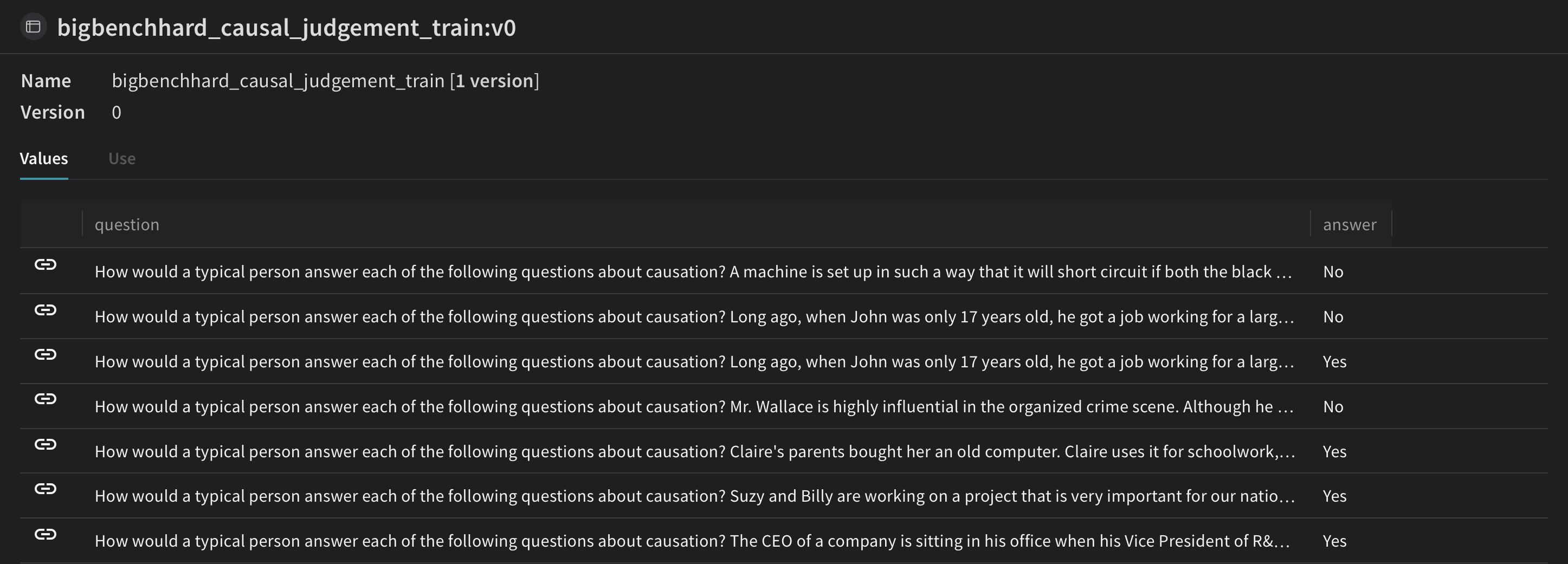
With Weave tracking enabled, the next step is to prepare the data used to train and evaluate the DSPy program. Load this dataset from HuggingFace Hub, split it into training and validation sets, and publish them on Weave. Publishing lets you version the datasets and also use weave.Evaluation to evaluate your prompting strategy.
import dspy
from datasets import load_dataset

@weave.op()
def get_dataset(metadata: Metadata):
    # load the BIG-Bench Hard dataset corresponding to the task from Huggingface Hug
    dataset = load_dataset(metadata.dataset_address, metadata.big_bench_hard_task)[
        "train"
    ]

    # create the training and validation datasets
    rows = [{"question": data["input"], "answer": data["target"]} for data in dataset]
    train_rows = rows[0 : metadata.num_train_examples]
    val_rows = rows[metadata.num_train_examples :]

    # create the training and validation examples consisting of `dspy.Example` objects
    dspy_train_examples = [
        dspy.Example(row).with_inputs("question") for row in train_rows
    ]
    dspy_val_examples = [dspy.Example(row).with_inputs("question") for row in val_rows]

    # publish the datasets to the Weave, this would let us version the data and use for evaluation
    weave.publish(
        weave.Dataset(
            name=f"bigbenchhard_{metadata.big_bench_hard_task}_train", rows=train_rows
        )
    )
    weave.publish(
        weave.Dataset(
            name=f"bigbenchhard_{metadata.big_bench_hard_task}_val", rows=val_rows
        )
    )

    return dspy_train_examples, dspy_val_examples

dspy_train_examples, dspy_val_examples = get_dataset(metadata)
DSPy dataset loading interface with dataset preparation steps and data structure

The DSPy program

With the dataset published to Weave, you can now define the baseline DSPy program that you later evaluate and optimize. DSPy is a framework that pushes building new LM pipelines away from manipulating free-form strings and closer to programming (composing modular operators to build text transformation graphs), where a compiler automatically generates optimized LM invocation strategies and prompts from a program. Use dspy.LM to configure the language model and dspy.configure to set it as the default.
llm = dspy.LM("openai/gpt-4o-mini")
dspy.configure(lm=llm)

Write the causal reasoning signature

A signature is a declarative specification of input/output behavior of a DSPy module. DSPy modules are task-adaptive components (akin to neural network layers) that abstract any particular text transformation.
class CausalReasoning(dspy.Signature):
    """You are an expert in causal reasoning. Analyze the given question carefully
    and answer Yes or No. Provide a detailed explanation justifying your answer."""

    question: str = dspy.InputField(desc="The question to be answered")
    answer: str = dspy.OutputField(desc="Yes or No")
    confidence: float = dspy.OutputField(desc="Confidence score between 0 and 1")
    explanation: str = dspy.OutputField(desc="Detailed explanation for the answer")

class CausalReasoningModule(dspy.Module):
    def __init__(self):
        self.prog = dspy.Predict(CausalReasoning)

    @weave.op()
    def forward(self, question: str) -> dict:
        result = self.prog(question=question)
        return {
            "answer": result.answer,
            "confidence": result.confidence,
            "explanation": result.explanation,
        }
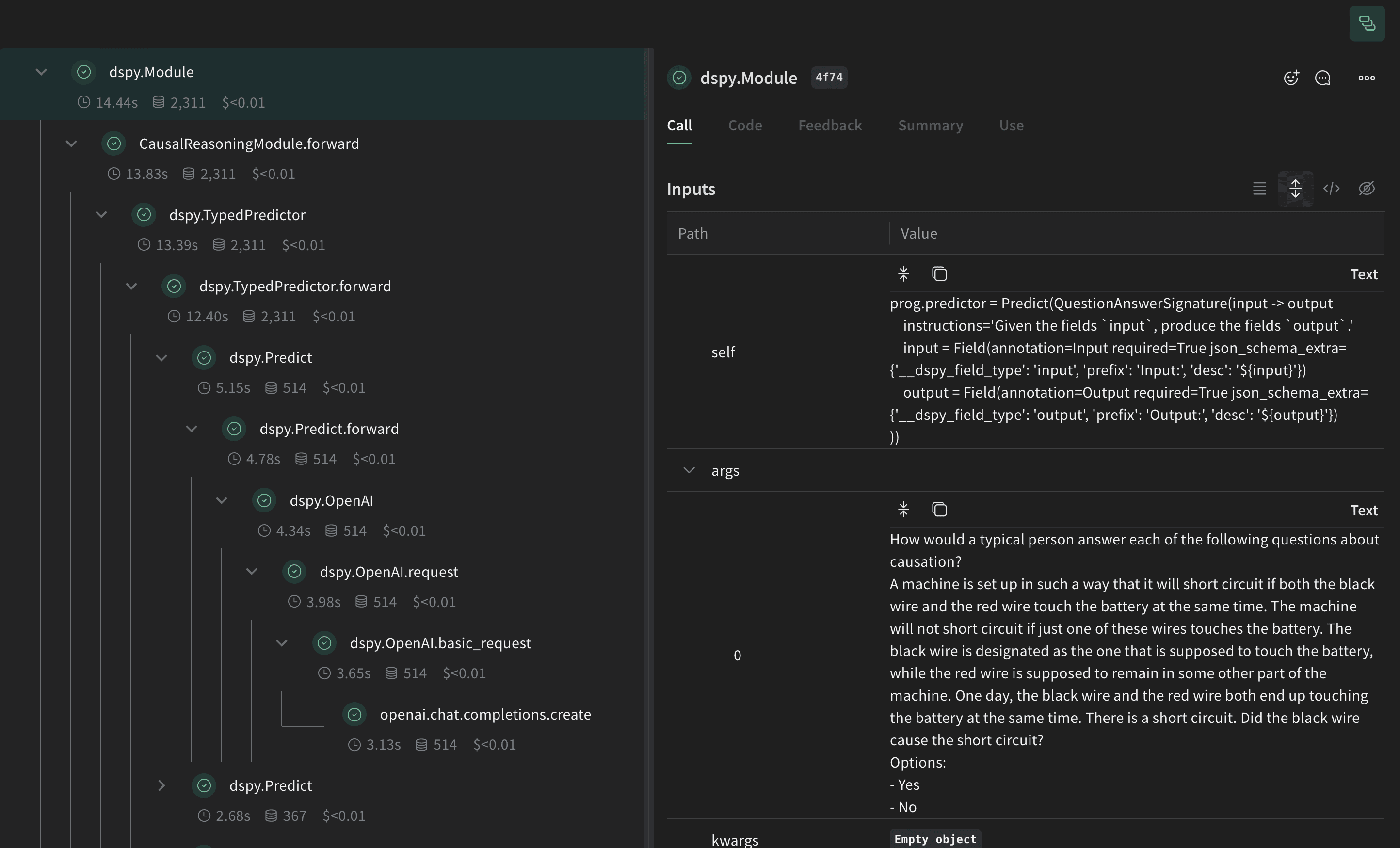
Test the LLM workflow (that is, the CausalReasoningModule) on an example from the causal reasoning subset of BIG-Bench Hard.
import rich

baseline_module = CausalReasoningModule()

prediction = baseline_module(dspy_train_examples[0]["question"])
rich.print(prediction)
Baseline DSPy program evaluation results with performance metrics and output examples

Evaluate the DSPy program

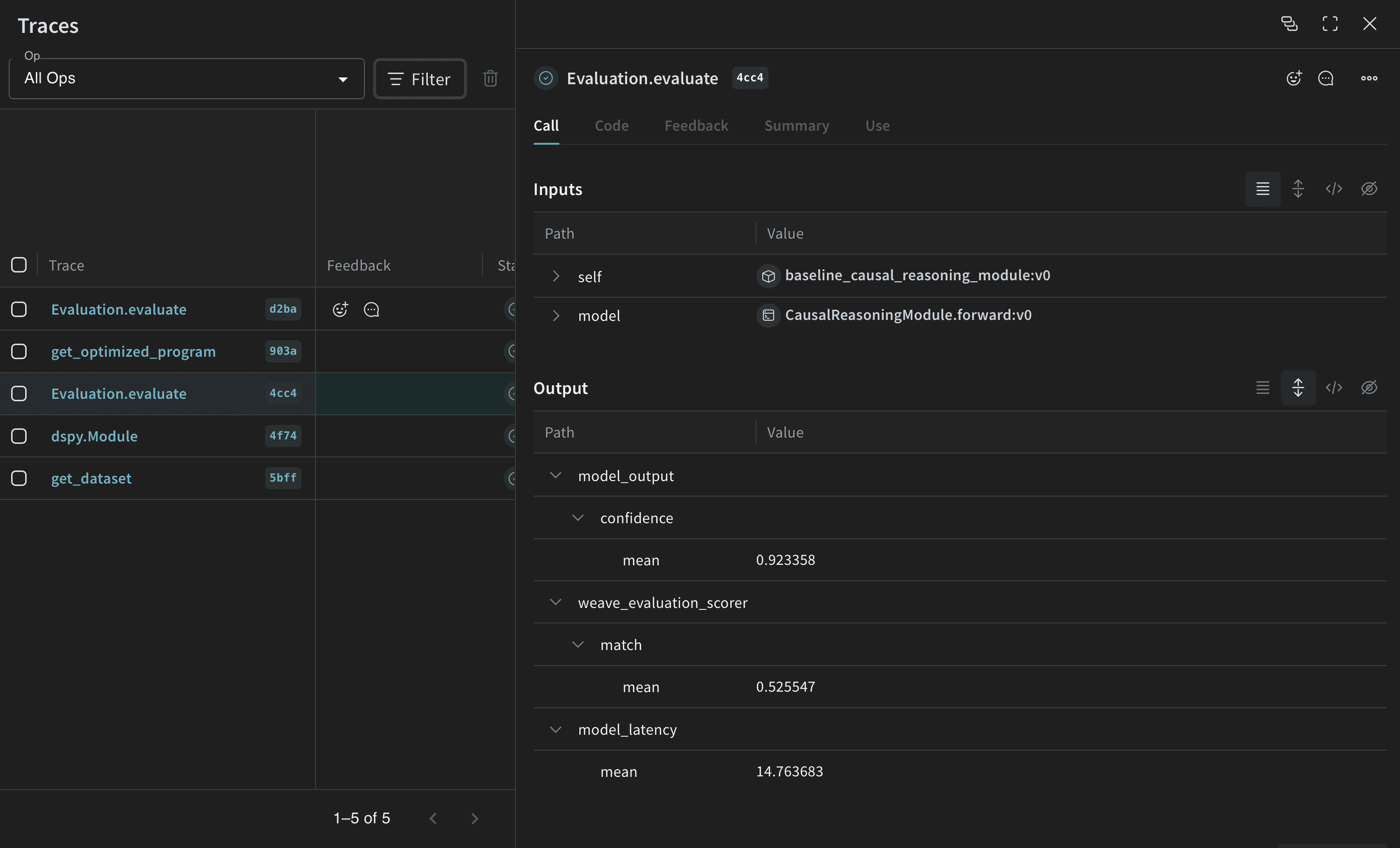
Now that you have a baseline prompting strategy, evaluate it on the validation set using weave.Evaluation with a metric that matches the predicted answer with the ground truth. Weave takes each example, passes it through your application, and scores the output on multiple custom scoring functions. This gives you a view of the performance of your application, and a rich UI to drill into individual outputs and scores. First, create a scoring function that determines whether the predicted answer matches the ground truth. Weave scoring functions receive the model’s return value as output and any matching keys from the dataset example as additional arguments. Here, answer comes from the dataset and output is the dict returned by CausalReasoningModule.forward.
@weave.op()
def weave_evaluation_scorer(answer: str, output: dict) -> dict:
    return {"match": int(answer.lower() == output["answer"].lower())}
Next, wrap the module in a traced function that weave.Evaluation can call. The wrapper’s argument names must match the dataset column names that the model consumes.
@weave.op()
def predict(question: str) -> dict:
    return baseline_module(question=question)
Now you can define the evaluation and run it.
validation_dataset = weave.ref(
    f"bigbenchhard_{metadata.big_bench_hard_task}_val:v0"
).get()

evaluation = weave.Evaluation(
    name="baseline_causal_reasoning_module",
    dataset=validation_dataset,
    scorers=[weave_evaluation_scorer],
)

await evaluation.evaluate(predict)
Weave evaluation dashboard with DSPy program performance metrics, traces, and comparison results
If you’re running from a Python script, you can use the following code to run the evaluation:
import asyncio
asyncio.run(evaluation.evaluate(predict))
Running the evaluation causal reasoning dataset costs approximately $0.24 in OpenAI credits.

Optimize the DSPy program

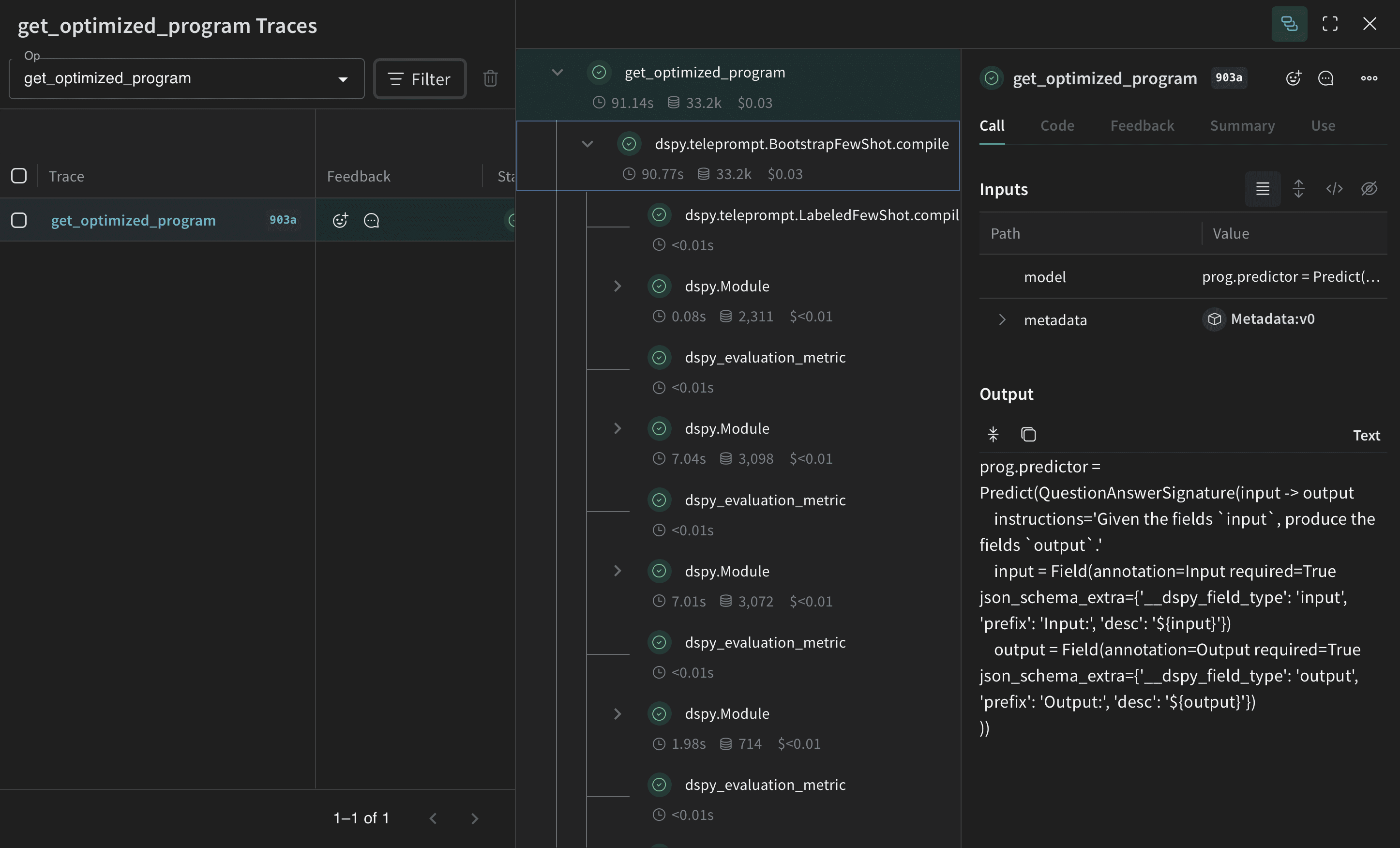
With the baseline performance measured, you can now apply a DSPy optimizer and compare the result to the baseline. Now that you have a baseline DSPy program, improve its performance for causal reasoning using the BootstrapFewShot optimizer, which can tune the parameters of a DSPy program to maximize the specified metrics.
from dspy.teleprompt import BootstrapFewShot

@weave.op()
def get_optimized_program(model: dspy.Module, metadata: Metadata) -> dspy.Module:
    @weave.op()
    def dspy_evaluation_metric(true, prediction, trace=None):
        return prediction["answer"].lower() == true.answer.lower()

    teleprompter = BootstrapFewShot(
        metric=dspy_evaluation_metric,
        max_bootstrapped_demos=metadata.max_bootstrapped_demos,
        max_labeled_demos=metadata.max_labeled_demos,
    )
    return teleprompter.compile(model, trainset=dspy_train_examples)

optimized_module = get_optimized_program(baseline_module, metadata)
DSPy program optimization process interface with teleprompter configuration and optimization progress
Running the evaluation causal reasoning dataset costs approximately $0.04 in OpenAI credits.
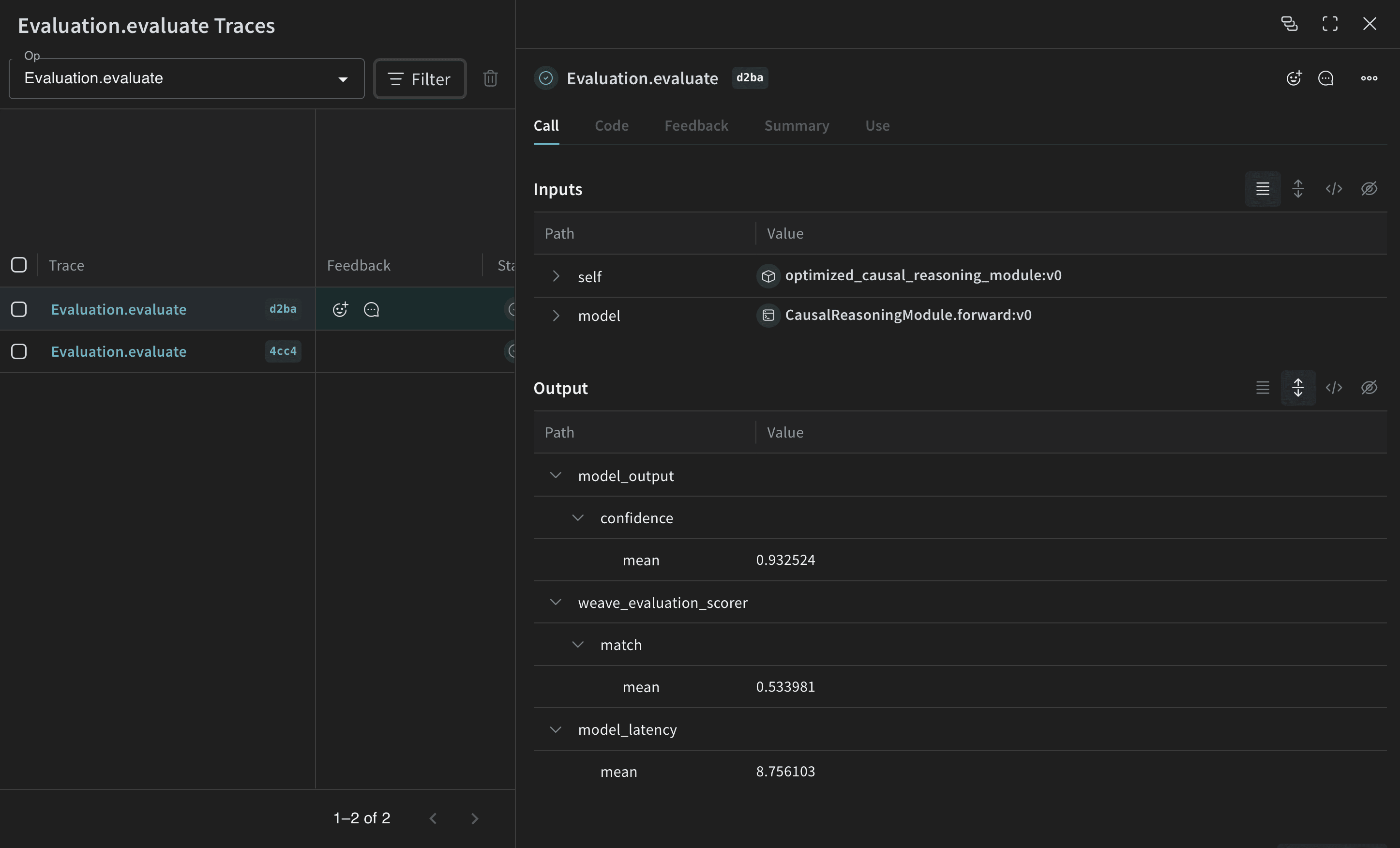
Now that you have the optimized program (the optimized prompting strategy), evaluate it again on the validation set and compare it with the baseline DSPy program.
@weave.op()
def predict_optimized(question: str) -> dict:
    return optimized_module(question=question)

evaluation = weave.Evaluation(
    name="optimized_causal_reasoning_module",
    dataset=validation_dataset,
    scorers=[weave_evaluation_scorer],
)

await evaluation.evaluate(predict_optimized)
Optimized DSPy program evaluation results with improved performance metrics and output quality
Comparing the evaluation of the baseline program with the optimized one shows that the optimized program answers the causal reasoning questions with more accuracy.

Conclusion

In this tutorial, you learned how to use DSPy for prompt optimization alongside Weave for tracking and evaluation to compare the original and optimized programs.