DSPy is a framework for algorithmically optimizing language model (LM) prompts and weights, especially when you use LMs one or more times within a pipeline. W&B Weave automatically tracks and logs calls made with DSPy modules and functions. This guide shows you how to enable Weave tracing for DSPy programs, track custom modules and signatures, and capture traces from DSPy optimizers and evaluations. With these traces, you can debug, analyze, and improve your DSPy applications.

Traces

This section shows you how to enable automatic tracing of DSPy calls in Weave. Store traces of language model applications in a central location, both during development and in production. These traces are useful for debugging and as a dataset that helps you improve your application. Weave automatically captures traces for DSPy. To start tracking, call weave.init(project_name="[YOUR-WANDB-PROJECT-NAME]") and use the library as normal. Replace [YOUR-OPENAI-API-KEY] with your OpenAI API key and [YOUR-WANDB-PROJECT-NAME] with your W&B project name.
import os
import dspy
import weave

os.environ["OPENAI_API_KEY"] = "[YOUR-OPENAI-API-KEY]"

weave.init(project_name="[YOUR-WANDB-PROJECT-NAME]")

lm = dspy.LM('openai/gpt-4o-mini')
dspy.configure(lm=lm)
classify = dspy.Predict("sentence -> sentiment")
classify(sentence="it's a charming and often affecting journey.")
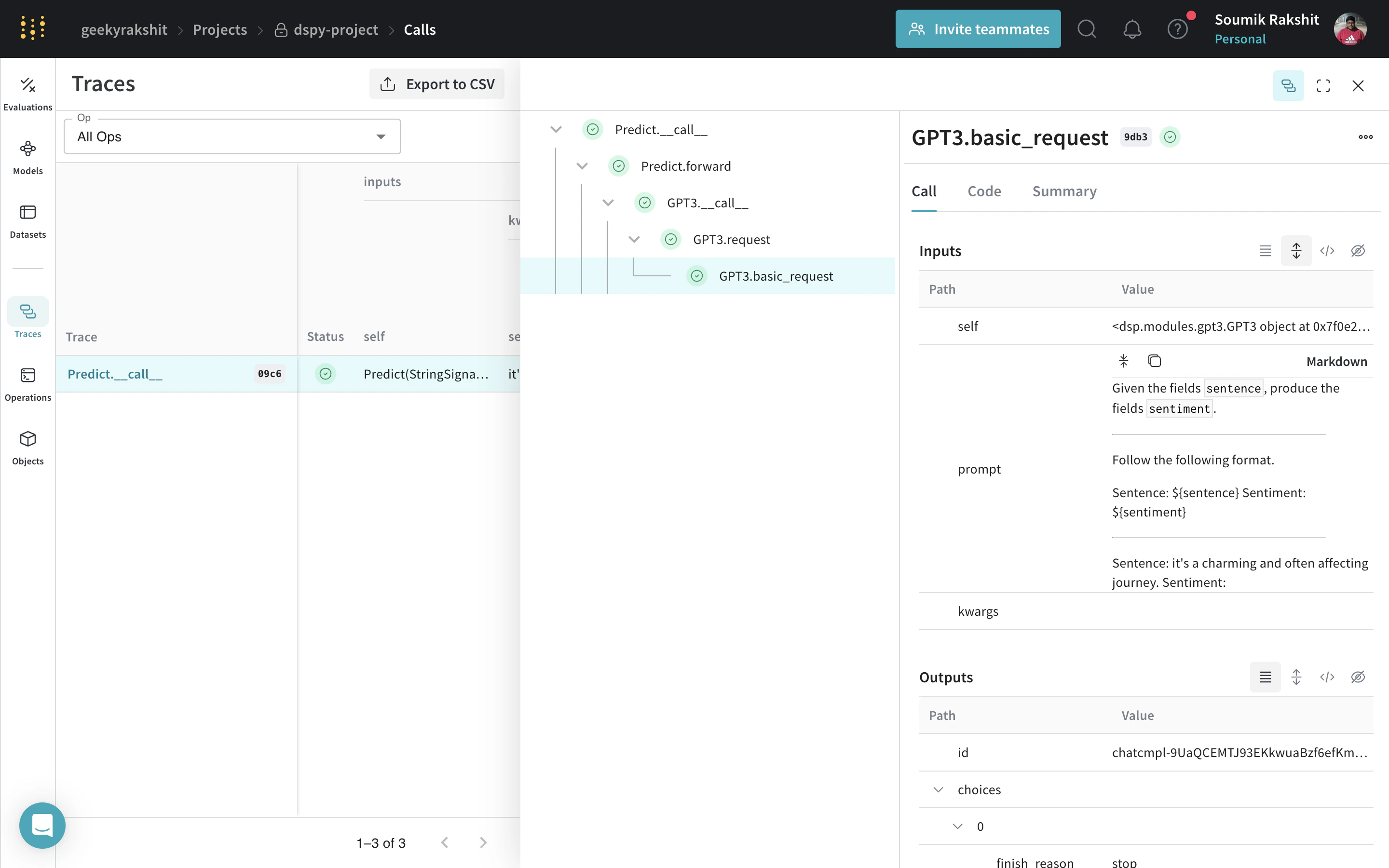
DSPy trace in Weave showing LM call inputs, outputs, and metadata With tracing enabled, Weave logs every LM call your DSPy program makes to your Weave project, where you can inspect inputs, outputs, and metadata.

Track your own DSPy modules and signatures

Beyond built-in calls, Weave also traces the custom modules and signatures you define. A Module is the building block with learnable parameters for DSPy programs that abstracts a prompting technique. A Signature is a declarative specification of input/output behavior of a DSPy Module. Weave automatically tracks all built-in and custom Signature and Module objects in your DSPy programs. Replace [YOUR-OPENAI-API-KEY] with your OpenAI API key and [YOUR-WANDB-PROJECT-NAME] with your W&B project name.
import os
import dspy
import weave

os.environ["OPENAI_API_KEY"] = "[YOUR-OPENAI-API-KEY]"

weave.init(project_name="[YOUR-WANDB-PROJECT-NAME]")

class Outline(dspy.Signature):
    """Outline a thorough overview of a topic."""

    topic: str = dspy.InputField()
    title: str = dspy.OutputField()
    sections: list[str] = dspy.OutputField()
    section_subheadings: dict[str, list[str]] = dspy.OutputField(
        desc="mapping from section headings to subheadings"
    )


class DraftSection(dspy.Signature):
    """Draft a top-level section of an article."""

    topic: str = dspy.InputField()
    section_heading: str = dspy.InputField()
    section_subheadings: list[str] = dspy.InputField()
    content: str = dspy.OutputField(desc="markdown-formatted section")


class DraftArticle(dspy.Module):
    def __init__(self):
        self.build_outline = dspy.ChainOfThought(Outline)
        self.draft_section = dspy.ChainOfThought(DraftSection)

    def forward(self, topic):
        outline = self.build_outline(topic=topic)
        sections = []
        for heading, subheadings in outline.section_subheadings.items():
            section, subheadings = (
                f"## {heading}",
                [f"### {subheading}" for subheading in subheadings],
            )
            section = self.draft_section(
                topic=outline.title,
                section_heading=section,
                section_subheadings=subheadings,
            )
            sections.append(section.content)
        return dspy.Prediction(title=outline.title, sections=sections)


draft_article = DraftArticle()
article = draft_article(topic="World Cup 2002")
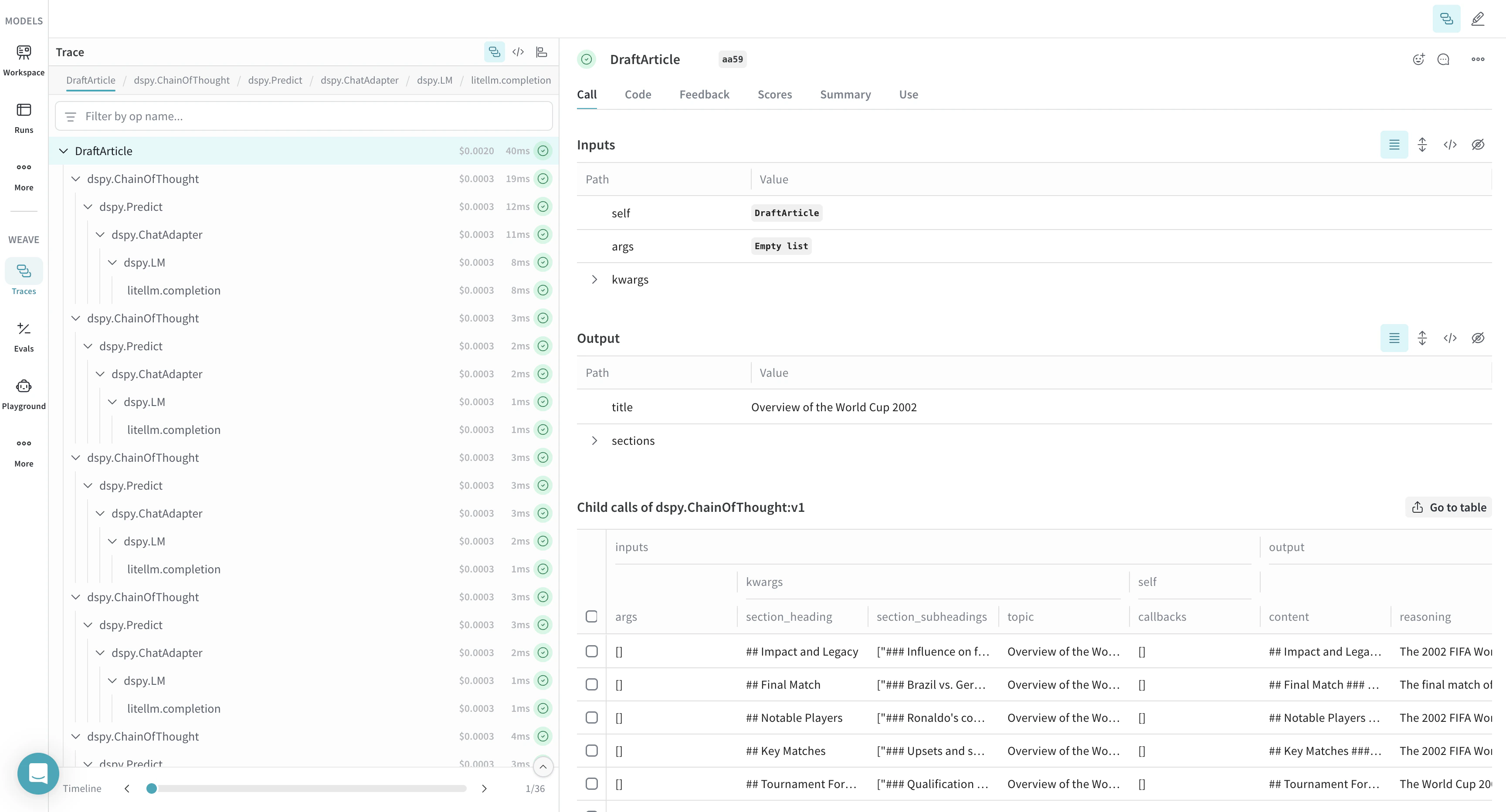
DSPy custom module trace in Weave with module execution flow and trace details

Optimize and evaluate your DSPy program

Weave also captures traces for DSPy optimizers and evaluation calls, which you can use to improve and evaluate your DSPy program’s performance on a development set. Replace [YOUR-OPENAI-API-KEY] with your OpenAI API key and [YOUR-WANDB-PROJECT-NAME] with your W&B project name.
import os
import dspy
import weave

os.environ["OPENAI_API_KEY"] = "[YOUR-OPENAI-API-KEY]"
weave.init(project_name="[YOUR-WANDB-PROJECT-NAME]")

def accuracy_metric(answer, output, trace=None):
    predicted_answer = output["answer"].lower()
    return answer["answer"].lower() == predicted_answer

module = dspy.ChainOfThought("question -> answer: str, explanation: str")
optimizer = dspy.BootstrapFewShot(metric=accuracy_metric)
optimized_module = optimizer.compile(
    module, trainset=SAMPLE_EVAL_DATASET, valset=SAMPLE_EVAL_DATASET
)
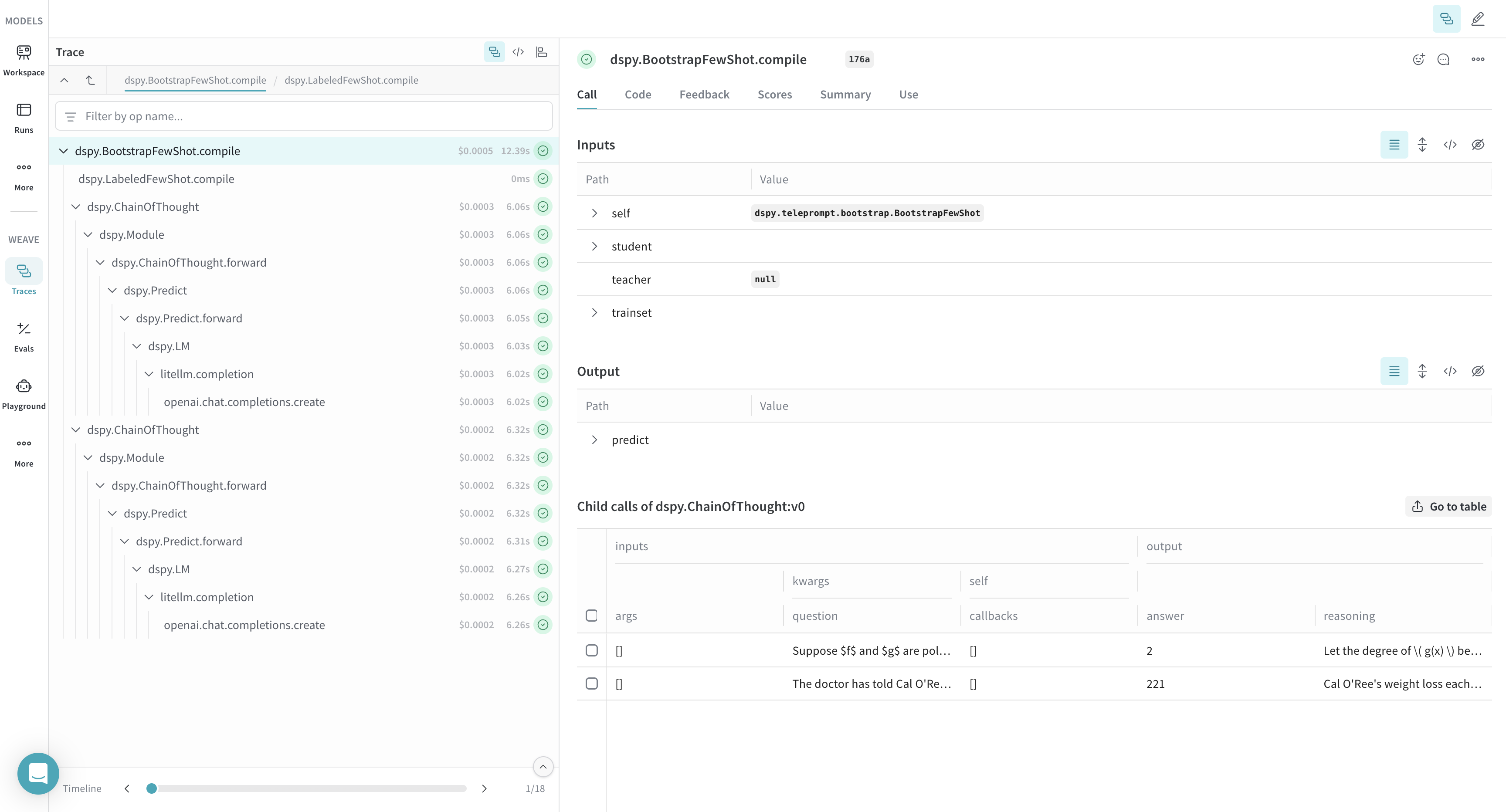
DSPy optimizer trace in Weave with optimization process and performance improvements