Open In Colab This guide shows you how to use Weave to monitor and trace CrewAI multi-agent applications, including both Crews and Flows. CrewAI is a Python framework for building autonomous AI agents. It’s independent of LangChain and other agent frameworks, and supports two abstractions: high-level Crews and low-level Flows. CrewAI applications often consist of multiple agents working together, which makes it important to understand how they collaborate and communicate. Weave automatically captures traces for your CrewAI applications so you can monitor and analyze your agents’ performance and interactions. The following sections walk through tracing a Crew, tracking tool usage, tracing a Flow, and wrapping a guardrail function as a Weave op.

Get started with Crew

To run this example, install CrewAI and Weave. For more information about CrewAI installation, see the CrewAI installation guide.
pip install crewai weave
The following example creates a CrewAI Crew and traces the execution with Weave. To enable tracing, call weave.init() at the beginning of your script. The argument to weave.init() is the project name where Weave logs traces.
import weave
from crewai import Agent, Task, Crew, LLM, Process

# Initialize Weave with your project name
weave.init(project_name="crewai_demo")

# Create an LLM with a temperature of 0 to ensure deterministic outputs
llm = LLM(model="gpt-4o-mini", temperature=0)

# Create agents
researcher = Agent(
    role='Research Analyst',
    goal='Find and analyze the best investment opportunities',
    backstory='Expert in financial analysis and market research',
    llm=llm,
    verbose=True,
    allow_delegation=False,
)

writer = Agent(
    role='Report Writer',
    goal='Write clear and concise investment reports',
    backstory='Experienced in creating detailed financial reports',
    llm=llm,
    verbose=True,
    allow_delegation=False,
)

# Create tasks
research_task = Task(
    description='Deep research on the {topic}',
    expected_output='Comprehensive market data including key players, market size, and growth trends.',
    agent=researcher
)

writing_task = Task(
    description='Write a detailed report based on the research',
    expected_output='The report should be easy to read and understand. Use bullet points where applicable.',
    agent=writer
)

# Create a crew
crew = Crew(
    agents=[researcher, writer],
    tasks=[research_task, writing_task],
    verbose=True,
    process=Process.sequential,
)

# Run the crew
result = crew.kickoff(inputs={"topic": "AI in material science"})
print(result)
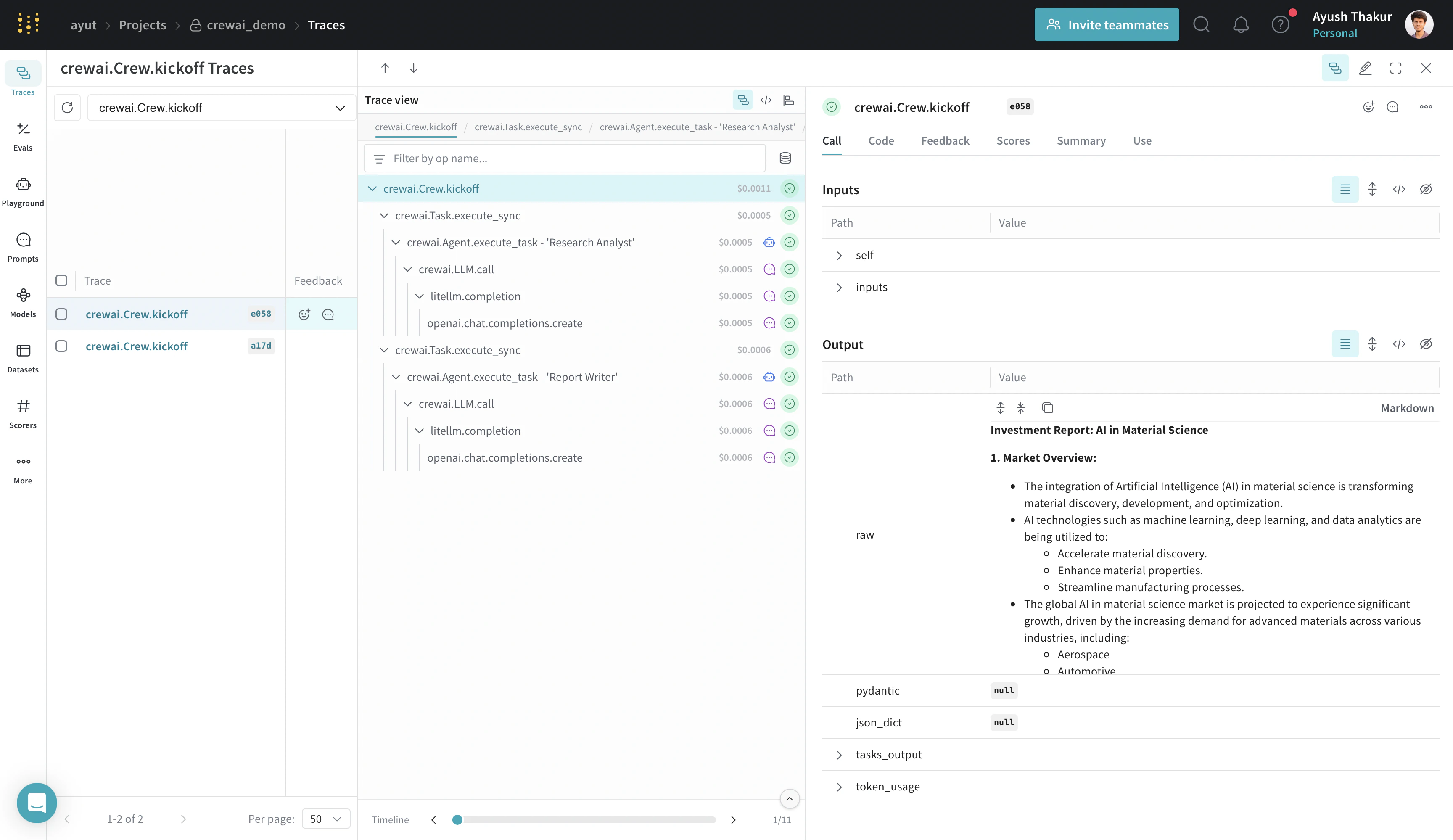
Weave tracks and logs all calls made through the CrewAI library, including agent interactions, task executions, and LLM calls. You can view the traces in the Weave web interface. crew_trace.png
CrewAI provides several methods for better control over the kickoff process: kickoff(), kickoff_for_each(), kickoff_async(), and kickoff_for_each_async(). The integration supports logging traces from all these methods.

Track tools

CrewAI tools give agents capabilities like web searching, data analysis, collaboration, and delegating tasks among coworkers. The integration traces them as well. The following example improves the quality of the generated report from the previous example by giving the agent access to a tool that can search the internet and return the most relevant results. First, install the extra dependency:
pip install 'crewai[tools]'
This example uses the SerperDevTool to enable the ‘Research Analyst’ agent to search relevant information on the internet. For more information about this tool and its API requirements, see the SerperDevTool documentation.
# .... existing imports ....
from crewai_tools import SerperDevTool

# We provide the agent with the tool.
researcher = Agent(
    role='Research Analyst',
    goal='Find and analyze the best investment opportunities',
    backstory='Expert in financial analysis and market research',
    llm=llm,
    verbose=True,
    allow_delegation=False,
    tools=[SerperDevTool()],
)

# .... existing code ....
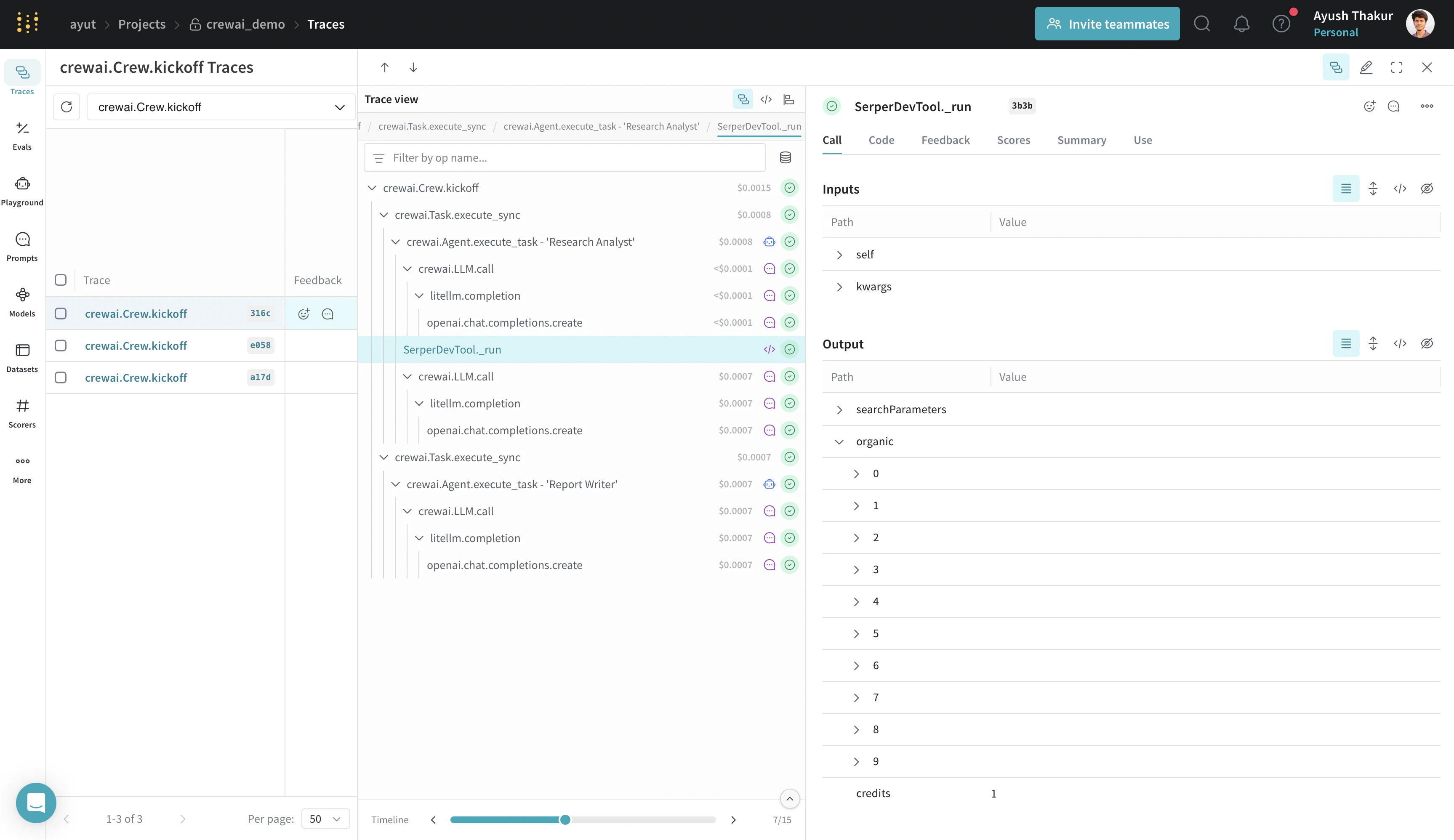
Running this Crew with an agent that has internet access produces a more relevant result. Weave automatically traces the tool usage, as shown in the following image. crew_with_tool_trace.png
The integration automatically patches all the tools available in the crewAI-tools repository.

Get started with Flow

The following example defines a CrewAI Flow and traces it with Weave. As with Crews, call weave.init() before defining the Flow so that Weave automatically captures the Flow.kickoff entry point and the @start, @listen, @router, @or_, and @and_ decorators.
import weave
# Initialize Weave with your project name
weave.init("crewai_demo")

from crewai.flow.flow import Flow, listen, router, start
from litellm import completion


class CustomerFeedbackFlow(Flow):
    model = "gpt-4o-mini"

    @start()
    def fetch_feedback(self):
        print("Fetching customer feedback")
        # In a real-world scenario, this could be replaced by an API call.
        # For this example, we simulate customer feedback.
        feedback = (
            "I had a terrible experience with the product. "
            "It broke after one use and customer service was unhelpful."
        )
        self.state["feedback"] = feedback
        return feedback

    @router(fetch_feedback)
    def analyze_feedback(self, feedback):
        # Use the language model to analyze sentiment
        prompt = (
            f"Analyze the sentiment of this customer feedback and "
            "return only 'positive' or 'negative':\n\n"
            f"Feedback: {feedback}"
        )
        response = completion(
            model=self.model,
            messages=[{"role": "user", "content": prompt}],
        )
        sentiment = response["choices"][0]["message"]["content"].strip().lower()
        # If the response is ambiguous, default to negative
        if sentiment not in ["positive", "negative"]:
            sentiment = "negative"
        return sentiment

    @listen("positive")
    def handle_positive_feedback(self):
        # Generate a thank you message for positive feedback
        prompt = "Generate a thank you message for a customer who provided positive feedback."
        response = completion(
            model=self.model,
            messages=[{"role": "user", "content": prompt}],
        )
        thank_you_message = response["choices"][0]["message"]["content"].strip()
        self.state["response"] = thank_you_message
        return thank_you_message

    @listen("negative")
    def handle_negative_feedback(self):
        # Generate an apology message with a promise to improve service for negative feedback
        prompt = (
            "Generate an apology message to a customer who provided negative feedback and offer assistance or a solution."
        )
        response = completion(
            model=self.model,
            messages=[{"role": "user", "content": prompt}],
        )
        apology_message = response["choices"][0]["message"]["content"].strip()
        self.state["response"] = apology_message
        return apology_message

# Instantiate and kickoff the flow
flow = CustomerFeedbackFlow()
result = flow.kickoff()
print(result)
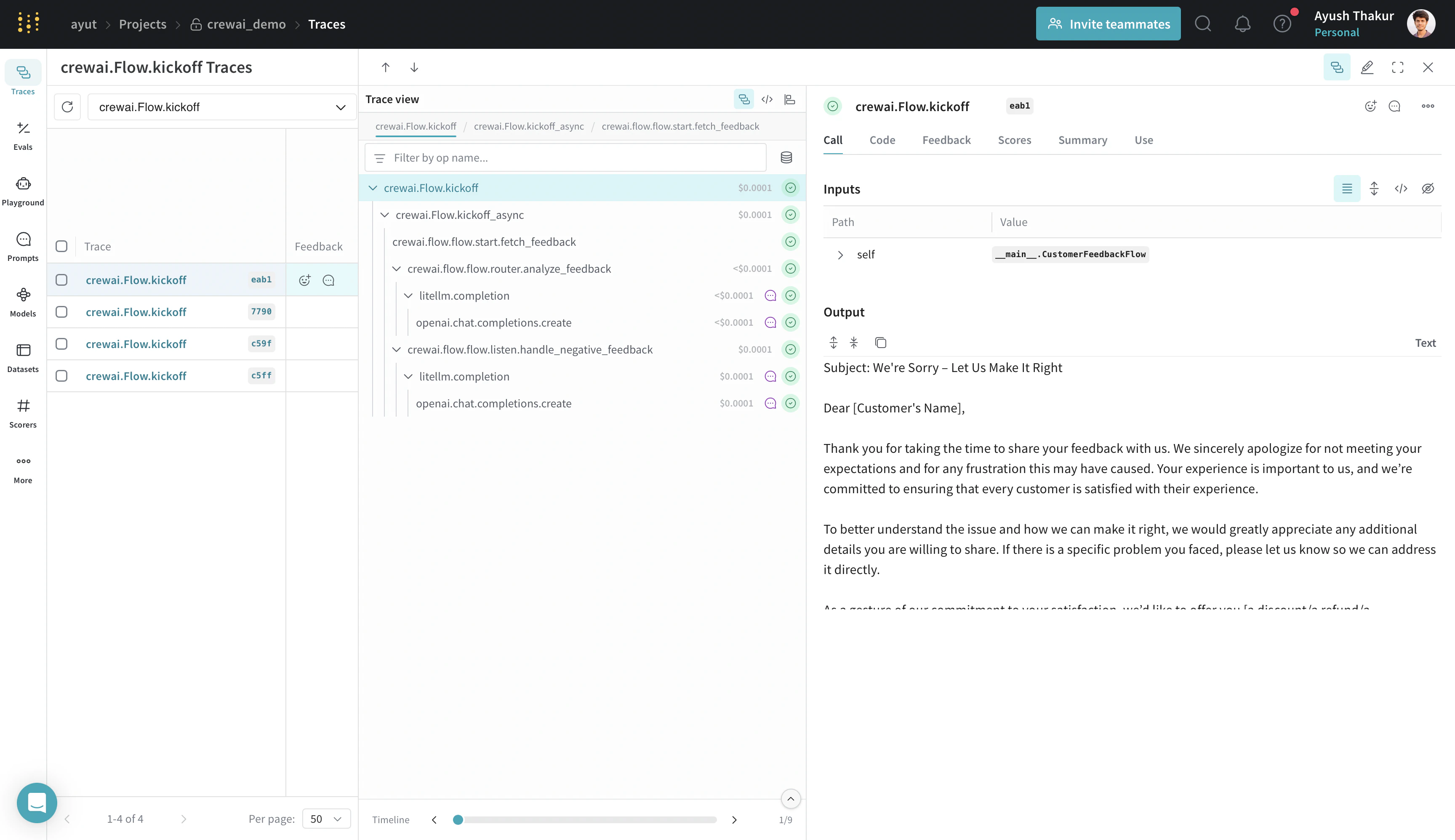
flow.png
The integration automatically patches the Flow.kickoff entry point and all the available decorators (@start, @listen, @router, @or_, and @and_).

Crew guardrail: track your own ops

Task guardrails let you validate and transform task outputs before CrewAI passes them to the next task. You can use a Python function to validate the agent’s execution on the fly. Wrapping the guardrail function with @weave.op captures its inputs, outputs, and app logic so you can debug how data is validated through your agents. It also automatically versions the code as you experiment, capturing ad-hoc details that haven’t been committed to git. The following example extends the research analyst and writer Crew by adding a guardrail that validates the length of the generated report.
# .... existing imports and weave initialization ....

# Decorate your guardrail function with `@weave.op()`
@weave.op(name="guardrail-validate_blog_content")
def validate_blog_content(result: TaskOutput) -> Tuple[bool, Any]:
    # Get raw string result
    result = result.raw

    """Validate blog content meets requirements."""
    try:
        # Check word count
        word_count = len(result.split())

        if word_count > 200:
            return (False, {
                "error": "Blog content exceeds 200 words",
                "code": "WORD_COUNT_ERROR",
                "context": {"word_count": word_count}
            })

        # Additional validation logic here
        return (True, result.strip())
    except Exception as e:
        return (False, {
            "error": "Unexpected error during validation",
            "code": "SYSTEM_ERROR"
        })


# .... existing agents and research analyst task ....

writing_task = Task(
    description='Write a detailed report based on the research under 200 words',
    expected_output='The report should be easy to read and understand. Use bullet points where applicable.',
    agent=writer,
    guardrail=validate_blog_content,
)

# .... existing code to run crew ....
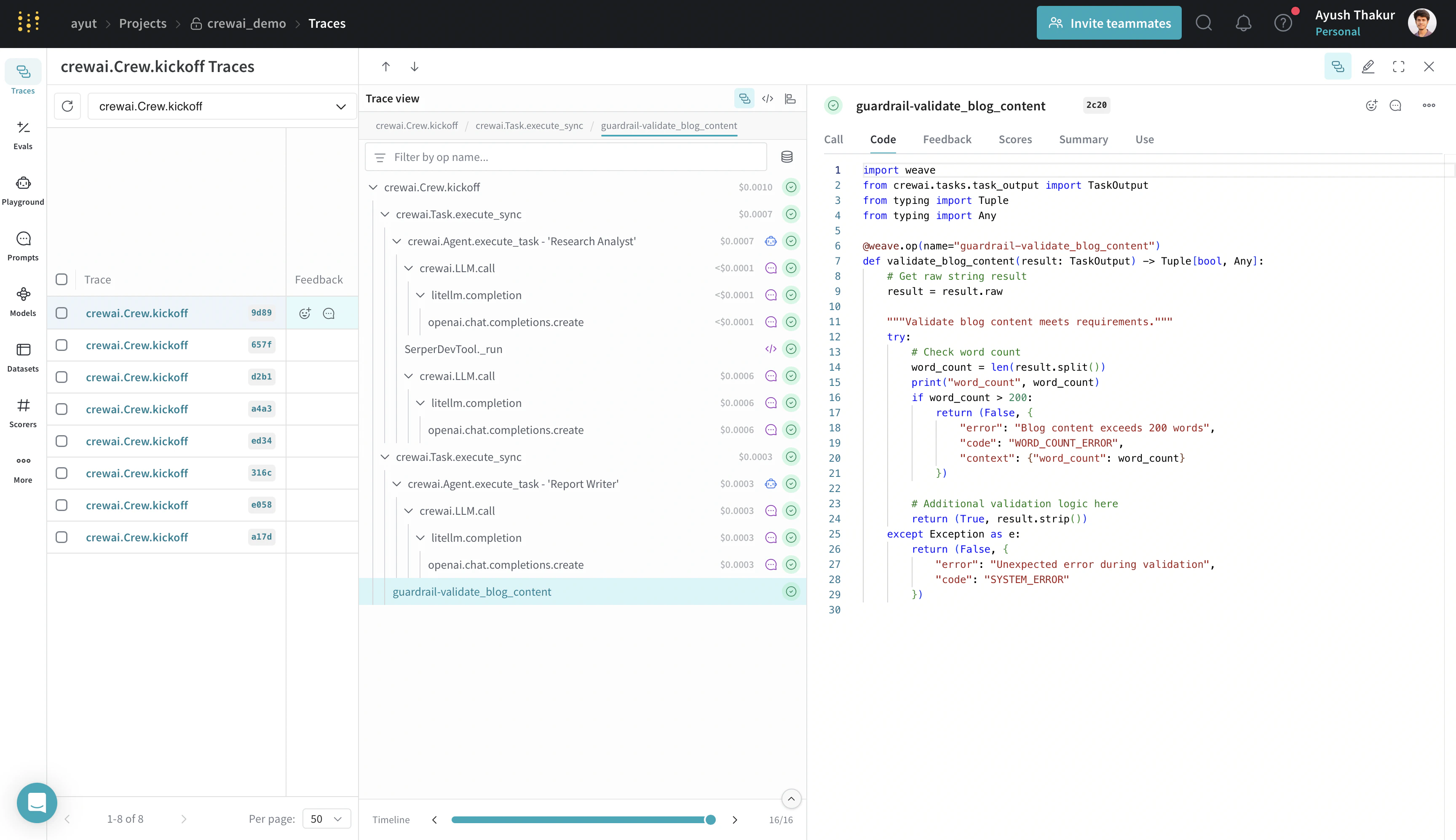
By decorating the guardrail function with @weave.op, you can track the input and output to this function along with execution time, token information if the function uses an LLM, code version, and more. guardrail.png
Conclusion

You now have a Weave-traced CrewAI application that captures agent interactions, tool usage, Flow execution, and guardrail validations. To suggest improvements or report problems with this integration, open an issue on GitHub. To learn more about building multi-agent systems with CrewAI, see the CrewAI examples and documentation.