You can trace Agno agent and tool calls in Weave using OpenTelemetry (OTEL). Agno is a Python framework for building multi-agent systems with shared memory, knowledge, and reasoning. It’s designed to be lightweight and model-independent, and supports multi-modal capabilities including text, image, audio, and video processing.
This guide explains how to trace Agno agent and tool calls using OTEL, and visualize those traces in Weave. You’ll learn how to install the required dependencies, configure an OTEL tracer to send data to Weave, and instrument your Agno agents and tools.
Prerequisites
-
Install the required dependencies:
pip install agno openinference-instrumentation-agno opentelemetry-sdk opentelemetry-exporter-otlp-proto-http
-
Set your OpenAI API key (or other model provider) as an environment variable:
export OPENAI_API_KEY=your_api_key_here
-
Configure OTEL tracing in Weave.
To send traces from Agno to Weave, configure OTEL with a TracerProvider and an OTLPSpanExporter. Set the exporter to the correct endpoint and HTTP headers for authentication and project identification.
Store sensitive environment variables like your API key and project info in an environment file (for example, .env), and load them using os.environ. This keeps your credentials secure and out of your codebase.
Required configuration
Configure the OTLP exporter with the following endpoint and headers:
- Endpoint:
https://trace.wandb.ai/otel/v1/traces
- Headers:
Authorization: Basic auth using your W&B API key.
project_id: Your W&B entity/project name (for example, myteam/myproject).
Send OTEL traces from Agno to Weave
After you complete the prerequisites, you can send OTEL traces from Agno to Weave. The following code snippet demonstrates how to configure an OTLP span exporter and tracer provider to send OTEL traces from an Agno application to Weave.
To ensure that Weave traces Agno properly, set the global tracer provider before using Agno components in your code.
# tracing.py
import base64
import os
from openinference.instrumentation.agno import AgnoInstrumentor
from opentelemetry.exporter.otlp.proto.http.trace_exporter import OTLPSpanExporter
from opentelemetry.sdk import trace as trace_sdk
from opentelemetry.sdk.trace.export import SimpleSpanProcessor
from opentelemetry import trace
# Load sensitive values from environment variables
WANDB_BASE_URL = "https://trace.wandb.ai"
# Your W&B entity/project name e.g. "myteam/myproject"
PROJECT_ID = os.environ.get("WANDB_PROJECT_ID")
# Create a W&B API key at https://wandb.ai/settings
WANDB_API_KEY = os.environ.get("WANDB_API_KEY")
OTEL_EXPORTER_OTLP_ENDPOINT = f"{WANDB_BASE_URL}/otel/v1/traces"
AUTH = base64.b64encode(f"api:{WANDB_API_KEY}".encode()).decode()
OTEL_EXPORTER_OTLP_HEADERS = {
"Authorization": f"Basic {AUTH}",
"project_id": PROJECT_ID,
}
# Create the OTLP span exporter with endpoint and headers
exporter = OTLPSpanExporter(
endpoint=OTEL_EXPORTER_OTLP_ENDPOINT,
headers=OTEL_EXPORTER_OTLP_HEADERS,
)
# Create a tracer provider and add the exporter
tracer_provider = trace_sdk.TracerProvider()
tracer_provider.add_span_processor(SimpleSpanProcessor(exporter))
# Set the global tracer provider BEFORE importing/using Agno
trace.set_tracer_provider(tracer_provider)
Trace Agno agents with OTEL
After you set up the tracer provider, you can create and run Agno agents with automatic tracing. Instrument Agno before you create agents to ensure that Weave captures all subsequent agent activity. The following example demonstrates how to create an agent with tools:
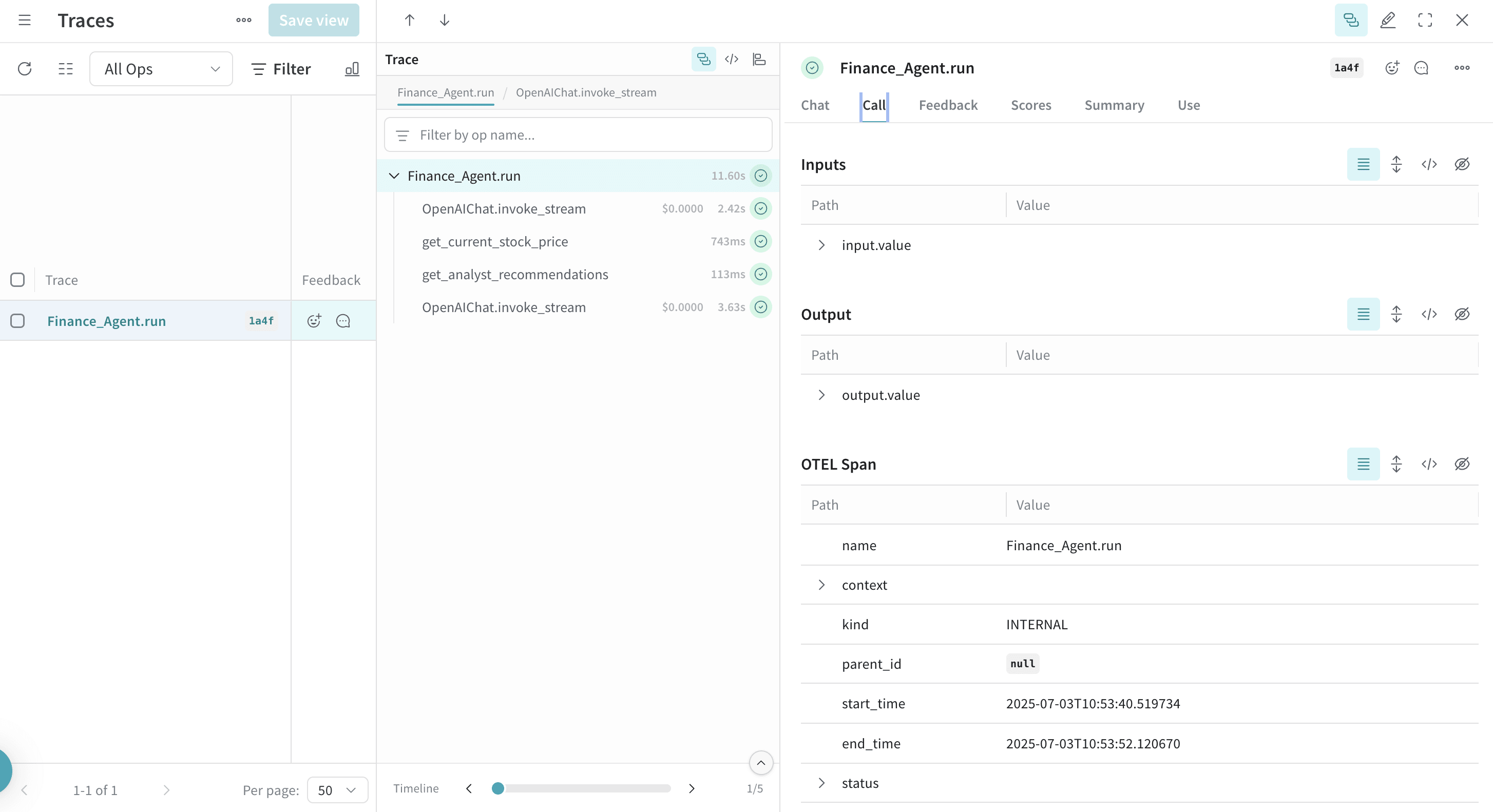
from agno.agent import Agent
from agno.models.openai import OpenAIChat
from agno.tools.yfinance import YFinanceTools
from dotenv import load_dotenv
load_dotenv()
# Load AgnoInstrumentor from the file created above
from tracing import AgnoInstrumentor
# Start instrumenting Agno
AgnoInstrumentor().instrument()
# Create a finance agent
finance_agent = Agent(
name="Finance Agent",
model=OpenAIChat(id="gpt-4o-mini"),
tools=[
YFinanceTools(
stock_price=True,
analyst_recommendations=True,
company_info=True,
company_news=True
)
],
instructions=["Use tables to display data"],
show_tool_calls=True,
markdown=True,
)
# Use the agent - Weave automatically traces this call
finance_agent.print_response(
"What is the current stock price of Apple and what are the latest analyst recommendations?",
stream=True
)
Weave automatically traces all agent operations, so you can visualize the execution flow, model calls, reasoning steps, and tool invocations.
When you define and use tools with Agno, the trace also captures these tool calls. The OTEL integration automatically instruments both the agent’s reasoning process and the individual tool executions, which provides a comprehensive view of your agent’s behavior.
Here’s an example with multiple tools:
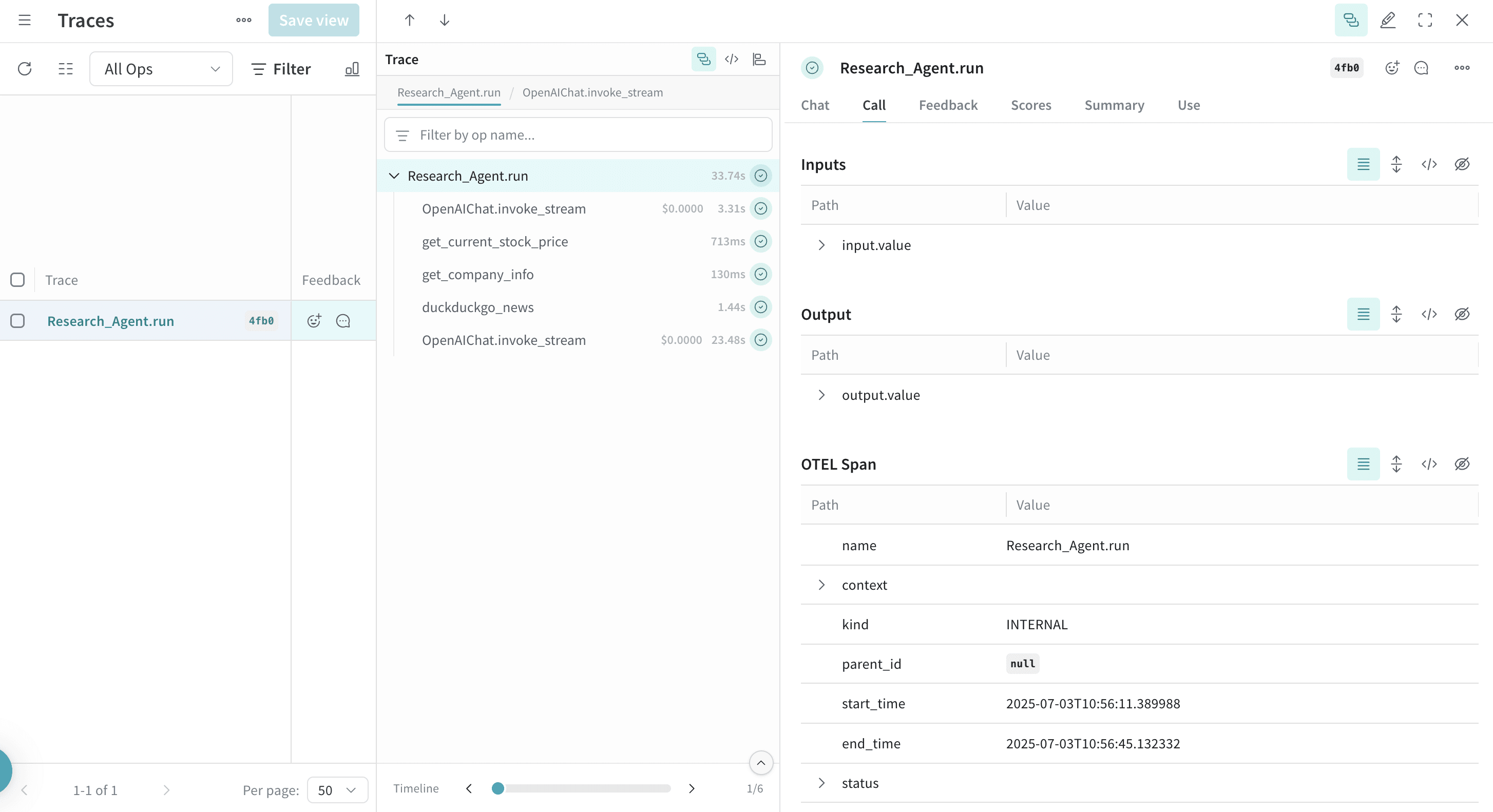
from agno.agent import Agent
from agno.models.openai import OpenAIChat
from agno.tools.duckduckgo import DuckDuckGoTools
from agno.tools.yfinance import YFinanceTools
from dotenv import load_dotenv
load_dotenv()
# Load AgnoInstrumentor from the file created above
from tracing import AgnoInstrumentor
# Start instrumenting Agno
AgnoInstrumentor().instrument()
# Create an agent with multiple tools
research_agent = Agent(
name="Research Agent",
model=OpenAIChat(id="gpt-4o-mini"),
tools=[
DuckDuckGoTools(),
YFinanceTools(stock_price=True, company_info=True),
],
instructions=[
"Search for current information and financial data",
"Always include sources",
"Use tables to display financial data"
],
show_tool_calls=True,
markdown=True,
)
# Use the agent - Weave traces the tool calls
research_agent.print_response(
"Research Tesla's recent performance and news. Include stock price and any recent developments.",
stream=True
)
Trace multi-agent teams with OTEL
Agno’s multi-agent architecture lets you create teams of agents that collaborate and share context. Weave also traces these team interactions in full:
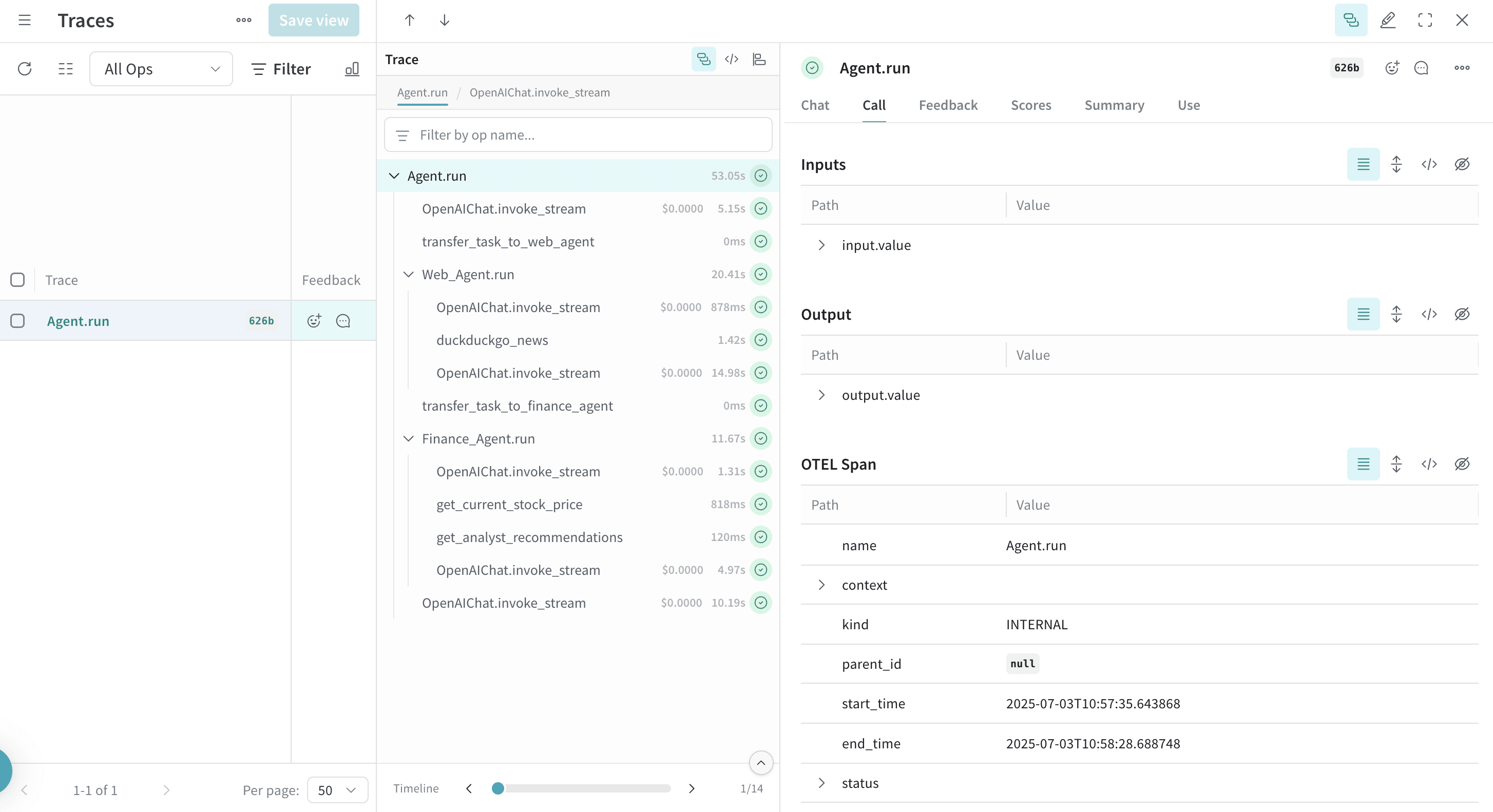
from agno.agent import Agent
from agno.models.openai import OpenAIChat
from agno.tools.duckduckgo import DuckDuckGoTools
from agno.tools.yfinance import YFinanceTools
from dotenv import load_dotenv
load_dotenv()
# Load AgnoInstrumentor from the tracing.py file
from tracing import AgnoInstrumentor
# Start instrumenting Agno
AgnoInstrumentor().instrument()
# Create specialized agents
web_agent = Agent(
name="Web Agent",
role="Search the web for information",
model=OpenAIChat(id="gpt-4o-mini"),
tools=[DuckDuckGoTools()],
instructions="Always include sources",
show_tool_calls=True,
markdown=True,
)
finance_agent = Agent(
name="Finance Agent",
role="Get financial data",
model=OpenAIChat(id="gpt-4o-mini"),
tools=[YFinanceTools(stock_price=True, analyst_recommendations=True)],
instructions="Use tables to display data",
show_tool_calls=True,
markdown=True,
)
# Create a team of agents
agent_team = Agent(
team=[web_agent, finance_agent],
model=OpenAIChat(id="gpt-4o"),
instructions=["Always include sources", "Use tables to display data"],
show_tool_calls=True,
markdown=True,
)
# Use the team - Weave traces all agent interactions
agent_team.print_response(
"What's the current market sentiment around NVIDIA? Include both news analysis and financial metrics.",
stream=True
)
This multi-agent trace shows the coordination between different agents in Weave, which provides visibility into how tasks are distributed and executed across your agent team.
Work with reasoning agents
Agno provides built-in reasoning capabilities that help agents process problems step-by-step. Traces also capture these reasoning processes:
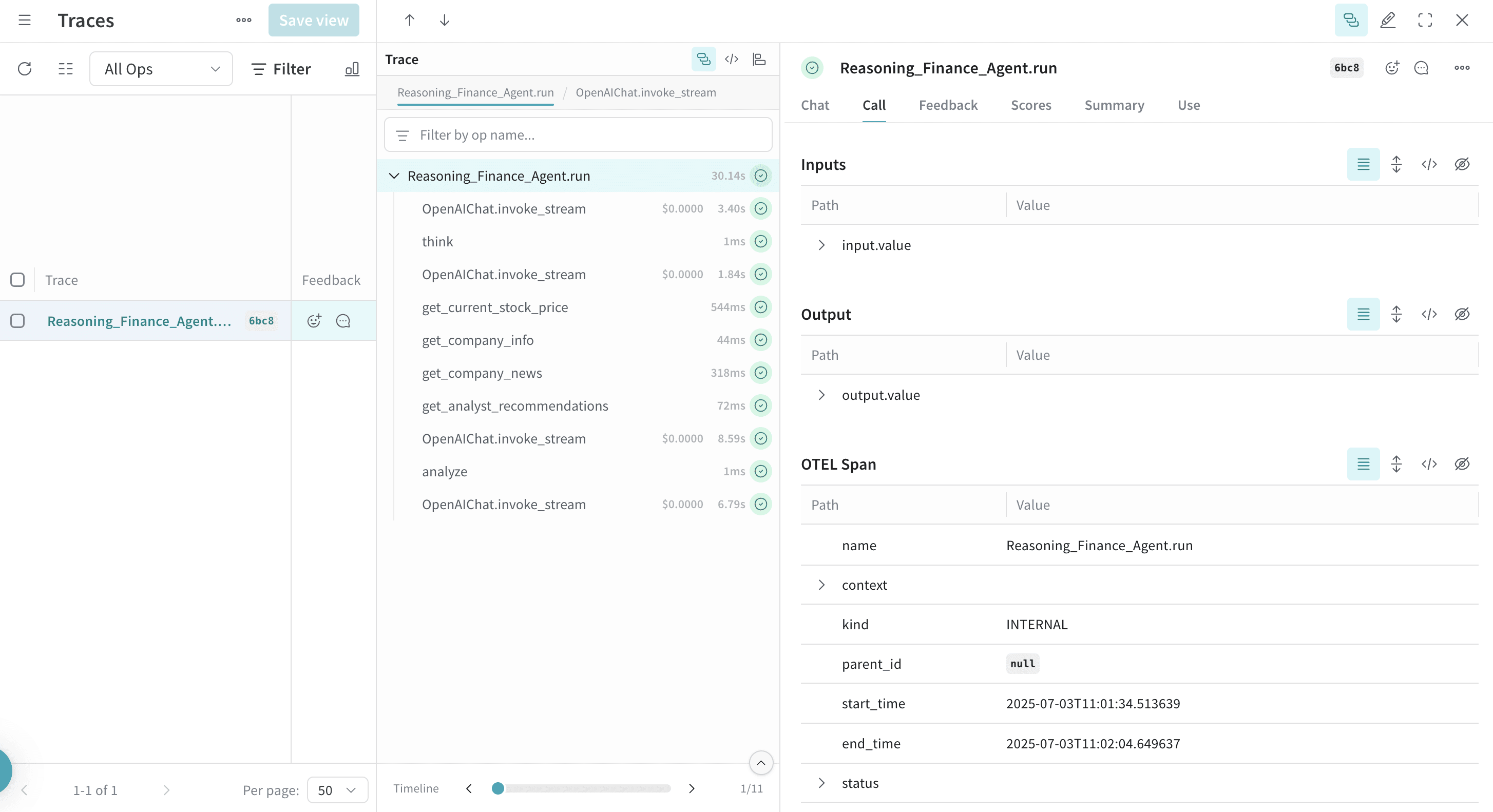
from agno.agent import Agent
from agno.models.openai import OpenAIChat
from agno.tools.reasoning import ReasoningTools
from agno.tools.yfinance import YFinanceTools
from dotenv import load_dotenv
load_dotenv()
# Load AgnoInstrumentor from the tracing.py file
from tracing import AgnoInstrumentor
# Start instrumenting Agno
AgnoInstrumentor().instrument()
# Create a reasoning agent
reasoning_agent = Agent(
name="Reasoning Finance Agent",
model=OpenAIChat(id="gpt-4o"),
tools=[
ReasoningTools(add_instructions=True),
YFinanceTools(
stock_price=True,
analyst_recommendations=True,
company_info=True,
company_news=True
),
],
instructions="Use tables to display data and show your reasoning process",
show_tool_calls=True,
markdown=True,
)
# Use the reasoning agent
reasoning_agent.print_response(
"Should I invest in Apple stock right now? Analyze the current situation and provide a reasoned recommendation.",
stream=True
)
The trace displays the reasoning steps that show how the agent breaks down complex problems and makes decisions.
Work with memory and knowledge
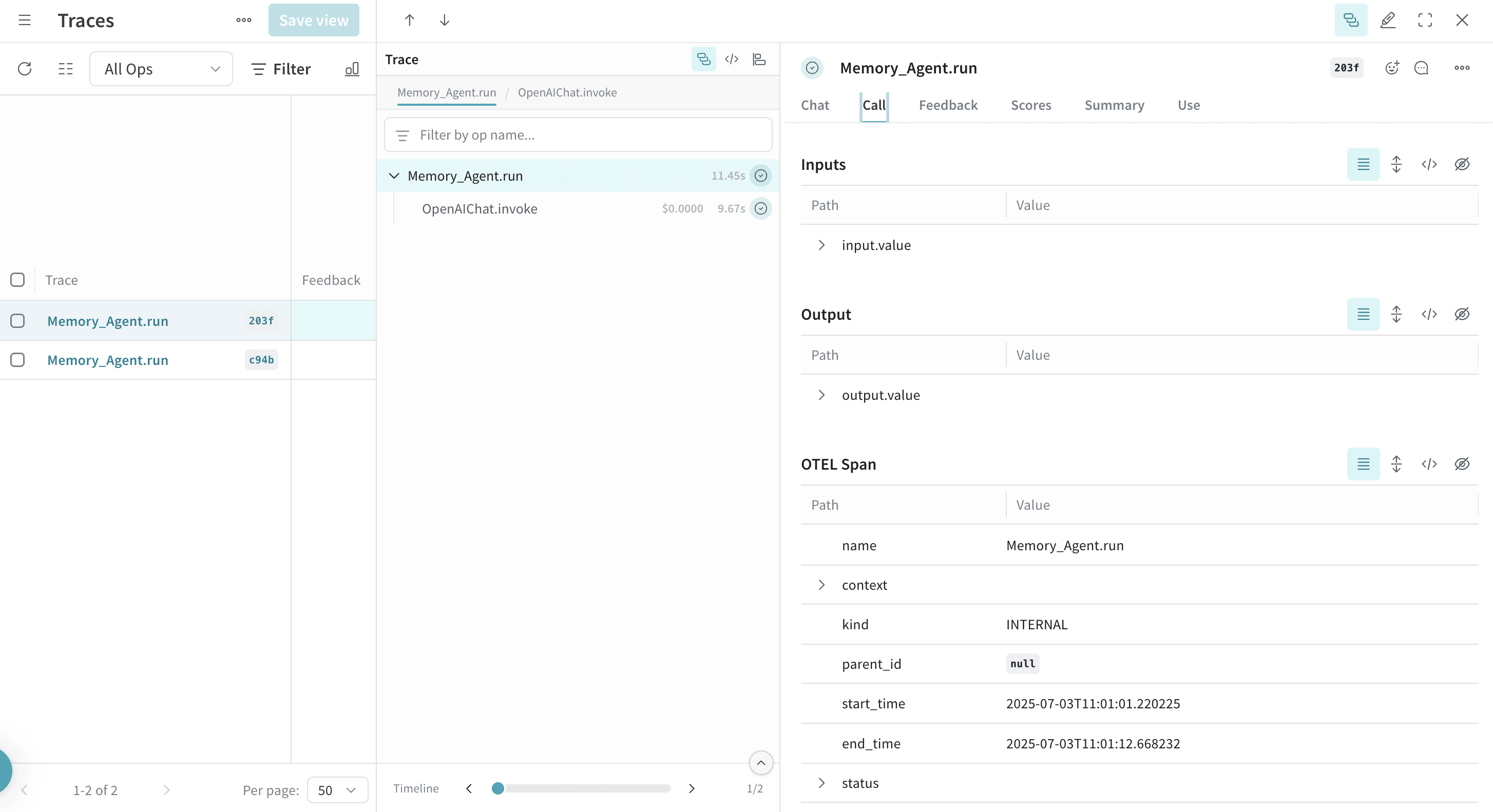
Agno agents can maintain memory and access knowledge bases, which lets agents persist context across interactions. Weave also traces these operations:
from agno.agent import Agent
from agno.models.openai import OpenAIChat
from agno.memory import AgentMemory
from agno.storage.sqlite import SqliteStorage
from dotenv import load_dotenv
load_dotenv()
# Load AgnoInstrumentor from the tracing.py file
from tracing import AgnoInstrumentor
# Start instrumenting Agno
AgnoInstrumentor().instrument()
# Create an agent with memory
memory_agent = Agent(
name="Memory Agent",
model=OpenAIChat(id="gpt-4o-mini"),
memory=AgentMemory(),
storage=SqliteStorage(
table_name="agent_sessions",
db_file="agent_memory.db"
),
instructions="Remember our conversation history",
show_tool_calls=True,
markdown=True,
)
# First interaction
memory_agent.print_response("My name is John and I'm interested in AI investing strategies.")
# Second interaction - agent remembers the previous context
memory_agent.print_response("What specific AI companies would you recommend for my portfolio?")
Memory operations, including storing and retrieving conversation history, appear in the trace.
Learn more