

 Weave tracks and logs calls made through the LangChain Python library.
When working with LLMs, debugging is part of the job. Whether a model call fails, an output is misformatted, or nested model calls create confusion, pinpointing issues can be hard. LangChain applications often consist of multiple steps and LLM call invocations, so it helps to understand the inner workings of your chains and agents.
Weave captures traces for your LangChain applications automatically. This lets you monitor and analyze your application’s performance, which makes it easier to debug and optimize your LLM workflows.
This guide is for developers building LangChain applications who want to add tracing, evaluation, and observability with Weave. It walks through enabling automatic tracing, attaching metadata, controlling tracing manually, and wrapping LangChain chains as Weave models for evaluation.
Weave tracks and logs calls made through the LangChain Python library.
When working with LLMs, debugging is part of the job. Whether a model call fails, an output is misformatted, or nested model calls create confusion, pinpointing issues can be hard. LangChain applications often consist of multiple steps and LLM call invocations, so it helps to understand the inner workings of your chains and agents.
Weave captures traces for your LangChain applications automatically. This lets you monitor and analyze your application’s performance, which makes it easier to debug and optimize your LLM workflows.
This guide is for developers building LangChain applications who want to add tracing, evaluation, and observability with Weave. It walks through enabling automatic tracing, attaching metadata, controlling tracing manually, and wrapping LangChain chains as Weave models for evaluation.
Getting started
To get started, callweave.init() at the beginning of your script. The argument to weave.init() is a project name that Weave uses to organize your traces.
Track call metadata
Custom metadata helps you filter and analyze traces in the Weave UI. To track metadata from your LangChain calls, use theweave.attributes context manager. This context manager lets you set custom metadata for a specific block of code, such as a chain or a single request.

Traces
Storing traces of LLM applications in a central database helps during both development and production. These traces give you a dataset you can use to debug and improve your application. Weave captures traces for your LangChain applications automatically. Weave tracks and logs calls made through the LangChain library, including prompt templates, chains, LLM calls, tools, and agent steps. You can view the traces in the Weave web interface.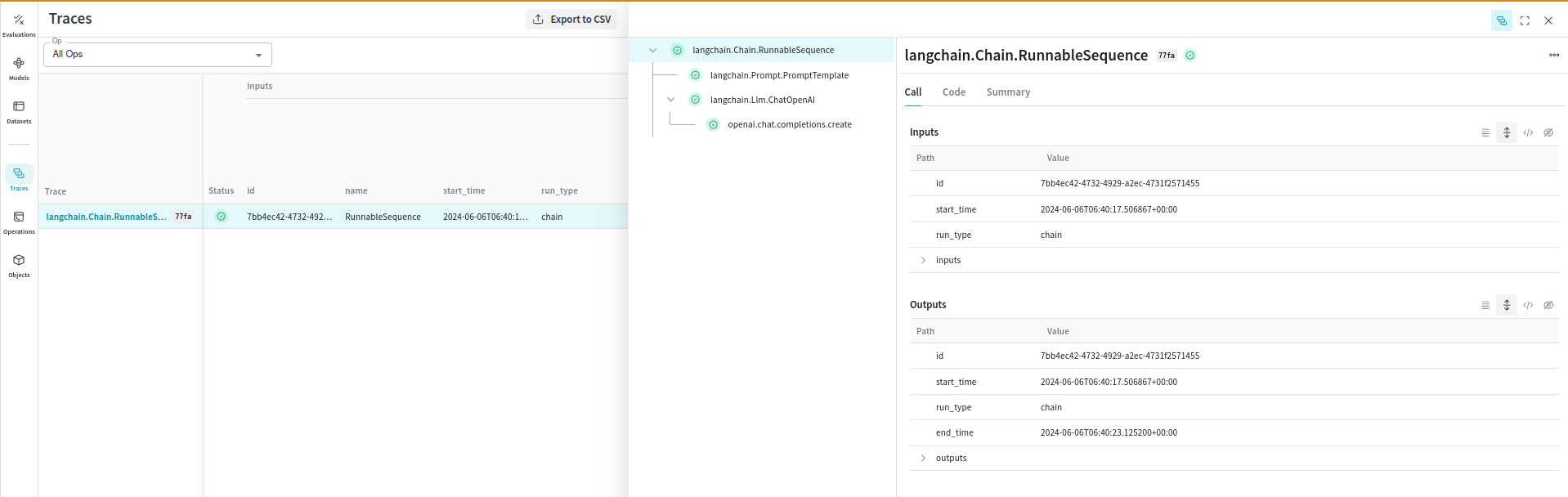
Trace calls manually
Besides automatic tracing, you can manually trace calls using theWeaveTracer callback or the weave_tracing_enabled context manager. These methods resemble using request callbacks in individual parts of a LangChain application. Use them when you want to trace specific chains or invocations rather than your whole application.
The following sections describe each approach.
Note: Weave traces LangChain Runnables by default, and this is enabled when you call weave.init(). You can disable this behavior by setting the environment variable WEAVE_TRACE_LANGCHAIN to "false" before calling weave.init(). This lets you control the tracing behavior of specific chains or even individual requests in your application.
Use WeaveTracer
You can pass the WeaveTracer callback to individual LangChain components to trace specific requests.
Use the weave_tracing_enabled context manager
Alternatively, you can use the weave_tracing_enabled context manager to enable tracing for specific blocks of code.
Configuration
When you callweave.init(), Weave enables tracing by setting the environment variable WEAVE_TRACE_LANGCHAIN to "true". This lets Weave automatically capture traces for your LangChain applications. To disable this behavior, set the environment variable to "false".
Relation to LangChain callbacks
This section explains how Weave’s tracing integrates with LangChain’s callback system, so you can choose the approach that best fits your application.Auto logging
The automatic logging provided byweave.init() is similar to passing a constructor callback to every component in a LangChain application. This means Weave tracks all interactions globally across your entire application, including prompt templates, chains, LLM calls, tools, and agent steps.
Manual logging
The manual logging methods (WeaveTracer and weave_tracing_enabled) are similar to using request callbacks in individual parts of a LangChain application. These methods give you finer control over which parts of your application Weave traces:
- Constructor callbacks: Apply to the entire chain or component and log all interactions consistently.
- Request callbacks: Apply to specific requests and provide detailed tracing of particular invocations.
Models and evaluations
Organizing and evaluating LLMs across different use cases gets harder as you add components like prompts, model configurations, and inference parameters. Withweave.Model, you can capture and organize experimental details like system prompts or the models you use, which makes it easier to compare iterations.
The following sections show how to wrap a LangChain chain as a weave.Model and then evaluate it.
The following example demonstrates wrapping a LangChain chain in a WeaveModel:
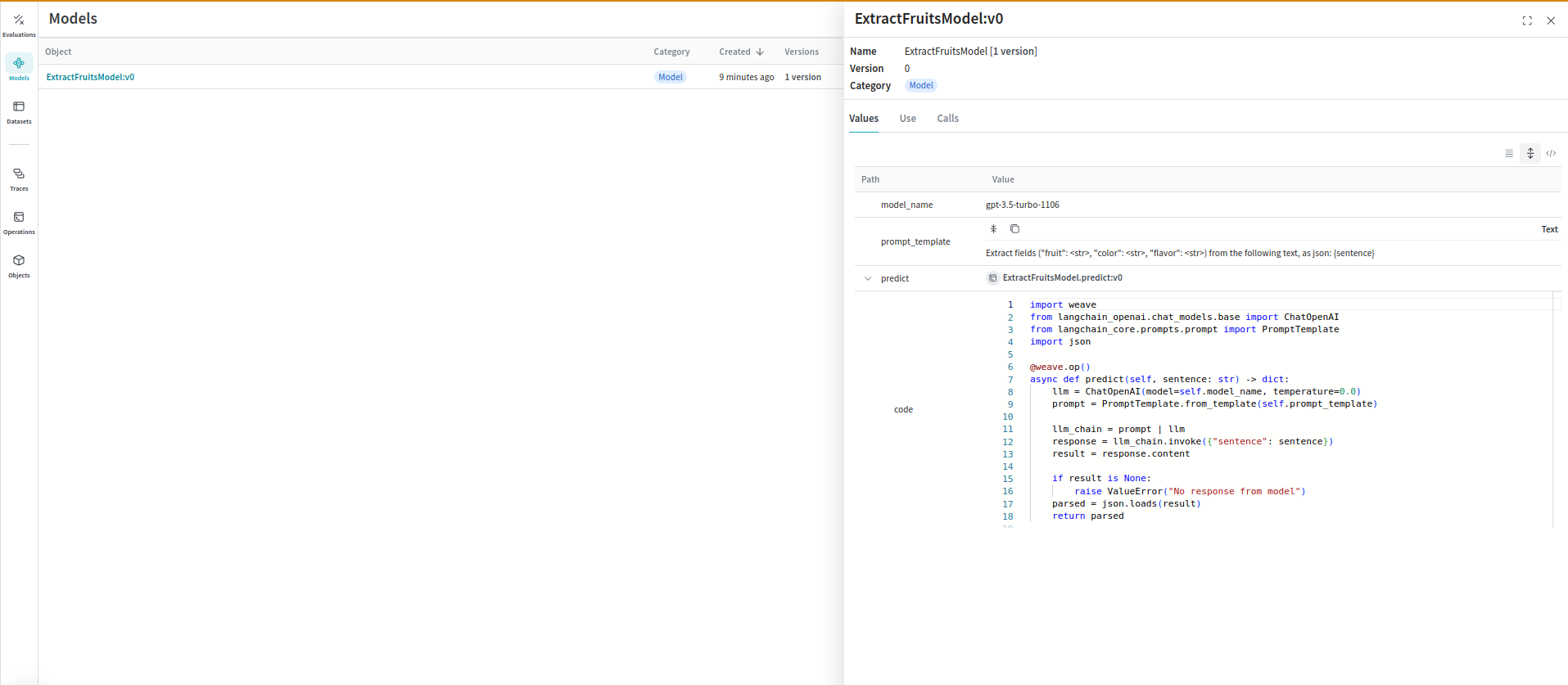 You can also use Weave Models with
 serve, and Evaluations.
Evaluations
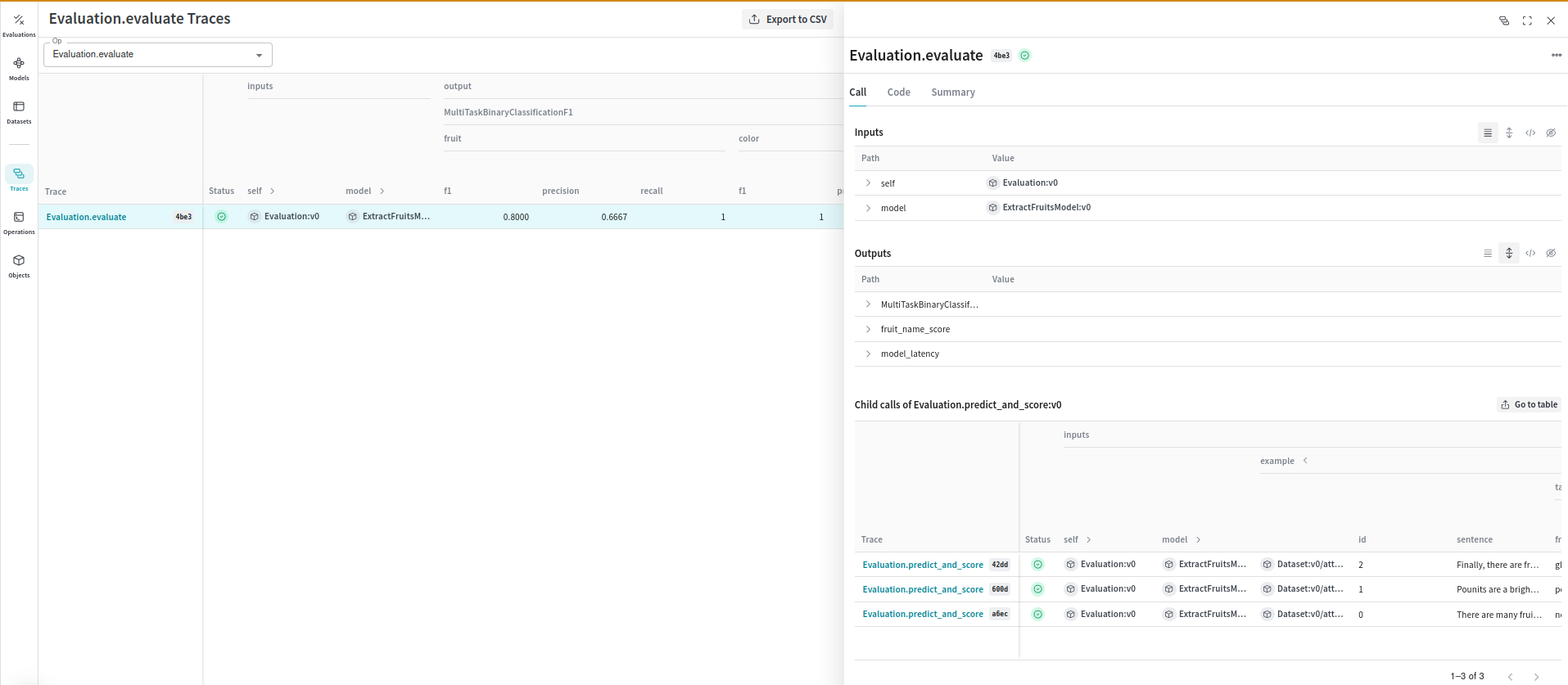
Evaluations help you measure the performance of your models. Theweave.Evaluation class captures how well your model performs on specific tasks or datasets. This makes it easier to compare different models and iterations of your application. The following example demonstrates how to evaluate the preceding model:
Known issues
Tracing async calls: A bug in the implementation of theAsyncCallbackManager in LangChain causes async calls to not be traced in the correct order. Weave has filed a PR to fix this. As a result, the order of calls in the trace may not be accurate when you use the ainvoke, astream, and abatch methods in LangChain Runnables.