

Run ID
A run’s ID uniquely identifies the run. By default, W&B generates a random and unique run ID automatically when you initialize a new run, unless you specify your own unique run ID when you initialize the run.Find a run’s ID
Find a run’s unique ID programmatically with the W&B Python SDK or interactively in the W&B App.- Python SDK
- W&B App
When you initialize a run, W&B returns the unique run ID in the terminal. For example, consider the following code snippet that initializes a W&B run:Within the terminal, W&B returns:The last part of the run URL (
1jx1ud12) is the unique run ID.Create a custom run ID
Pass your desired run ID as a string to theid parameter when you initialize a run:
Run name
Each run has a human-readable, non-unique run name. By default, W&B generates a random run name when you initialize a new run if you do not specify a run name for it. The name of a run appears within your project’s workspace and at the top of the run’s Overview page. Continuing from the previous example, the name of the run isglowing-shadows-8.
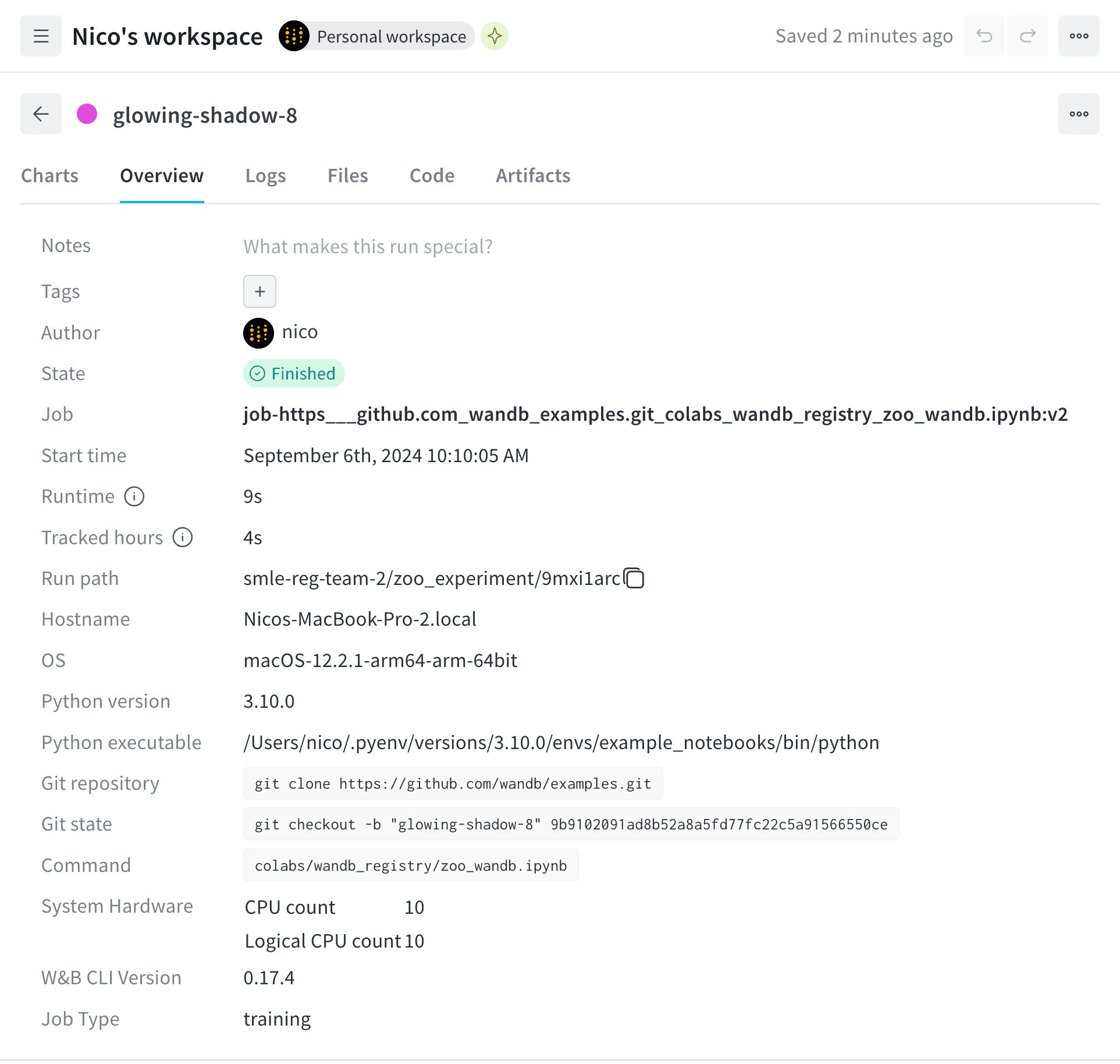
Create a custom run name
Specify a name for your run by passing thename parameter to the wandb.init() method.
Find the run path
A run path identifies a run by its entity, project, and run ID:- Navigate to your W&B project.
- Select the Workspace or Runs tab.
- Search or scroll to the run you want to find the run path for.
- Click on the run to open the run’s Overview page.
- Copy and paste the run path from the Run path field.
Rename a run
Rename a run after initializing it programmatically with the Python SDK or interactively in the W&B App.- Python SDK
- W&B App
Use
wandb.Api.Run to access a run logged to W&B. This method returns a run object that you can use to update the run name. Call wandb.Api.Run.update() method to persist changes.Replace the values enclosed in angle brackets (< >) with your own values.Run display name
Each run also has a run display name that you can customize for each workspace.If you change a run’s display name in one workspace, the display name changes only for that workspace, not in other workspaces or projects.
Rename a run’s display name
Change a run’s display name from the W&B App:- Navigate to your W&B project.
- Select the Workspace or Runs tab.
- Search or scroll to the run you want to rename.
- Hover over the run name, click the action () menu, then click Edit run name.
- Specify a new value for the Display name field.
- Click Save.
Customize run name truncation
By default, long run names are truncated in the middle for readability. To customize the truncation of run names:- Click the action () menu at the top of the list of runs.
- Set Run name cropping to crop the end, middle, or beginning.