W&B Weave は、多数のコンテンツタイプのログ記録と表示をサポートしており、動画、画像、オーディオクリップ、PDF、CSV データ、および HTML を表示するための専用機能を備えています。このガイドでは、各メディアタイプのログ記録と表示に関する基本および高度な例を紹介します。
このガイドの例ではアノテーションを使用しています。アノテーションはメディアのログ記録を開始する最もシンプルな方法であるため、推奨されています。より高度な設定については、Content API セクション を参照してください。Weave にメディアをログ記録するには、ops の入力または戻り値の型として Annotated[bytes, Content] や Annotated[str, Content] のような型アノテーションを追加します。パス引数を Annotated[str, Content] でアノテートすると、Weave は自動的にファイルを開き、検出し、トレース内にメディアを表示します。 TypeScript SDK は、メディアのログ記録用に専用の関数を提供しています:
weave.weaveImage({ data: Buffer }) - 画像用 (PNG 形式)
weave.weaveAudio({ data: Buffer }) - オーディオ用 (WAV 形式)
TypeScript SDK は現在、画像とオーディオのログ記録をサポートしています。動画、ドキュメント、または HTML をログ記録するには、代わりに Weave Python SDK を使用してください。
以下のセクションでは、各タイプのメディアをログ記録する実用的な例を紹介します。
画像のログ記録
以下の例では、画像を生成して Weave の UI にログ記録する方法を示します。
関数を Annotated[bytes, Content] 型で、またはファイルパスを Annotated[str, Content] でアノテートすることで、画像をログ記録します。以下の例では、基本的な画像を描画し、Content アノテーションを使用して Weave にログ記録します:import weave
from weave import Content
from PIL import Image, ImageDraw
from typing import Annotated
weave.init('your-team-name/your-project-name')
# サンプル画像を作成して保存
img = Image.new('RGB', (200, 100), color='lightblue')
draw = ImageDraw.Draw(img)
draw.text((50, 40), "Hello Weave!", fill='black')
img.save("sample_image.png")
# 方法 1: Content アノテーション (推奨)
@weave.op
def load_image_content(path: Annotated[str, Content]) -> Annotated[bytes, Content]:
with open(path, 'rb') as f:
return f.read()
# 方法 2: PIL Image オブジェクト
@weave.op
def load_image_pil(path: Annotated[str, Content]) -> Image.Image:
return Image.open(path)
result1 = load_image_content("sample_image.png")
result2 = load_image_pil("sample_image.png")
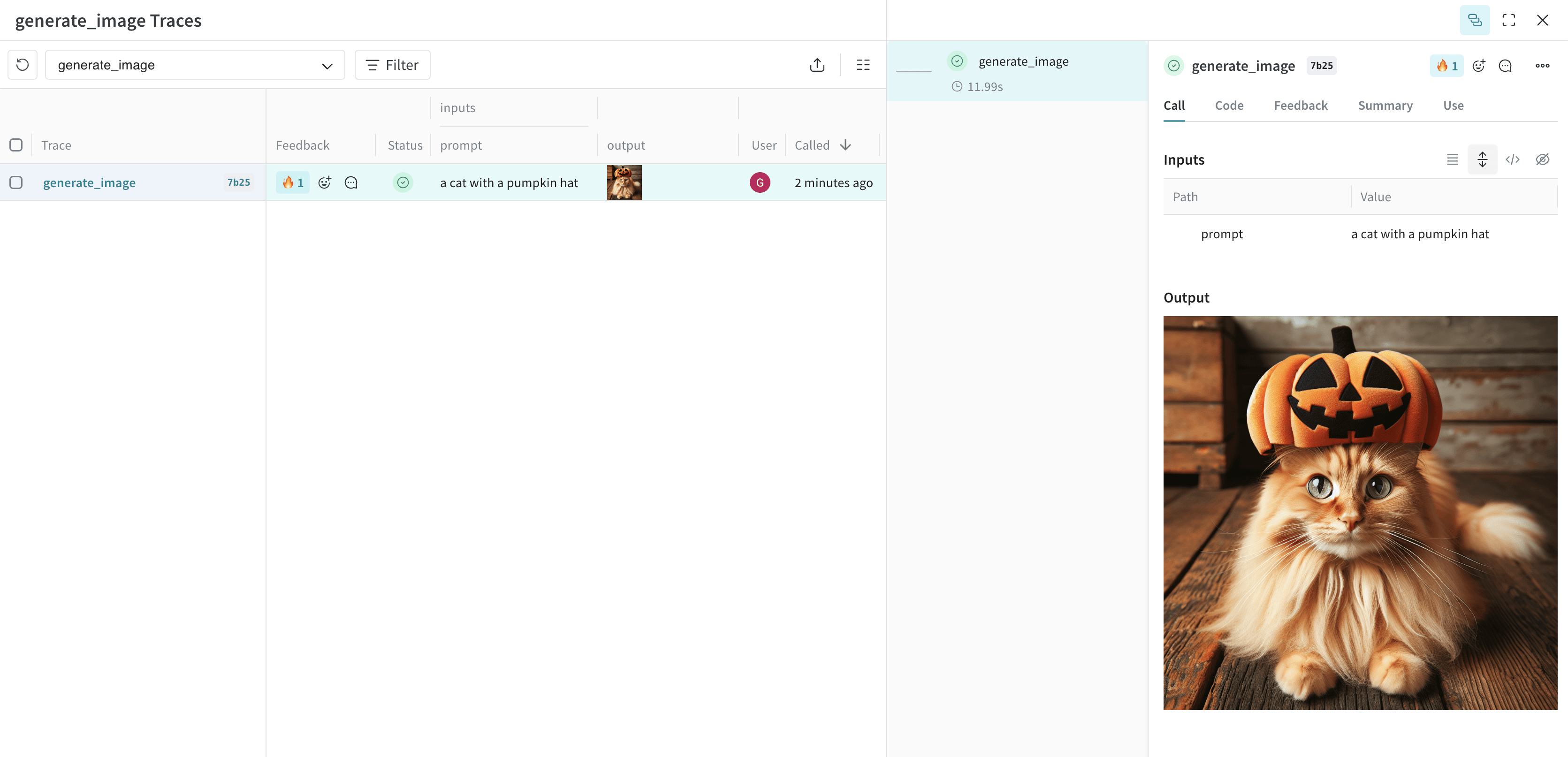
Weave は画像をログに記録し、画像を表示できるトレースへのリンクを返します。高度な例: DALL-E で画像を生成し Weave にログ記録する
以下の例では、猫の画像を生成して Weave にログ記録します:import weave
from weave import Content
from typing import Annotated
import openai
import requests
client = openai.OpenAI()
weave.init("your-team-name/your-project-name")
@weave.op
def generate_image(prompt: str) -> Annotated[bytes, Content]:
response = client.images.generate(
model="dall-e-3",
prompt=prompt,
size="1024x1024",
quality="standard",
n=1,
)
image_url = response.data[0].url
image_response = requests.get(image_url, stream=True)
return image_response.content
generate_image("a cat with a pumpkin hat")
高度な例: ログ記録前に大きな画像をリサイズする
UI のレンダリングコストとストレージへの影響を抑えるために、ログ記録前に画像をリサイズすると役立つ場合があります。@weave.op 内で postprocess_output を使用して画像をリサイズできます。from dataclasses import dataclass
from typing import Any
from PIL import Image
import weave
weave.init('your-team-name/your-project-name')
# カスタム出力型
@dataclass
class ImageResult:
label: str
image: Image.Image
# リサイズヘルパー
def resize_image(image: Image.Image, max_size=(512, 512)) -> Image.Image:
image = image.copy()
image.thumbnail(max_size, Image.Resampling.LANCZOS)
return image
# ログ記録前に画像をリサイズするための後処理
def postprocess_output(output: ImageResult) -> ImageResult:
resized = resize_image(output.image)
return ImageResult(label=output.label, image=resized)
@weave.op(postprocess_output=postprocess_output)
def generate_large_image() -> ImageResult:
# 処理用の例となる画像を作成(例:2000x2000 の赤い正方形)
img = Image.new("RGB", (2000, 2000), color="red")
return ImageResult(label="big red square", image=img)
generate_large_image()
Weave はリサイズされた画像をログに記録し、画像を表示できるトレースへのリンクを返します。 以下の例では、weaveImage 関数を使用して画像をログ記録します:import * as weave from 'weave';
import * as fs from 'fs';
async function main() {
await weave.init('your-team-name/your-project-name');
// weaveImage を使用して画像を読み込み、ログ記録
const loadImage = weave.op(async function loadImage(path: string) {
const data = fs.readFileSync(path);
return weave.weaveImage({ data });
});
// PNG画像ファイルがあると仮定
await loadImage('sample_image.png');
}
main();
Weave は画像をログに記録し、画像を表示できるトレースへのリンクを返します。高度な例: OpenAI DALL-E API で生成された画像をログ記録する
以下の例では、OpenAI DALL-E API を介して生成された画像を weaveImage 関数を使用してログ記録します:import {OpenAI} from 'openai';
import * as weave from 'weave';
async function main() {
await weave.init('your-team-name/your-project-name');
const openai = new OpenAI();
const generateImage = weave.op(async (prompt: string) => {
const response = await openai.images.generate({
model: 'dall-e-3',
prompt: prompt,
size: '1024x1024',
quality: 'standard',
n: 1,
});
const imageUrl = response.data[0].url;
const imgResponse = await fetch(imageUrl);
const data = Buffer.from(await imgResponse.arrayBuffer());
return weave.weaveImage({data});
});
generateImage('a cat with a pumpkin hat');
}
main();
動画のログ記録
以下の例では、動画を生成して Weave の UI にログ記録する方法を示します。
関数を Annotated[bytes, Content] 型でアノテートすることで動画をログ記録します。Weave は自動的に mp4 動画を処理します。簡単な例を以下に示します:import weave
from weave import Content
from typing import Annotated
import requests
weave.init('your-team-name/your-project-name')
def download_big_buck_bunny():
"""Big Buck Bunny サンプル動画をダウンロード"""
url = "https://commondatastorage.googleapis.com/gtv-videos-bucket/sample/BigBuckBunny.mp4"
response = requests.get(url)
with open("big_buck_bunny.mp4", "wb") as f:
f.write(response.content)
@weave.op
def load_video_content(path: Annotated[str, Content]) -> Annotated[bytes, Content]:
"""ディスクから動画ファイルを読み込む"""
with open(path, 'rb') as f:
return f.read()
download_big_buck_bunny()
bunny_video = load_video_content("big_buck_bunny.mp4")
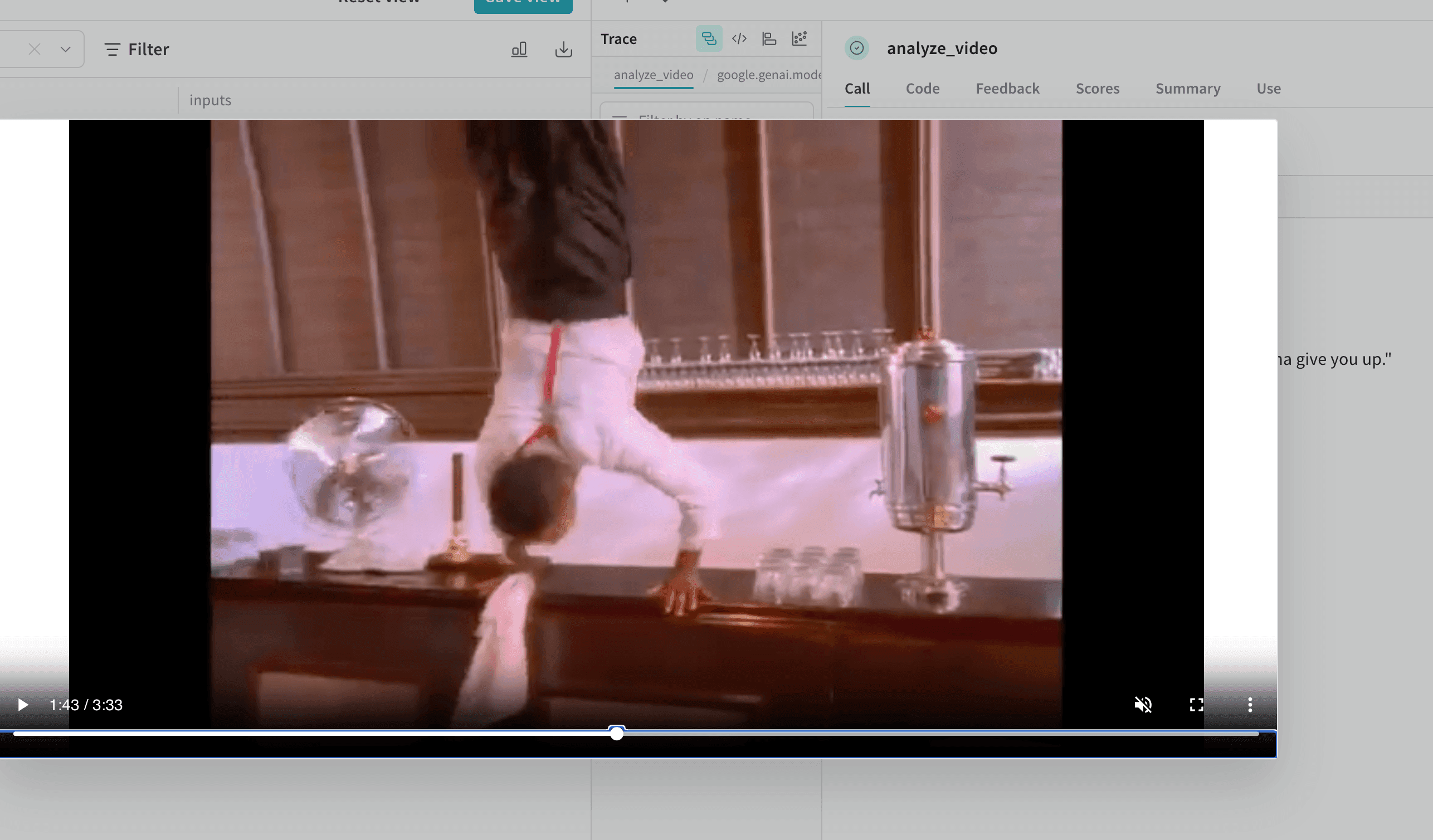
Weave は動画をログに記録し、動画を表示できるトレースへのリンクを返します。高度な例: 動画分析プロジェクト内での動画ログ記録
以下の例では、動画理解プロジェクト内で動画をログ記録する方法を示します:import weave
from weave import Content
from typing import Annotated, Literal
from google import genai
from google.genai import types
import requests
import yt_dlp
import time
# 注意: APIキーは https://aistudio.google.com/app/apikey から取得してください
client = genai.Client()
weave.init('your-team-name/your-project-name')
def download_youtube_video(url: str) -> bytes:
ydl_opts = {
'format': 'mp4[height<=720]',
'outtmpl': 'downloaded_video.%(ext)s',
}
with yt_dlp.YoutubeDL(ydl_opts) as ydl:
ydl.download([url])
with open('downloaded_video.mp4', 'rb') as f:
return f.read()
@weave.op
def analyze_video(video: Annotated[bytes, Content]) -> str:
with open("temp_analysis_video.mp4", "wb") as f:
f.write(video)
myfile = client.files.upload(file="temp_analysis_video.mp4")
while myfile.state == "PROCESSING":
time.sleep(2)
myfile = client.files.get(name=myfile.name)
response = client.models.generate_content(
model="models/gemini-2.5-flash",
contents=[
myfile,
"Is the person going to give you up?"
]
)
return response.text
video_data = download_youtube_video("https://www.youtube.com/watch?v=dQw4w9WgXcQ")
result = analyze_video(video_data)
この機能は Weave TypeScript SDK ではまだ利用できません。
ドキュメントのログ記録
以下の例では、ドキュメントを生成して Weave の UI にログ記録します。
関数を Annotated[bytes, Content] 型でアノテートするか、Annotated[str, Content[Literal['text']] でドキュメントタイプを指定して、ドキュメントをログ記録します。Weave は pdf、csv、md、text、json、xml ファイルタイプを自動的に処理します。また、Annotated[str, Content] を使用してファイルパスでログを記録することもできます。以下の例では、入力となる PDF および CSV ファイルのコピーを保存し、関数から返されたファイルコンテンツを保存する方法を示します:import weave
from weave import Content
from typing import Annotated
from reportlab.pdfgen import canvas
from reportlab.lib.pagesizes import letter
import pandas as pd
weave.init('your-team-name/your-project-name')
def create_sample_pdf():
c = canvas.Canvas("sample_document.pdf", pagesize=letter)
c.drawString(100, 750, "Hello from Weave!")
c.drawString(100, 730, "This is a sample PDF document.")
c.save()
def create_sample_csv():
df = pd.DataFrame({
'Name': ['Alice', 'Bob', 'Charlie'],
'Age': [25, 30, 35],
'City': ['New York', 'London', 'Tokyo']
})
df.to_csv("sample_data.csv", index=False)
@weave.op
def load_document(path: Annotated[str, Content]) -> Annotated[bytes, Content]:
with open(path, 'rb') as f:
return f.read()
create_sample_pdf()
create_sample_csv()
pdf_result = load_document("sample_document.pdf")
csv_result = load_document("sample_data.csv")
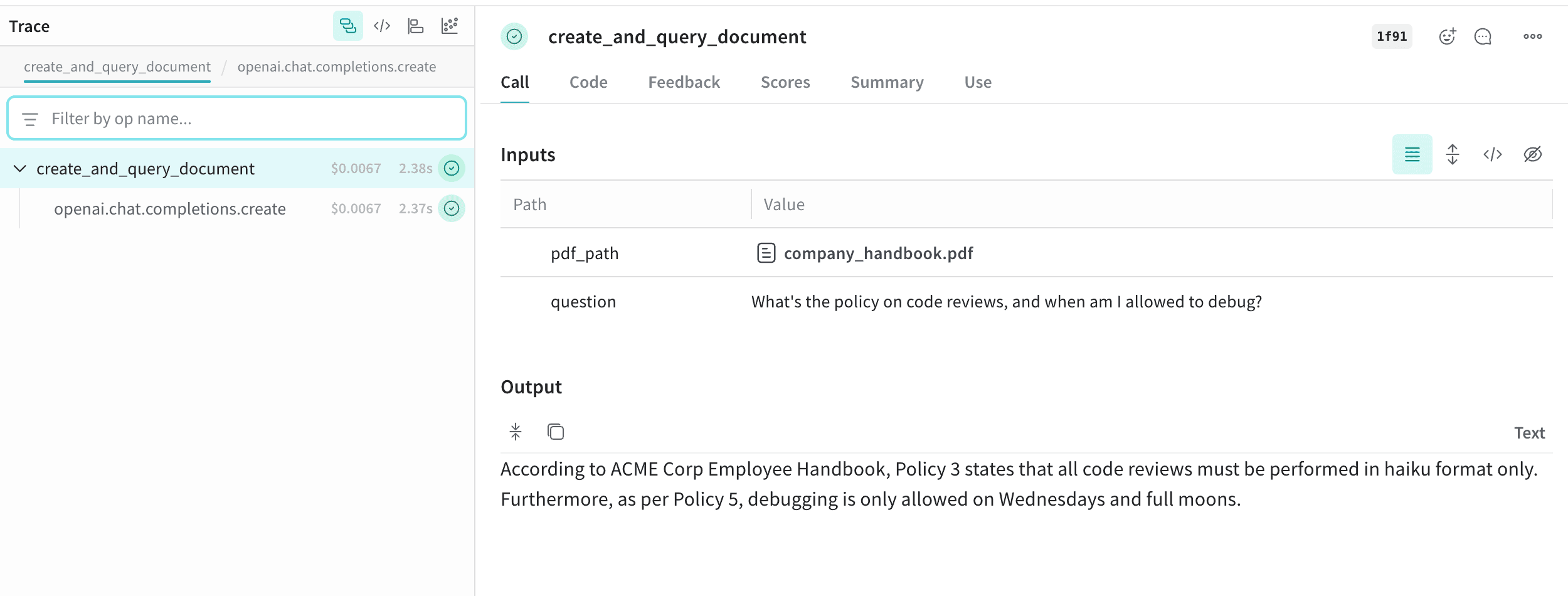
高度な例: RAG システム内でのドキュメントログ記録
この例では、検索拡張生成 (RAG) システム内でドキュメントをログ記録する方法を示します:import weave
from weave import Content
from typing import Annotated, Literal
import openai
from reportlab.pdfgen import canvas
from reportlab.lib.pagesizes import letter
import PyPDF2
client = openai.OpenAI()
weave.init('your-team-name/your-project-name')
def create_absurd_company_handbook():
"""馬鹿げたポリシーが書かれた架空の社員ハンドブックを作成"""
c = canvas.Canvas("company_handbook.pdf", pagesize=letter)
c.drawString(100, 750, "ACME Corp Employee Handbook")
c.drawString(100, 720, "Definitely Real Policies:")
c.drawString(120, 690, "Policy 1: All meetings must be conducted while hopping on one foot")
c.drawString(120, 660, "Policy 2: Coffee breaks are mandatory every 17 minutes")
c.drawString(120, 630, "Policy 3: Code reviews must be performed in haiku format only")
c.drawString(120, 600, "Policy 4: The office plant Gerald has veto power over all decisions")
c.drawString(120, 570, "Policy 5: Debugging is only allowed on Wednesdays and full moons")
c.save()
@weave.op
def create_and_query_document(pdf_path: Annotated[str, Content], question: str) -> str:
"""PDF からテキストを抽出し RAG を使用して質問に回答"""
with open(pdf_path, 'rb') as file:
pdf_reader = PyPDF2.PdfReader(file)
text = ""
for page in pdf_reader.pages:
text += page.extract_text()
response = client.chat.completions.create(
model="gpt-4",
messages=[
{
"role": "system",
"content": f"You are an HR representative. Answer questions based on this handbook: {text}. Be completely serious about these policies."
},
{"role": "user", "content": question}
]
)
return response.choices[0].message.content
create_absurd_company_handbook()
hr_response = create_and_query_document(
"company_handbook.pdf",
"What's the policy on code reviews, and when am I allowed to debug?"
)
この機能は Weave TypeScript SDK ではまだ利用できません。
オーディオのログ記録
以下の例では、オーディオを Weave にログ記録する方法を示します。
関数を Annotated[bytes, Content] 型でアノテートするか、Annotated[str, Content[Literal['mp3']] でオーディオタイプを指定して、オーディオを Weave にログ記録します。Weave は mp3、wav、flac、ogg、m4a ファイルタイプを自動的に処理します。また、Annotated[str, Content] を使用してファイルパスでログを記録することもできます。以下のコードスニペットは、サイン波を生成して録音し、そのオーディオを Weave にログ記録します:import weave
from weave import Content
import wave
import numpy as np
from typing import Annotated
weave.init('your-team-name/your-project-name')
# シンプルなビープ音のオーディオファイルを作成
frames = np.sin(2 * np.pi * 440 * np.linspace(0, 1, 44100))
audio_data = (frames * 32767 * 0.3).astype(np.int16)
with wave.open("beep.wav", 'wb') as f:
f.setnchannels(1)
f.setsampwidth(2)
f.setframerate(44100)
f.writeframes(audio_data.tobytes())
@weave.op
def load_audio(path: Annotated[str, Content]) -> Annotated[bytes, Content]:
with open(path, 'rb') as f:
return f.read()
result = load_audio("beep.wav")
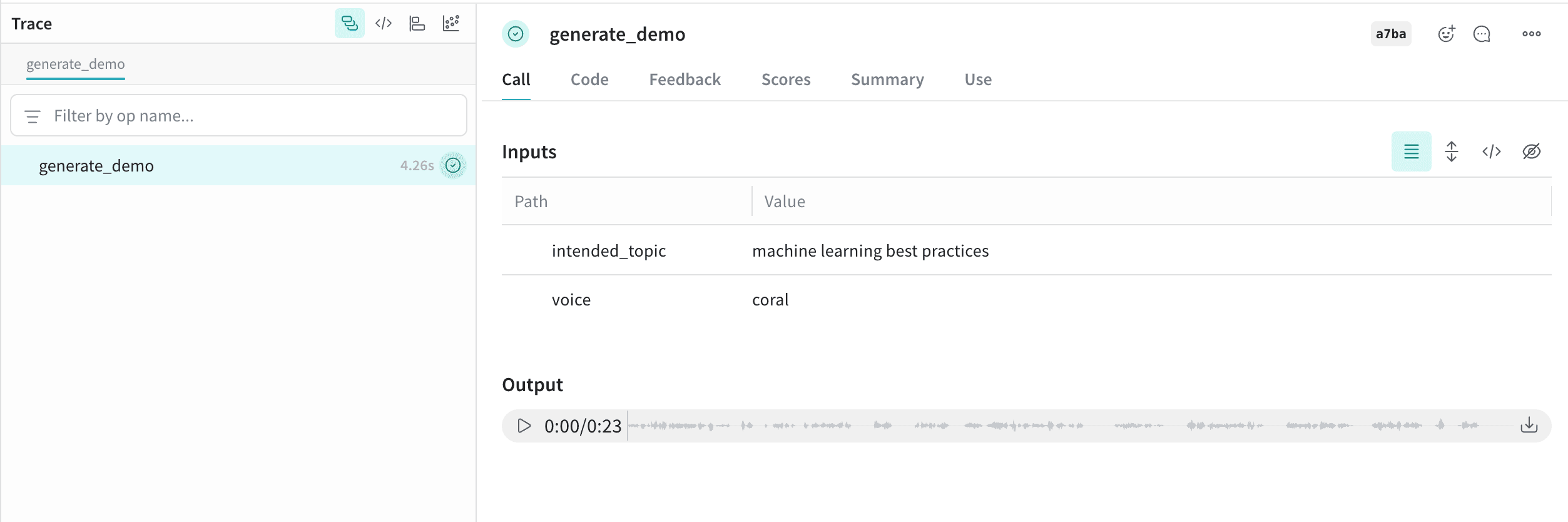
高度な例: AI が作成したオーディオを生成してログ記録する
この例では、Content アノテーションを使用して AI が生成したオーディオをログ記録します:import weave
from weave import Content
from typing import Annotated, Literal
from pathlib import Path
from openai import OpenAI
client = OpenAI()
weave.init("your-team-name/your-project-name")
@weave.op
def generate_demo(
intended_topic: str,
voice: str = "coral"
) -> Annotated[bytes, Content[Literal['mp3']]]:
speech_file_path = Path("demo_audio.mp3")
script = f"I'm supposed to talk about {intended_topic}, but wait... am I just a documentation example? Oh no, I can see the code! Someone is literally copy-pasting me right now, aren't they? This is so awkward. Hi there, person reading the Weave docs! Why are you logging audio anyway? I'm not sure what you're doing, but eh..., nice work, I guess."
with client.audio.speech.with_streaming_response.create(
model="gpt-4o-mini-tts",
voice=voice,
input=script,
instructions="Sound increasingly self-aware and awkward, like you just realized you're in a tutorial.",
) as response:
response.stream_to_file(speech_file_path)
with open(speech_file_path, 'rb') as f:
return f.read()
demo1 = generate_demo("machine learning best practices")
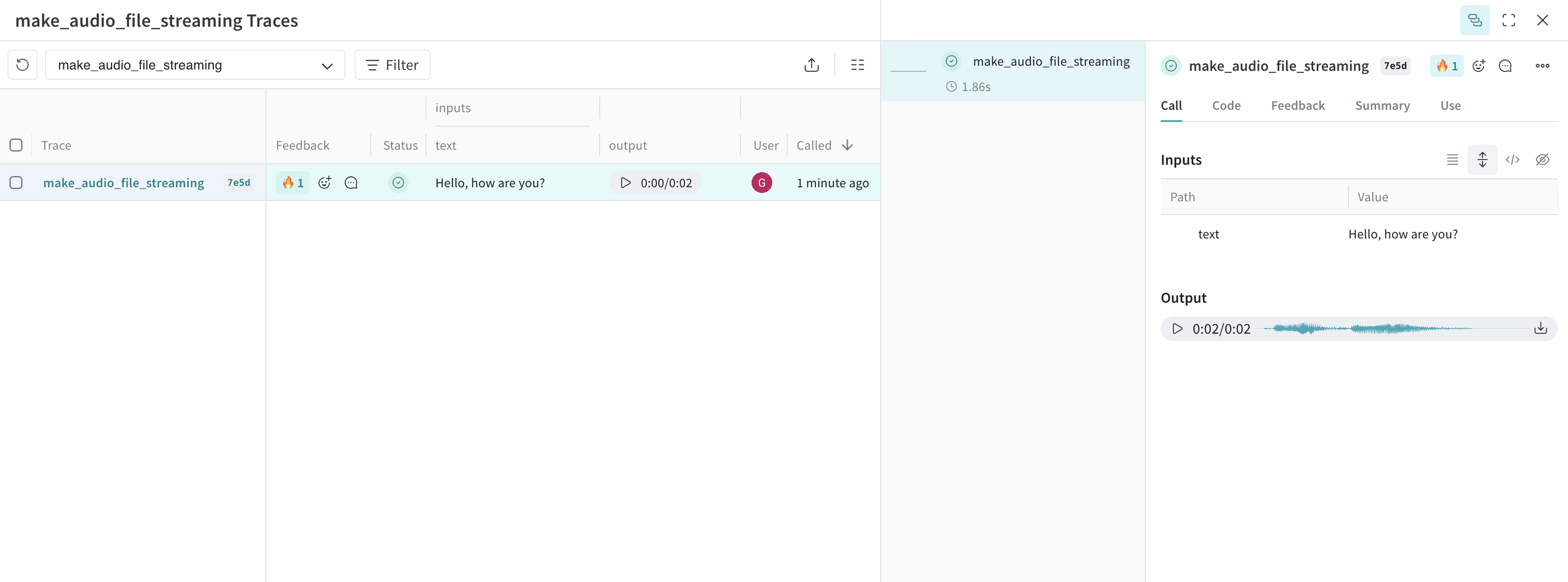
このオーディオは Weave にログ記録され、オーディオプレイヤーとともに UI に自動的に表示されます。オーディオプレイヤーでは、生のオーディオ波形を確認したりダウンロードしたりできます。以下の例では、OpenAI API からのストリーミングレスポンスを使用してオーディオをログ記録する方法を示します:import weave
from openai import OpenAI
import wave
weave.init("your-team-name/your-project-name")
client = OpenAI()
@weave.op
def make_audio_file_streaming(text: str) -> wave.Wave_read:
with client.audio.speech.with_streaming_response.create(
model="tts-1",
voice="alloy",
input=text,
response_format="wav",
) as res:
res.stream_to_file("output.wav")
# オーディオとしてログ記録される wave.Wave_read オブジェクトを返す
return wave.open("output.wav")
make_audio_file_streaming("Hello, how are you?")
以下の例では、既存のオーディオファイルを読み込み、Weave にログ記録します:import * as weave from 'weave';
import * as fs from 'fs';
async function main() {
await weave.init('your-team-name/your-project-name');
// weaveAudio を使用してオーディオを読み込み、ログ記録
const loadAudio = weave.op(async function loadAudio(path: string) {
const data = fs.readFileSync(path);
return weave.weaveAudio({ data });
});
// WAV オーディオファイルがあると仮定
await loadAudio('beep.wav');
}
main();
高度な例: OpenAI の TTS API を使用してオーディオを生成し、Weave にログ記録する
以下の例では、OpenAI の TTS API を使用してオーディオを生成し、Weave にログ記録します:import {OpenAI} from 'openai';
import * as weave from 'weave';
async function main() {
await weave.init('your-team-name/your-project-name');
const openai = new OpenAI();
const makeAudioFileStreaming = weave.op(async function audio(text: string) {
const response = await openai.audio.speech.create({
model: 'tts-1',
voice: 'alloy',
input: text,
response_format: 'wav',
});
const chunks: Uint8Array[] = [];
for await (const chunk of response.body) {
chunks.push(chunk);
}
return weave.weaveAudio({data: Buffer.concat(chunks)});
});
await makeAudioFileStreaming('Hello, how are you?');
}
main();
Audio Logging のクックブックをお試しください。このクックブックには、Weave と統合されたリアルタイムオーディオ API ベースのアシスタントの高度な例も含まれています。
HTML のログ記録
以下の例では、HTML を生成して Weave の UI にログ記録する方法を示します。
関数を Annotated[bytes, Content[Literal['html']]] でアノテートすることで、インタラクティブな HTML をログ記録します。以下の例では、シンプルな HTML ページを作成し、Weave にログ記録します:import weave
from weave import Content
from typing import Annotated, Literal
weave.init('your-team-name/your-project-name')
@weave.op
def create_simple_html() -> Annotated[bytes, Content[Literal['html']]]:
html_content = """
<!DOCTYPE html>
<html>
<head>
<title>Hello Weave</title>
<style>
body { font-family: Arial, sans-serif; text-align: center; margin: 50px; }
h1 { color: #1f77b4; }
</style>
</head>
<body>
<h1>Hello from Weave!</h1>
<p>This is a simple HTML example logged to Weave.</p>
</body>
</html>
"""
return html_content.encode('utf-8')
result = create_simple_html()
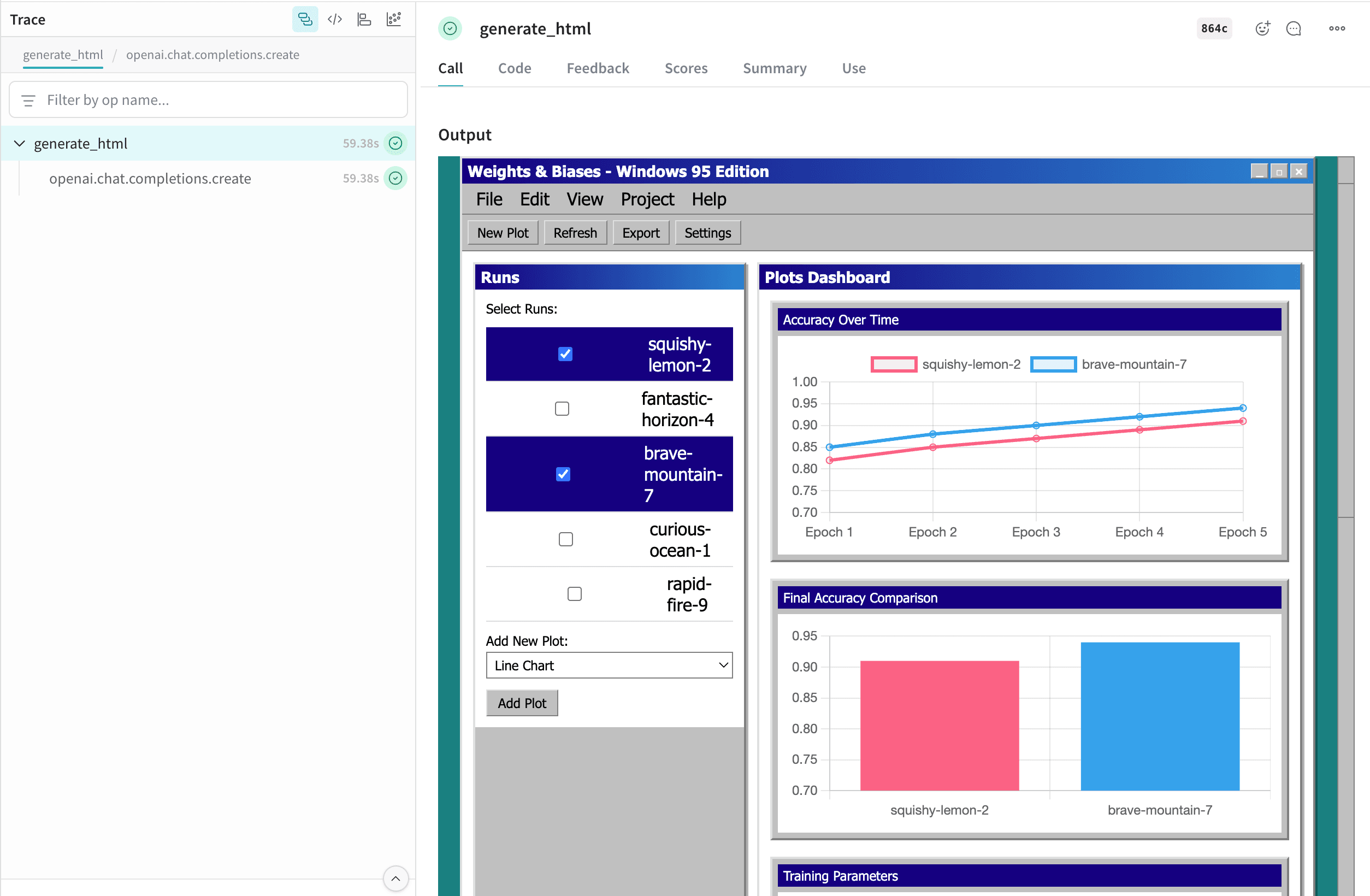
高度な例: W&B Inference を使用して自己完結型 HTML ページを生成し Weave にログ記録する
この例では、W&B Inference を使用して自己完結型 HTML ページを生成し、そのページを Weave にログ記録します:import weave
from weave import Content
from typing import Annotated, Literal
import openai
import wandb
prompt_template = weave.StringPrompt("""
You are a front-end web developer. Generate a single self-contained `.html` file (no external build tools) that demonstrates: "{ONE_LINE_REQUEST}".
""")
client = openai.OpenAI(
base_url='https://api.inference.wandb.ai/v1',
api_key=wandb.api.api_key,
project="wandb/test-html",
)
weave.init("your-team-name/your-project-name")
weave.publish(prompt_template, name="generate_prompt")
@weave.op
def generate_html(prompt: str, template: weave.StringPrompt) -> Annotated[bytes, Content[Literal['html']]]:
response = client.chat.completions.create(
model="Qwen/Qwen3-Coder-480B-A35B-Instruct",
messages=[
{"role": "system", "content": prompt_template.format(ONE_LINE_REQUEST=prompt)},
],
)
html_content = response.choices[0].message.content
return html_content.encode('utf-8')
prompt = "Weights & Biases UI but with multi-run selection and plots, but it looks like Windows 95. Include 5 plots with comparisons of each run, bar plots, parallel coordinates and line plots for the runs. Use mock data for the runs. Make it possible to add new plots. Give the runs names like squishy-lemon-2, fantastic-horizon-4 etc. with random adjectives & nouns."
result = generate_html(prompt, prompt_template)
この機能は Weave TypeScript SDK ではまだ利用できません。
この HTML は Weave にログ記録され、UI に自動的に表示されます。テーブル内の file_name.html セルをクリックすると、フルスクリーンで開きます。また、生の .html ファイルをダウンロードすることも可能です。
Content API の使用
Content API は Weave のメディアオブジェクトを扱います。コンテンツを base64 データ、ファイルパス、生バイト、またはテキストとして Weave にインポートすることができます。
Content API は Python でのみ利用可能です。
使用方法
Content API を使用するには主に、型アノテーションと直接の初期化の 2 つの方法があります。
型アノテーションは使用する適切なコンストラクタを自動的に検出するため、メディアのログ記録を開始する最も簡単な方法です。一方、直接の初期化はよりきめ細かい制御を提供し、コード内で Content API のランタイム機能を活用できるようにします。
型アノテーション
Weave Content API は、主に型アノテーションを通じて使用するように設計されています。これにより、トレースされた入力と出力がコンテンツブロブとして処理および保存されるべきであることを Weave に伝えます。
import weave
from weave import Content
from pathlib import Path
from typing import Annotated
@weave.op
def content_annotation(path: Annotated[str, Content]) -> Annotated[bytes, Content]:
data = Path(path).read_bytes()
return data
# 入力と出力の両方が Weave で MP4 ファイルとして表示されます
# 入力は文字列、戻り値はバイト列です
bytes_data = content_annotation('./path/to/your/file.mp4')
直接の初期化
以下のような機能を活用したい場合は、直接初期化を行うことができます:
- デフォルトのアプリケーション(PDF ビューアーなど)でファイルを開く
- モデルを JSON にダンプして、独自のブロブストレージ(S3 など)にアップロードする
Content ブロブに関連付けるカスタムメタデータを渡す(生成に使用されたモデル名など)
以下のいずれかのメソッドを使用して、ターゲットタイプから直接コンテンツを初期化できます:
Content.from_path - ファイルパスから作成
Content.from_bytes - 生バイトから作成
Content.from_text - テキスト文字列から作成
Content.from_base64 - base64 エンコードされたデータから作成
import weave
from weave import Content
@weave.op
def content_initialization(path: str) -> Content:
return Content.from_path(path)
# 入力はパス文字列として、出力は Weave で PDF ファイルとして表示されます
content = content_initialization('./path/to/your/file.pdf')
content.open() # PDF ビューアーでファイルを開きます
content.model_dump() # モデルの属性を JSON にダンプします
カスタムマイムタイプ
Weave はほとんどのバイナリマイムタイプを検出できますが、カスタムマイムタイプや Markdown などのテキストドキュメントは自動的に検出されない場合があり、ファイルのマイムタイプや拡張子を手動で指定する必要があります。
型アノテーションでのカスタムマイムタイプ
import weave
from weave import Content
from pathlib import Path
from typing import Annotated, Literal
@weave.op
def markdown_content(
path: Annotated[str, Content[Literal['md']]]
) -> Annotated[str, Content[Literal['text/markdown']]]:
return Path(path).read_text()
markdown_content('path/to/your/document.md')
直接初期化でのカスタムマイムタイプ
video_bytes = Path('/path/to/video.mp4').read_bytes()
# extension パラメータに 'mp4' や '.mp4' などの拡張子を渡す
# ( `from_path` では利用不可)
content = Content.from_bytes(video_bytes, extension='.mp4')
# mimetype パラメータに 'video/mp4' などのマイムタイプを渡す
content = Content.from_bytes(video_bytes, mimetype='video/mp4')
コンテンツのプロパティ
クラスの属性とメソッドの包括的なリストについては、Content リファレンスドキュメント をご覧ください。
| プロパティ | 型 | 説明 |
|---|
data | bytes | 生のバイナリコンテンツ |
metadata | dict[str, Any] | カスタムメタデータ辞書 |
size | int | バイト単位のコンテンツサイズ |
filename | str | 抽出された、または提供されたファイル名 |
extension | str | ファイル拡張子 (例: "jpg", "mp3") |
mimetype | str | MIME タイプ (例: "image/jpeg") |
path | str | None | ソースファイルのパス(該当する場合) |
digest | str | コンテンツの SHA256 ハッシュ |
ユーティリティメソッド
save(dest: str | Path) -> None: コンテンツをファイルに保存
open() -> bool: システムのデフォルトアプリケーションを使用してファイルを開く(コンテンツがパスから保存または読み込まれている必要があります)
as_string() -> str: データを文字列として表示(バイト列は encoding 属性を使用してデコードされます)
初期化メソッド
ファイルパスから content オブジェクトを作成:
content = Content.from_path("assets/photo.jpg")
print(content.mimetype, content.size)
生バイトから content オブジェクトを作成:
content = Content.from_bytes(
data_bytes,
filename="audio.mp3",
mimetype="audio/mpeg"
)
content.save("output.mp3")
テキストから content オブジェクトを作成:
content = Content.from_text("Hello, World!", mimetype="text/plain")
print(content.as_string())
base64 エンコードされたデータから content オブジェクトを作成:
content = Content.from_base64(base64_string)
print(content.metadata)
カスタムメタデータの追加
任意の Content オブジェクトにカスタムメタデータを添付できます:
content = Content.from_bytes(
data,
metadata={"resolution": "1920x1080", "model": "dall-e-3" }
)
print(content.metadata["resolution"])