メインコンテンツへスキップ
LLM を活用したアプリケーションには、複数の LLM 呼び出しに加えて、監視が重要な追加のデータ処理や検証ロジックが含まれることがあります。これらのネストされた関数とその親子関係は、Python では @weave.op() デコレーターを使用し、TypeScript では weave.op() でラップすることで、Weave でトラッキングできます。 アプリケーションの完全な実行フローを把握するために、関数やサブ関数はできるだけ細かい粒度でデコレートすることをお勧めします。これにより、アプリケーションの挙動をより深く理解し、改善しやすくなります。 次のコードは、クイックスタートの例 を基に、LLM から返された項目数を数え、それらをより上位の関数でまとめるロジックを追加したものです。さらに、この例では weave.op() を使用して、すべての関数、その呼び出し順序、および親子関係をトレースします:
import weave
import json
from openai import OpenAI

client = OpenAI()

@weave.op()
def extract_dinos(sentence: str) -> dict:
    response = client.chat.completions.create(
        model="gpt-4o",
        messages=[
            {
                "role": "system",
                "content": """Extract any dinosaur `name`, their `common_name`, \
names and whether its `diet` is a herbivore or carnivore, in JSON format."""
            },
            {
                "role": "user",
                "content": sentence
            }
            ],
            response_format={ "type": "json_object" }
        )
    return response.choices[0].message.content

@weave.op()
def count_dinos(dino_data: dict) -> int:
    # 返されたリスト内の項目数を数える
    k = list(dino_data.keys())[0]
    return len(dino_data[k])

@weave.op()
def dino_tracker(sentence: str) -> dict:
    # LLM を使用して恐竜を抽出する
    dino_data = extract_dinos(sentence)

    # 返された恐竜の数を数える
    dino_data = json.loads(dino_data)
    n_dinos = count_dinos(dino_data)
    return {"n_dinosaurs": n_dinos, "dinosaurs": dino_data}

weave.init('jurassic-park')

sentence = """I watched as a Tyrannosaurus rex (T. rex) chased after a Triceratops (Trike), \
both carnivore and herbivore locked in an ancient dance. Meanwhile, a gentle giant \
Brachiosaurus (Brachi) calmly munched on treetops, blissfully unaware of the chaos below."""

result = dino_tracker(sentence)
print(result)
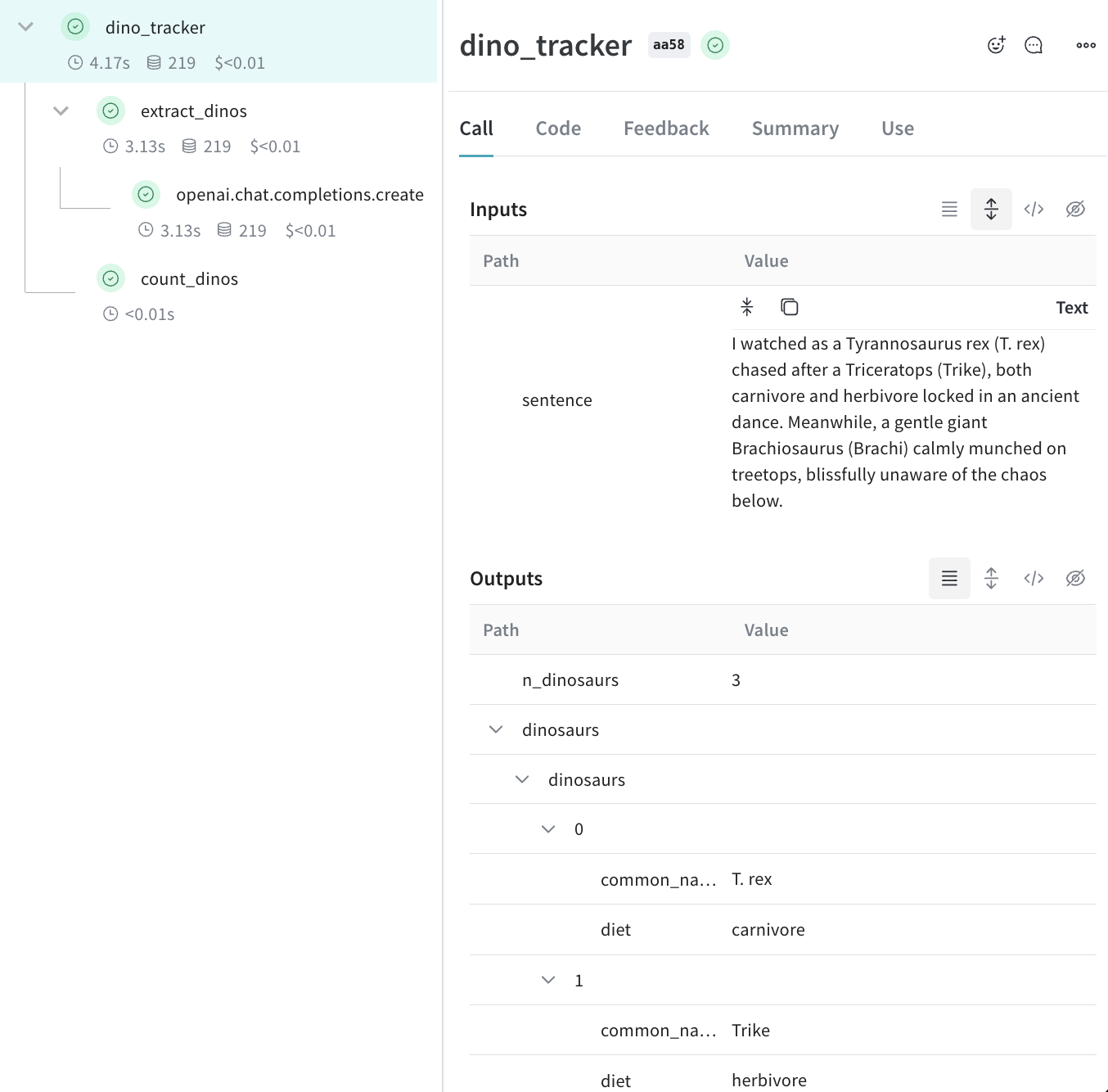
ネストされた関数上記のコードを実行すると、Traces ページに、ネストされた 2 つの関数 (extract_dinoscount_dinos) の入力と出力に加え、自動的に記録された OpenAI のトレースが表示されます。中央のトレース ツリー パネルと、選択した Call の詳細パネルを示す、ネストされた Weave Traces ページ
メタデータをトラッキングする

weave.attributes コンテキストマネージャーを使用し、call 時にトラッキングするメタデータを含む辞書を渡すことで、メタデータをトラッキングできます。 上記の例の続きです。
import weave

weave.init('jurassic-park')

sentence = """I watched as a Tyrannosaurus rex (T. rex) chased after a Triceratops (Trike), \
both carnivore and herbivore locked in an ancient dance. Meanwhile, a gentle giant \
Brachiosaurus (Brachi) calmly munched on treetops, blissfully unaware of the chaos below."""

# 以前に定義した関数とあわせてメタデータをトラッキングする
with weave.attributes({'user_id': 'lukas', 'env': 'production'}):
    result = dino_tracker(sentence)
ユーザー ID やコードの実行環境 (development、staging、または production) などのメタデータは、実行時にトラッキングすることを推奨します。system prompt などのシステム設定をトラッキングするには、Weave Models を使用することを推奨します。
attributes の使用方法の詳細は、属性を定義してログする を参照してください。

次のステップ

  • App Versioning チュートリアル に沿って、アドホックなプロンプト、モデル、アプリケーションへの変更を記録し、バージョン管理し、整理しましょう。