- An agent or model prototype your team serves behind an OpenAI-compatible API.
- A self-hosted or local model (for example, one served by Ollama or vLLM).
- A provider or model version that Weave doesn’t have built-in support for.
Where you can use custom runtimes
Models from a registered custom runtime appear in the model selector in the following places:- Playground: Chat with the endpoint interactively.
- Evaluation Playground: Evaluate and compare the endpoint against other models.
- Signals: Use the endpoint as the judge model that scores incoming traces.
- Scorer iteration and Agent Signals model selectors.
- The Weave completions API: Pass the model ID
custom::<runtime-name>::<runtime-id>to thecompletions/createendpoint to run traced completions against your endpoint programmatically. See the service API reference.
Add a custom runtime
You can add a custom runtime to your project using code or the Weave UI. To add a custom runtime, you need the following information about your runtime:Add a custom runtime using code
Using the runtime’s information outlined in the previous section, update the appropriate fields in the following registration request, and then run it to either create or update a custom runtime in your project. Programmatic registration requires theweave Python package version 0.53.4 or later, or the weave npm package version 0.16.5 or later.
- Python
- TypeScript
custom::<runtime-name>::<runtime-id>. After the call succeeds, the runtime’s models appear in model selectors under the runtime’s name, the same as a runtime registered in the UI.
After you update a runtime, inference may continue to use the previous configuration for up to 60 seconds while caches expire.
Register a custom runtime in the UI
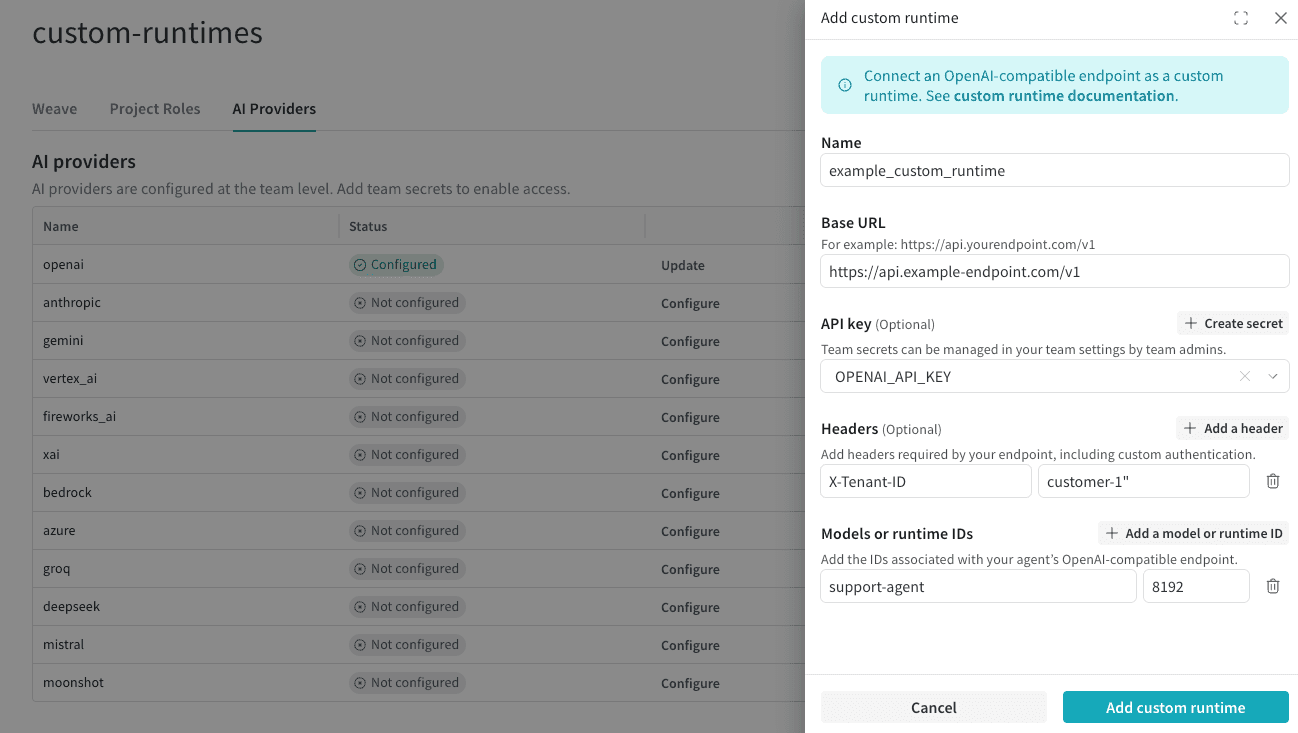
To register a custom runtime from the W&B UI:- In the Weave sidebar, select Project and then select the AI Providers tab. Alternatively, in the Playground model selector, click Configure providers.
- Click Add custom runtime. This opens the configuration drawer.
- In the drawer, enter the runtime’s name, base URL, and one or more runtime IDs. Optionally add an API key secret and custom headers.
- Save the runtime.