This guide shows you how to instrument your application so that its execution appears as detailed traces in W&B Weave. Traces help you debug, evaluate, and monitor LLM-powered code by capturing inputs, outputs, and the structure of each operation as a Call. To see your running code as detailed traces in Weave, you create Calls. The following sections describe the three main ways to do this, from least to most manual:
  • Automatic tracking of LLM library calls.
  • Tracking of custom functions with weave.op.
  • Manual Call tracking using the API directly.
Choose the approach that fits how much control you need over what gets traced.

Automatic tracking of LLM library calls

Weave integrates automatically with many common libraries and frameworks, such as openai, anthropic, cohere, mistral, and LangChain. Import the LLM or framework library and initialize your Weave project. Weave then automatically traces all Calls made to the LLM or platform to your project without any additional code changes. For a complete list of supported library integrations, see Integrations overview.
import weave

from openai import OpenAI
client = OpenAI()

# Initialize Weave Tracing
weave.init('intro-example')

response = client.chat.completions.create(
    model="gpt-4",
    messages=[
        {
            "role": "user",
            "content": "How are you?"
        }
    ],
    temperature=0.8,
    max_tokens=64,
    top_p=1,
)
If you want more control over automatic behavior, see Configure automatic LLM call tracking.

Track custom functions

LLM applications often have additional logic, such as pre-processing and post-processing, prompts, and more, that you want to track. Use this approach when you want Weave to capture your own functions alongside the LLM calls it traces automatically.
Weave lets you manually track these Calls using the @weave.op decorator. For example:
import weave

# Initialize Weave Tracing
weave.init('intro-example')

# Decorate your function
@weave.op
def my_function(name: str):
    return f"Hello, {name}!"

# Call your function -- Weave will automatically track inputs and outputs
print(my_function("World"))
You can also track methods on classes.

Track class and object methods

In addition to standalone functions, you can track class and object methods. You can track any method in a class by decorating the method with weave.op.
import weave

# Initialize Weave Tracing
weave.init("intro-example")

class MyClass:
    # Decorate your method
    @weave.op
    def my_method(self, name: str):
        return f"Hello, {name}!"

instance = MyClass()

# Call your method -- Weave will automatically track inputs and outputs
print(instance.my_method("World"))

Trace parallel (multi-threaded) function calls

By default, parallel Calls all appear in Weave as separate root Calls, which makes the trace hierarchy hard to follow. To get correct nesting under the same parent Op, use a ThreadPoolExecutor.
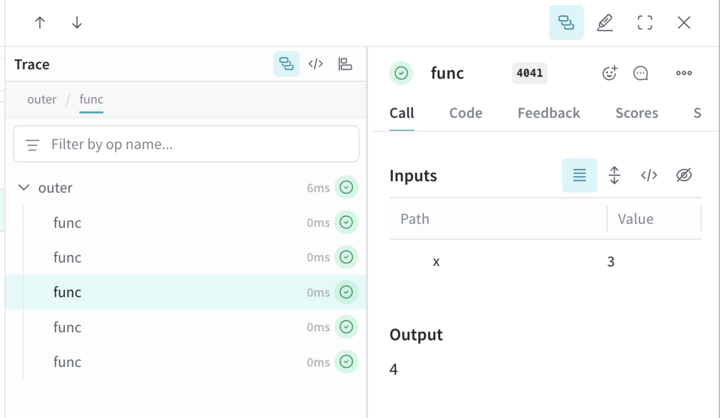
The following code sample demonstrates the use of ThreadPoolExecutor. The first function, func, is a simple Op that takes x and returns x+1. The second function, outer, is another Op that accepts a list of inputs. Inside outer, the use of ThreadPoolExecutor and exc.map(func, inputs) means that each call to func still carries the same parent trace context.
import weave

@weave.op
def func(x):
    return x+1

@weave.op
def outer(inputs):
    with weave.ThreadPoolExecutor() as exc:
        exc.map(func, inputs)

# Update your Weave project name
client = weave.init('my-weave-project')
outer([1,2,3,4,5])
In the Weave UI, this produces a single parent Call with five nested child Calls. You get a fully hierarchical trace even though the increments run in parallel. The Trace UI, showing a single parent Call for outer, with five nested child Calls.

Manual Call tracking

If neither automatic integration nor the weave.op decorator fits your workflow, you can manually create Calls using the API directly. This approach gives you full control over when a Call starts and ends, at the cost of more boilerplate.
import weave

# Initialize Weave Tracing
client = weave.init('intro-example')

def my_function(name: str):
    # Start a Call
    call = client.create_call(op="my_function", inputs={"name": name})

    # ... your function code ...

    # End a Call
    client.finish_call(call, output="Hello, World!")

    # Call your function
    print(my_function("World"))