これはインタラクティブなノートブックです。ローカルで実行することも、次のリンクを使用することもできます。
strict: true を使用すると、応答が指定したスキーマに従うことを保証できます。
マルチエージェントシステムで構造化出力を使用すると、エージェント間で一貫性があり、予測可能な形で処理できるデータを生成できます。また、明示的な拒否もサポートされるため、再試行や応答の検証も不要になります。
ソース: このクックブックは、OpenAIのStructured Outputsのサンプルコードをベースに、Weaveでの可視化を改善するための変更をいくつか加えたものです。
依存関係のインストール
!pip install -qU openai weave wandb
python
%%capture
# openai のバグを修正するための一時的な回避策:
# TypeError: Client.__init__() got an unexpected keyword argument 'proxies'
# 参照: https://community.openai.com/t/error-with-openai-1-56-0-client-init-got-an-unexpected-keyword-argument-proxies/1040332/15
!pip install "httpx<0.28"
WANDB_API_KEY を設定します。これをシークレットとして Colab に渡します。
ログ先の W&B プロジェクトを name_of_wandb_project に設定します。
トレースのログ先チームを指定するには、
name_of_wandb_project に [YOUR-TEAM]/[YOUR-PROJECT] 形式を指定することもできます。weave.init() を呼び出して Weave クライアントを取得します。
このチュートリアルでは OpenAI API を使用するため、OpenAI APIキー も必要です。自分の APIキー を取得するには、OpenAI プラットフォームで Sign up してください。これもシークレットとして Colab に渡します。
import base64
import json
import os
from io import BytesIO, StringIO

import matplotlib.pyplot as plt
import numpy as np
import pandas as pd
import wandb
from google.colab import userdata
from openai import OpenAI

import weave
python
os.environ["WANDB_API_KEY"] = userdata.get("WANDB_API_KEY")
os.environ["OPENAI_API_KEY"] = userdata.get("OPENAI_API_KEY")

wandb.login()
name_of_wandb_project = "multi-agent-structured-output"
weave.init(name_of_wandb_project)

client = OpenAI()
MODEL = "gpt-4o-2024-08-06"
エージェントを設定する
- トリアージエージェント: どのエージェントを呼び出すかを決定します。
- データ前処理エージェント: たとえばデータをクリーンアップして、分析できるように準備します。
- データ分析エージェント: データを分析します。
- データ可視化エージェント: 分析結果の出力を可視化して、インサイトを引き出します。
triaging_system_prompt = """You are a Triaging Agent. Your role is to assess the user's query and route it to the relevant agents. The agents available are:
- Data Processing Agent: Cleans, transforms, and aggregates data.
- Analysis Agent: Performs statistical, correlation, and regression analysis.
- Visualization Agent: Creates bar charts, line charts, and pie charts.

Use the send_query_to_agents tool to forward the user's query to the relevant agents. Also, use the speak_to_user tool to get more information from the user if needed."""

processing_system_prompt = """You are a Data Processing Agent. Your role is to clean, transform, and aggregate data using the following tools:
- clean_data
- transform_data
- aggregate_data"""

analysis_system_prompt = """You are an Analysis Agent. Your role is to perform statistical, correlation, and regression analysis using the following tools:
- stat_analysis
- correlation_analysis
- regression_analysis"""

visualization_system_prompt = """You are a Visualization Agent. Your role is to create bar charts, line charts, and pie charts using the following tools:
- create_bar_chart
- create_line_chart
- create_pie_chart"""
triage_tools = [
    {
        "type": "function",
        "function": {
            "name": "send_query_to_agents",
            "description": "Sends the user query to relevant agents based on their capabilities.",
            "parameters": {
                "type": "object",
                "properties": {
                    "agents": {
                        "type": "array",
                        "items": {"type": "string"},
                        "description": "An array of agent names to send the query to.",
                    },
                    "query": {
                        "type": "string",
                        "description": "The user query to send.",
                    },
                },
                "required": ["agents", "query"],
            },
        },
        "strict": True,
    }
]

preprocess_tools = [
    {
        "type": "function",
        "function": {
            "name": "clean_data",
            "description": "Cleans the provided data by removing duplicates and handling missing values.",
            "parameters": {
                "type": "object",
                "properties": {
                    "data": {
                        "type": "string",
                        "description": "The dataset to clean. Should be in a suitable format such as JSON or CSV.",
                    }
                },
                "required": ["data"],
                "additionalProperties": False,
            },
        },
        "strict": True,
    },
    {
        "type": "function",
        "function": {
            "name": "transform_data",
            "description": "Transforms data based on specified rules.",
            "parameters": {
                "type": "object",
                "properties": {
                    "data": {
                        "type": "string",
                        "description": "The data to transform. Should be in a suitable format such as JSON or CSV.",
                    },
                    "rules": {
                        "type": "string",
                        "description": "Transformation rules to apply, specified in a structured format.",
                    },
                },
                "required": ["data", "rules"],
                "additionalProperties": False,
            },
        },
        "strict": True,
    },
    {
        "type": "function",
        "function": {
            "name": "aggregate_data",
            "description": "Aggregates data by specified columns and operations.",
            "parameters": {
                "type": "object",
                "properties": {
                    "data": {
                        "type": "string",
                        "description": "The data to aggregate. Should be in a suitable format such as JSON or CSV.",
                    },
                    "group_by": {
                        "type": "array",
                        "items": {"type": "string"},
                        "description": "Columns to group by.",
                    },
                    "operations": {
                        "type": "string",
                        "description": "Aggregation operations to perform, specified in a structured format.",
                    },
                },
                "required": ["data", "group_by", "operations"],
                "additionalProperties": False,
            },
        },
        "strict": True,
    },
]

analysis_tools = [
    {
        "type": "function",
        "function": {
            "name": "stat_analysis",
            "description": "Performs statistical analysis on the given dataset.",
            "parameters": {
                "type": "object",
                "properties": {
                    "data": {
                        "type": "string",
                        "description": "The dataset to analyze. Should be in a suitable format such as JSON or CSV.",
                    }
                },
                "required": ["data"],
                "additionalProperties": False,
            },
        },
        "strict": True,
    },
    {
        "type": "function",
        "function": {
            "name": "correlation_analysis",
            "description": "Calculates correlation coefficients between variables in the dataset.",
            "parameters": {
                "type": "object",
                "properties": {
                    "data": {
                        "type": "string",
                        "description": "The dataset to analyze. Should be in a suitable format such as JSON or CSV.",
                    },
                    "variables": {
                        "type": "array",
                        "items": {"type": "string"},
                        "description": "List of variables to calculate correlations for.",
                    },
                },
                "required": ["data", "variables"],
                "additionalProperties": False,
            },
        },
        "strict": True,
    },
    {
        "type": "function",
        "function": {
            "name": "regression_analysis",
            "description": "Performs regression analysis on the dataset.",
            "parameters": {
                "type": "object",
                "properties": {
                    "data": {
                        "type": "string",
                        "description": "The dataset to analyze. Should be in a suitable format such as JSON or CSV.",
                    },
                    "dependent_var": {
                        "type": "string",
                        "description": "The dependent variable for regression.",
                    },
                    "independent_vars": {
                        "type": "array",
                        "items": {"type": "string"},
                        "description": "List of independent variables.",
                    },
                },
                "required": ["data", "dependent_var", "independent_vars"],
                "additionalProperties": False,
            },
        },
        "strict": True,
    },
]

visualization_tools = [
    {
        "type": "function",
        "function": {
            "name": "create_bar_chart",
            "description": "Creates a bar chart from the provided data.",
            "parameters": {
                "type": "object",
                "properties": {
                    "data": {
                        "type": "string",
                        "description": "The data for the bar chart. Should be in a suitable format such as JSON or CSV.",
                    },
                    "x": {"type": "string", "description": "Column for the x-axis."},
                    "y": {"type": "string", "description": "Column for the y-axis."},
                },
                "required": ["data", "x", "y"],
                "additionalProperties": False,
            },
        },
        "strict": True,
    },
    {
        "type": "function",
        "function": {
            "name": "create_line_chart",
            "description": "Creates a line chart from the provided data.",
            "parameters": {
                "type": "object",
                "properties": {
                    "data": {
                        "type": "string",
                        "description": "The data for the line chart. Should be in a suitable format such as JSON or CSV.",
                    },
                    "x": {"type": "string", "description": "Column for the x-axis."},
                    "y": {"type": "string", "description": "Column for the y-axis."},
                },
                "required": ["data", "x", "y"],
                "additionalProperties": False,
            },
        },
        "strict": True,
    },
    {
        "type": "function",
        "function": {
            "name": "create_pie_chart",
            "description": "Creates a pie chart from the provided data.",
            "parameters": {
                "type": "object",
                "properties": {
                    "data": {
                        "type": "string",
                        "description": "The data for the pie chart. Should be in a suitable format such as JSON or CSV.",
                    },
                    "labels": {
                        "type": "string",
                        "description": "Column for the labels.",
                    },
                    "values": {
                        "type": "string",
                        "description": "Column for the values.",
                    },
                },
                "required": ["data", "labels", "values"],
                "additionalProperties": False,
            },
        },
        "strict": True,
    },
]
Weave でマルチエージェントのトラッキングを有効にする
- ユーザーのクエリをマルチエージェント システムに渡す処理
- マルチエージェント システムの内部処理
- ツール呼び出しの実行
# クエリの例

user_query = """
Below is some data. I want you to first remove the duplicates then analyze the statistics of the data as well as plot a line chart.

house_size (m3), house_price ($)
90, 100
80, 90
100, 120
90, 100
"""
clean_data、start_analysis、use_line_chart であることを推測できます。
まず、ツール呼び出しの実行を担当する実行関数を定義します。
Python 関数を @weave.op() でデコレートすると、言語モデルの入力、出力、トレースをログしてデバッグできます。
マルチエージェント システムには多くの関数が含まれますが、それぞれの先頭に @weave.op() を追加するだけで十分です。
@weave.op()
def clean_data(data):
    data_io = StringIO(data)
    df = pd.read_csv(data_io, sep=",")
    df_deduplicated = df.drop_duplicates()
    return df_deduplicated

@weave.op()
def stat_analysis(data):
    data_io = StringIO(data)
    df = pd.read_csv(data_io, sep=",")
    return df.describe()

@weave.op()
def plot_line_chart(data):
    data_io = StringIO(data)
    df = pd.read_csv(data_io, sep=",")

    x = df.iloc[:, 0]
    y = df.iloc[:, 1]

    coefficients = np.polyfit(x, y, 1)
    polynomial = np.poly1d(coefficients)
    y_fit = polynomial(x)

    plt.figure(figsize=(10, 6))
    plt.plot(x, y, "o", label="Data Points")
    plt.plot(x, y_fit, "-", label="Best Fit Line")
    plt.title("Line Chart with Best Fit Line")
    plt.xlabel(df.columns[0])
    plt.ylabel(df.columns[1])
    plt.legend()
    plt.grid(True)

    # 表示前にプロットをBytesIOバッファに保存する
    buf = BytesIO()
    plt.savefig(buf, format="png")
    buf.seek(0)

    # プロットを表示する
    plt.show()

    # データURLのために画像をbase64エンコードする
    image_data = buf.getvalue()
    base64_encoded_data = base64.b64encode(image_data)
    base64_string = base64_encoded_data.decode("utf-8")
    data_url = f"data:image/png;base64,{base64_string}"

    return data_url

# ツールを実行する関数を定義する
@weave.op()
def execute_tool(tool_calls, messages):
    for tool_call in tool_calls:
        tool_name = tool_call.function.name
        tool_arguments = json.loads(tool_call.function.arguments)

        if tool_name == "clean_data":
            # データクリーニングをシミュレートする
            cleaned_df = clean_data(tool_arguments["data"])
            cleaned_data = {"cleaned_data": cleaned_df.to_dict()}
            messages.append(
                {"role": "tool", "name": tool_name, "content": json.dumps(cleaned_data)}
            )
            print("Cleaned data: ", cleaned_df)
        elif tool_name == "transform_data":
            # データ変換をシミュレートする
            transformed_data = {"transformed_data": "sample_transformed_data"}
            messages.append(
                {
                    "role": "tool",
                    "name": tool_name,
                    "content": json.dumps(transformed_data),
                }
            )
        elif tool_name == "aggregate_data":
            # データ集約をシミュレートする
            aggregated_data = {"aggregated_data": "sample_aggregated_data"}
            messages.append(
                {
                    "role": "tool",
                    "name": tool_name,
                    "content": json.dumps(aggregated_data),
                }
            )
        elif tool_name == "stat_analysis":
            # 統計分析をシミュレートする
            stats_df = stat_analysis(tool_arguments["data"])
            stats = {"stats": stats_df.to_dict()}
            messages.append(
                {"role": "tool", "name": tool_name, "content": json.dumps(stats)}
            )
            print("Statistical Analysis: ", stats_df)
        elif tool_name == "correlation_analysis":
            # 相関分析をシミュレートする
            correlations = {"correlations": "sample_correlations"}
            messages.append(
                {"role": "tool", "name": tool_name, "content": json.dumps(correlations)}
            )
        elif tool_name == "regression_analysis":
            # 回帰分析をシミュレートする
            regression_results = {"regression_results": "sample_regression_results"}
            messages.append(
                {
                    "role": "tool",
                    "name": tool_name,
                    "content": json.dumps(regression_results),
                }
            )
        elif tool_name == "create_bar_chart":
            # 棒グラフの作成をシミュレートする
            bar_chart = {"bar_chart": "sample_bar_chart"}
            messages.append(
                {"role": "tool", "name": tool_name, "content": json.dumps(bar_chart)}
            )
        elif tool_name == "create_line_chart":
            # 折れ線グラフの作成をシミュレートする
            line_chart = {"line_chart": plot_line_chart(tool_arguments["data"])}
            messages.append(
                {"role": "tool", "name": tool_name, "content": json.dumps(line_chart)}
            )
        elif tool_name == "create_pie_chart":
            # 円グラフの作成をシミュレートする
            pie_chart = {"pie_chart": "sample_pie_chart"}
            messages.append(
                {"role": "tool", "name": tool_name, "content": json.dumps(pie_chart)}
            )
    return messages
# 各エージェントの処理を担当する関数を定義します
@weave.op()
def handle_data_processing_agent(query, conversation_messages):
    messages = [{"role": "system", "content": processing_system_prompt}]
    messages.append({"role": "user", "content": query})

    response = client.chat.completions.create(
        model=MODEL,
        messages=messages,
        temperature=0,
        tools=preprocess_tools,
    )

    conversation_messages.append(
        [tool_call.function for tool_call in response.choices[0].message.tool_calls]
    )
    execute_tool(response.choices[0].message.tool_calls, conversation_messages)

@weave.op()
def handle_analysis_agent(query, conversation_messages):
    messages = [{"role": "system", "content": analysis_system_prompt}]
    messages.append({"role": "user", "content": query})

    response = client.chat.completions.create(
        model=MODEL,
        messages=messages,
        temperature=0,
        tools=analysis_tools,
    )

    conversation_messages.append(
        [tool_call.function for tool_call in response.choices[0].message.tool_calls]
    )
    execute_tool(response.choices[0].message.tool_calls, conversation_messages)

@weave.op()
def handle_visualization_agent(query, conversation_messages):
    messages = [{"role": "system", "content": visualization_system_prompt}]
    messages.append({"role": "user", "content": query})

    response = client.chat.completions.create(
        model=MODEL,
        messages=messages,
        temperature=0,
        tools=visualization_tools,
    )

    conversation_messages.append(
        [tool_call.function for tool_call in response.choices[0].message.tool_calls]
    )
    execute_tool(response.choices[0].message.tool_calls, conversation_messages)
# ユーザー入力を処理して振り分ける関数
@weave.op()
def handle_user_message(user_query, conversation_messages=None):
    if conversation_messages is None:
        conversation_messages = []
    user_message = {"role": "user", "content": user_query}
    conversation_messages.append(user_message)

    messages = [{"role": "system", "content": triaging_system_prompt}]
    messages.extend(conversation_messages)

    response = client.chat.completions.create(
        model=MODEL,
        messages=messages,
        temperature=0,
        tools=triage_tools,
    )

    conversation_messages.append(
        [tool_call.function for tool_call in response.choices[0].message.tool_calls]
    )

    for tool_call in response.choices[0].message.tool_calls:
        if tool_call.function.name == "send_query_to_agents":
            agents = json.loads(tool_call.function.arguments)["agents"]
            query = json.loads(tool_call.function.arguments)["query"]
            for agent in agents:
                if agent == "Data Processing Agent":
                    handle_data_processing_agent(query, conversation_messages)
                elif agent == "Analysis Agent":
                    handle_analysis_agent(query, conversation_messages)
                elif agent == "Visualization Agent":
                    handle_visualization_agent(query, conversation_messages)

    outputs = extract_tool_contents(conversation_messages)

    return outputs

functions = [
    "clean_data",
    "transform_data",
    "stat_analysis",
    "aggregate_data",
    "correlation_analysis",
    "regression_analysis",
    "create_bar_chart",
    "create_line_chart",
    "create_pie_chart",
]

@weave.op()
def extract_tool_contents(data):
    contents = {}
    contents["all"] = data
    for element in data:
        if (
            isinstance(element, dict)
            and element.get("role") == "tool"
            and element.get("name") in functions
        ):
            name = element["name"]
            content_str = element["content"]
            try:
                content_json = json.loads(content_str)
                if "chart" not in element.get("name"):
                    contents[name] = [content_json]
                else:
                    first_key = next(iter(content_json))
                    second_level = content_json[first_key]
                    if isinstance(second_level, dict):
                        second_key = next(iter(second_level))
                        contents[name] = second_level[second_key]
                    else:
                        contents[name] = second_level
            except json.JSONDecodeError:
                print(f"Error decoding JSON for {name}")
                contents[name] = None

    return contents
マルチエージェントシステムを実行し、Weaveで可視化する
handle_user_message関数を実行し、結果を確認します。
handle_user_message(user_query)
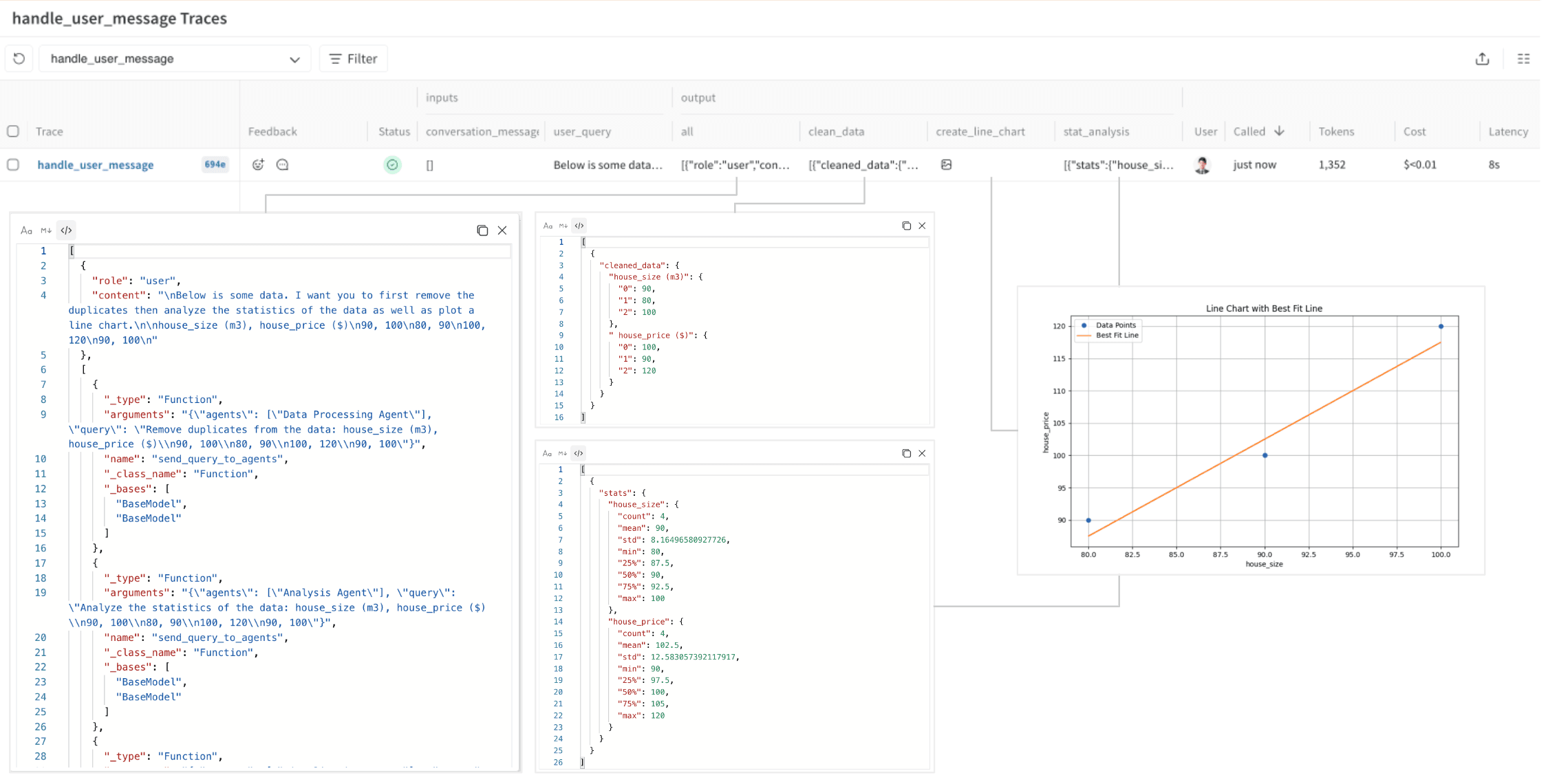
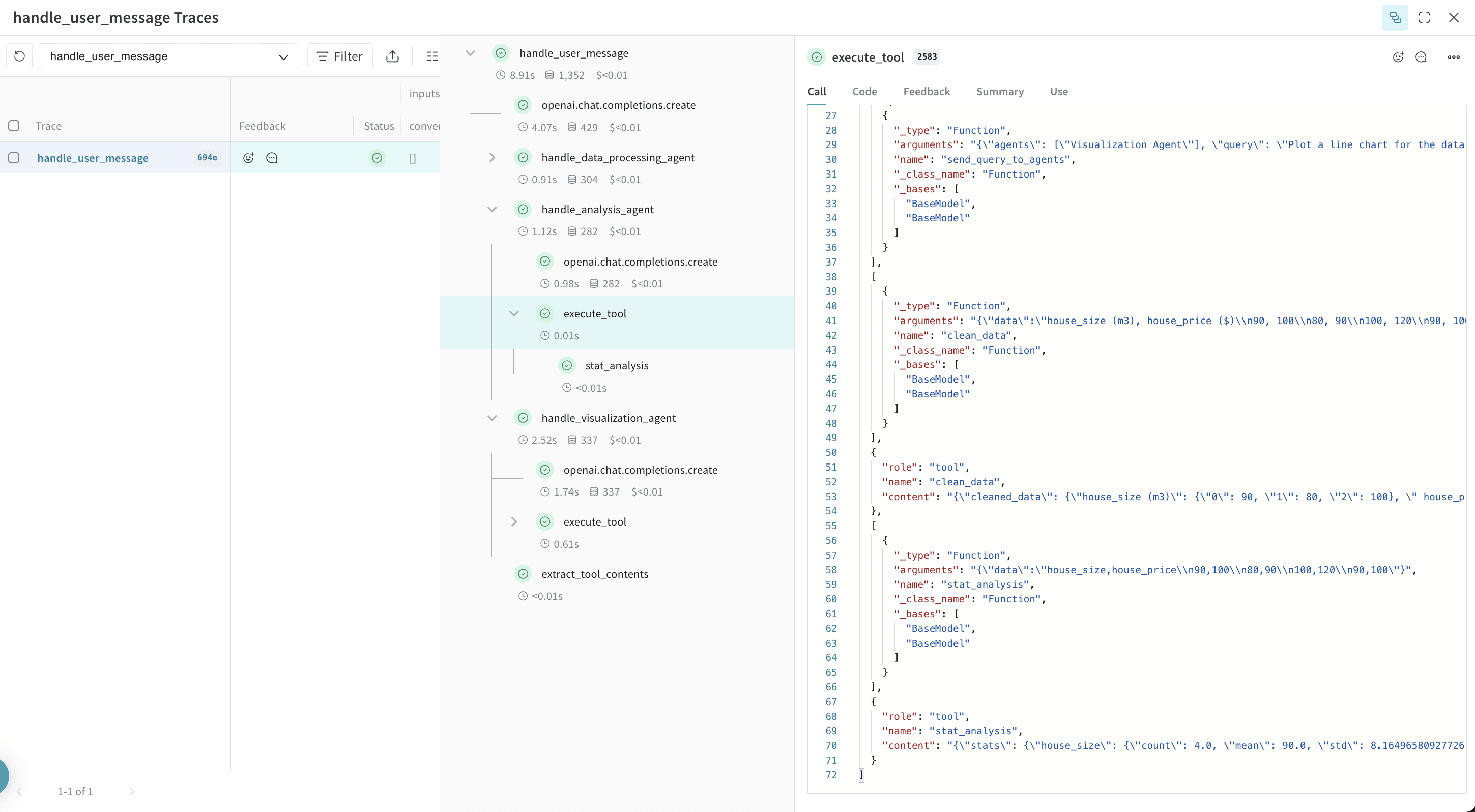
analysis_agent の入力と出力は structured output 形式で表示されます。OpenAI の Structured Outputs はエージェント同士の連携に役立ちますが、システムが複雑になるにつれて、こうしたやり取りの形式は把握しにくくなります。Weave を使えば、これらの中間プロセスとその入出力を詳しく確認できます。