Agno エージェントやツール呼び出しは、OpenTelemetry (OTEL) を使用して Weave でトレースできます。Agno は、共有メモリ、知識、推論を備えたマルチエージェントシステムを構築するための Python フレームワークです。軽量でモデル非依存かつ高いパフォーマンスを発揮するよう設計されており、テキスト、画像、音声、動画処理を含むマルチモーダル機能をサポートします。
このガイドでは、OTEL を使用して Agno エージェントとツール呼び出しをトレースし、そのトレースを Weave で可視化する方法を説明します。必要な依存関係のインストール方法、Weave に OTEL トレースを送信するトレーサーの設定方法、そして Agno エージェントとツールの計装方法を学びます。
-
必要な依存関係をインストールします:
pip install agno openinference-instrumentation-agno opentelemetry-sdk opentelemetry-exporter-otlp-proto-http
-
OpenAI API キー (または他のモデルプロバイダー) を環境変数として設定します:
export OPENAI_API_KEY=your_api_key_here
-
Weave で OTEL トレーシングを構成する。
Agno から Weave にトレースを送信するには、TracerProvider と OTLPSpanExporter を使って OTEL を設定します。エクスポーターには、認証とプロジェクト識別のための 正しいエンドポイントと HTTP ヘッダー を指定します。
- Endpoint:
https://trace.wandb.ai/otel/v1/traces
- Headers:
Authorization: W&B API キーを使用した Basic 認証
project_id: W&B エンティティ / プロジェクト名 (例: myteam/myproject)
Agno から Weave に OTEL トレースを送信する
前提条件 を満たしたら、Agno から Weave に OTEL トレースを送信できます。次のコードスニペットでは、Agno アプリケーションから Weave に OTEL トレースを送信するために、OTLP span exporter と tracer provider を構成する方法を示します。
Weave が Agno を正しくトレースできるようにするために、コード内で Agno のコンポーネントを使用する 前に グローバル tracer provider を設定してください。
# tracing.py
import base64
import os
from openinference.instrumentation.agno import AgnoInstrumentor
from opentelemetry.exporter.otlp.proto.http.trace_exporter import OTLPSpanExporter
from opentelemetry.sdk import trace as trace_sdk
from opentelemetry.sdk.trace.export import SimpleSpanProcessor
from opentelemetry import trace
# 環境変数から機密情報を読み込む
WANDB_BASE_URL = "https://trace.wandb.ai"
# W&B のエンティティ/プロジェクト名(例: "myteam/myproject")
PROJECT_ID = os.environ.get("WANDB_PROJECT_ID")
# https://wandb.ai/settings で W&B の API キーを作成する
WANDB_API_KEY = os.environ.get("WANDB_API_KEY")
OTEL_EXPORTER_OTLP_ENDPOINT = f"{WANDB_BASE_URL}/otel/v1/traces"
AUTH = base64.b64encode(f"api:{WANDB_API_KEY}".encode()).decode()
OTEL_EXPORTER_OTLP_HEADERS = {
"Authorization": f"Basic {AUTH}",
"project_id": PROJECT_ID,
}
# エンドポイントとヘッダーを指定して OTLP スパンエクスポーターを作成する
exporter = OTLPSpanExporter(
endpoint=OTEL_EXPORTER_OTLP_ENDPOINT,
headers=OTEL_EXPORTER_OTLP_HEADERS,
)
# トレーサープロバイダーを作成してエクスポーターを追加する
tracer_provider = trace_sdk.TracerProvider()
tracer_provider.add_span_processor(SimpleSpanProcessor(exporter))
# Agno をインポート/使用する前にグローバルトレーサープロバイダーを設定する
trace.set_tracer_provider(tracer_provider)
OTEL で Agno エージェントをトレースする
tracer provider をセットアップしたら、自動トレース付きで Agno エージェントを作成して実行できます。次の例は、ツールを使ったシンプルなエージェントの作成方法を示しています。
from agno.agent import Agent
from agno.models.openai import OpenAIChat
from agno.tools.yfinance import YFinanceTools
from dotenv import load_dotenv
load_dotenv()
# 上記で作成したファイルから AgnoInstrumentor を読み込む
from tracing import AgnoInstrumentor
# Agno のインストルメンテーションを開始する
AgnoInstrumentor().instrument()
# ファイナンスエージェントを作成する
finance_agent = Agent(
name="Finance Agent",
model=OpenAIChat(id="gpt-4o-mini"),
tools=[
YFinanceTools(
stock_price=True,
analyst_recommendations=True,
company_info=True,
company_news=True
)
],
instructions=["Use tables to display data"],
show_tool_calls=True,
markdown=True,
)
# エージェントを使用する - 自動的にトレースされる
finance_agent.print_response(
"What is the current stock price of Apple and what are the latest analyst recommendations?",
stream=True
)
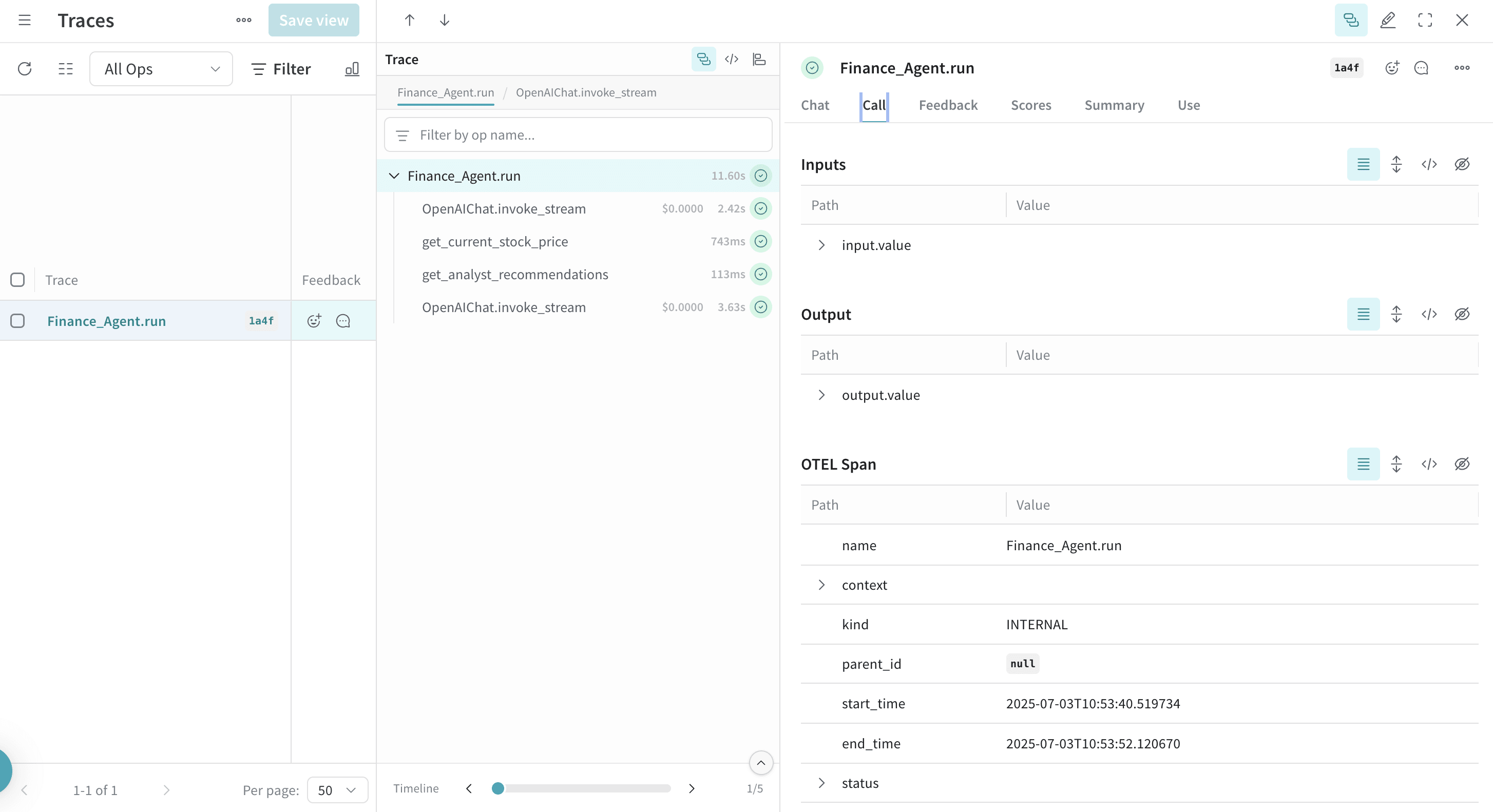
すべてのエージェントの操作は自動的にトレースされ Weave に送信されます。これにより、実行フロー、モデル呼び出し、推論ステップ、ツールの呼び出しを可視化できます。
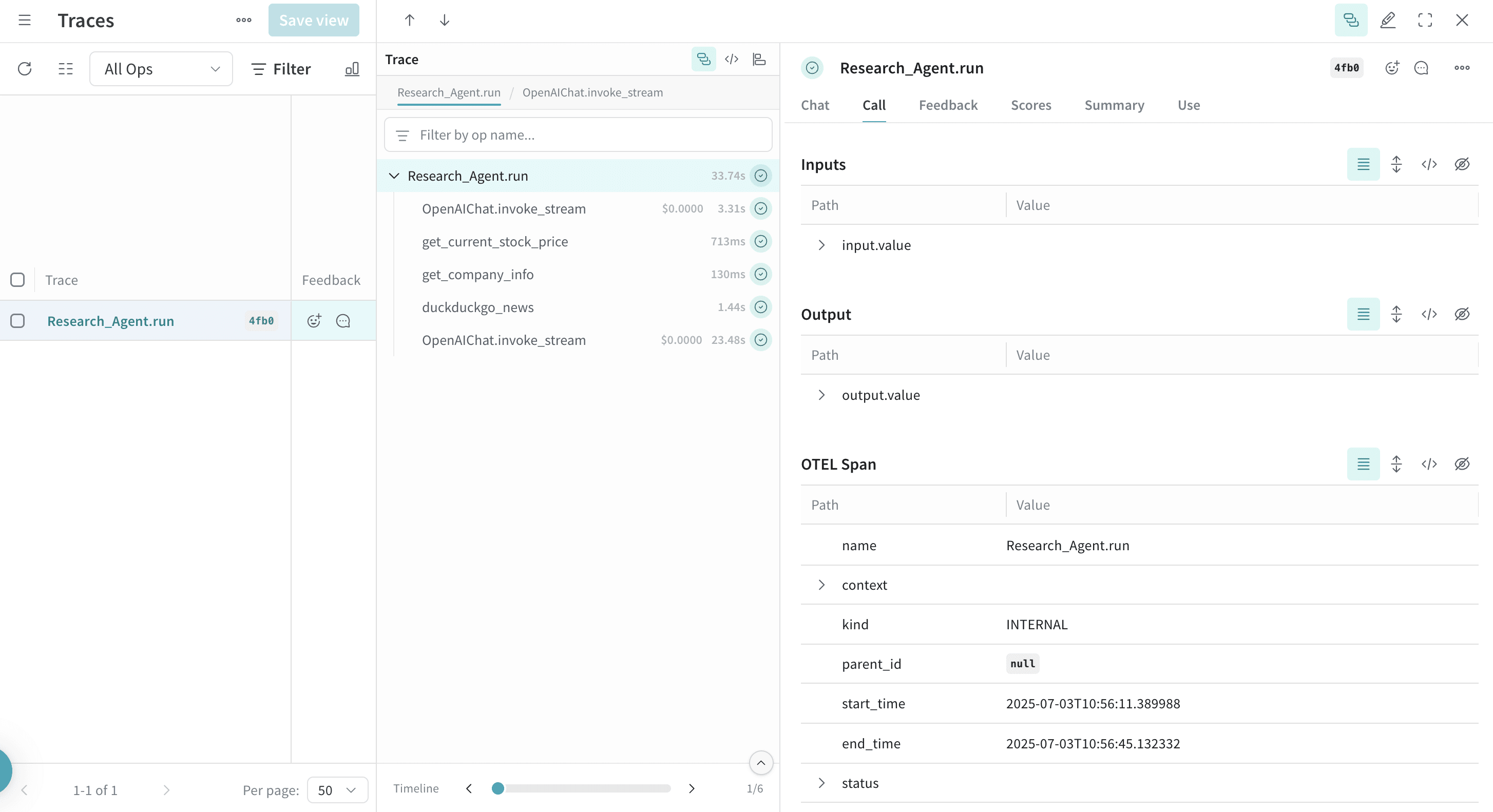
Agno でツールを定義して使用すると、これらのツール呼び出しもトレース内に記録されます。OTEL インテグレーションは、エージェントの思考プロセスと個々のツール実行の両方を自動的にインスツルメンテーションし、エージェントの挙動を包括的に把握できるようにします。
複数のツールを用いた例を次に示します。
from agno.agent import Agent
from agno.models.openai import OpenAIChat
from agno.tools.duckduckgo import DuckDuckGoTools
from agno.tools.yfinance import YFinanceTools
from dotenv import load_dotenv
load_dotenv()
# 上記で作成したファイルから AgnoInstrumentor を読み込む
from tracing import AgnoInstrumentor
# Agno のインストルメンテーションを開始する
AgnoInstrumentor().instrument()
# 複数のツールを持つエージェントを作成する
research_agent = Agent(
name="Research Agent",
model=OpenAIChat(id="gpt-4o-mini"),
tools=[
DuckDuckGoTools(),
YFinanceTools(stock_price=True, company_info=True),
],
instructions=[
"Search for current information and financial data",
"Always include sources",
"Use tables to display financial data"
],
show_tool_calls=True,
markdown=True,
)
# エージェントを使用する - ツール呼び出しはトレースされる
research_agent.print_response(
"Research Tesla's recent performance and news. Include stock price and any recent developments.",
stream=True
)
OTEL でマルチエージェント チームをトレースする
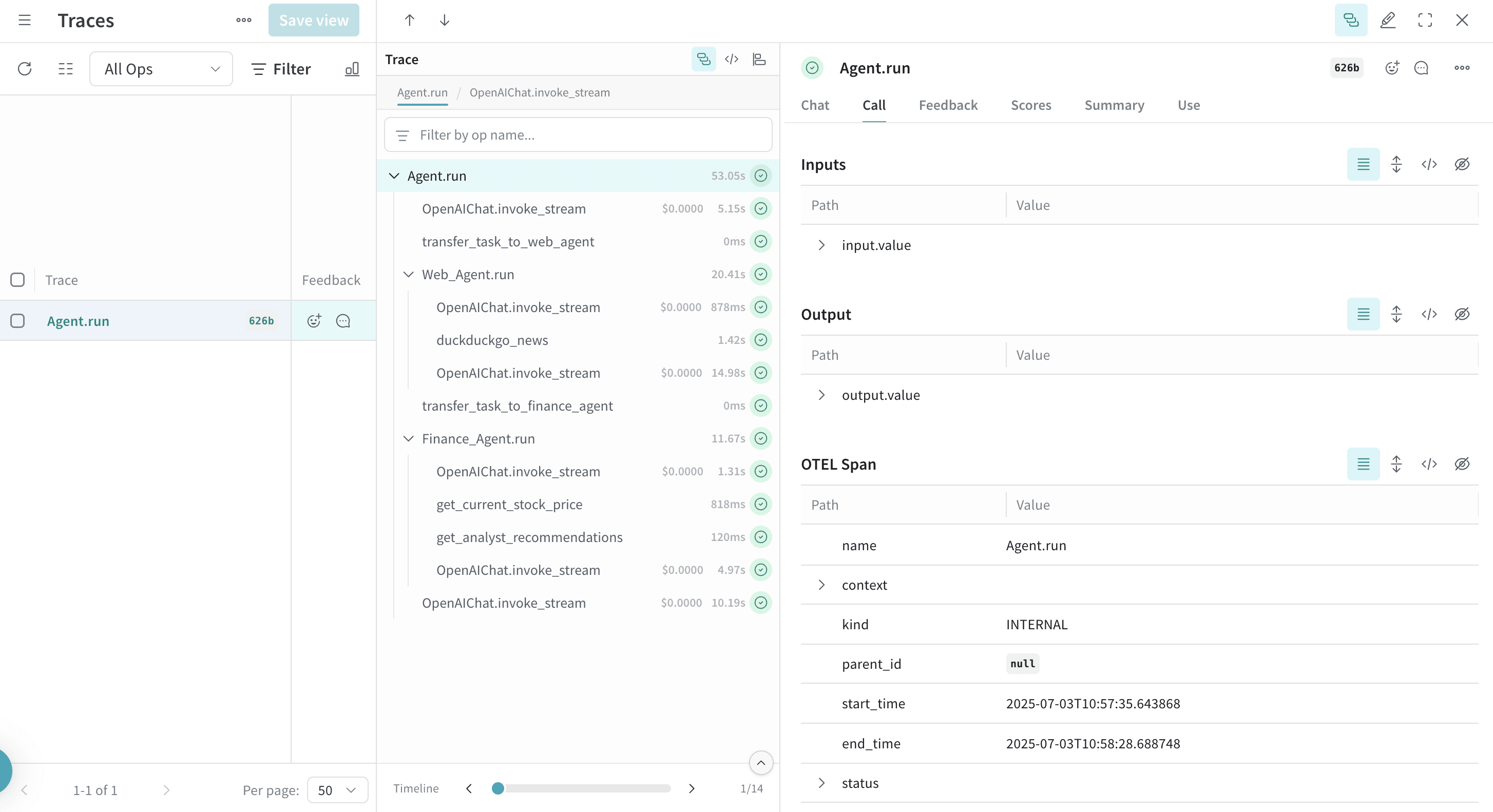
Agno の強力なマルチエージェント アーキテクチャにより、コンテキストを共有しながら協調して動作するエージェント チームを作成できます。これらのチーム間のやり取りもすべてトレースされます。
from agno.agent import Agent
from agno.models.openai import OpenAIChat
from agno.tools.duckduckgo import DuckDuckGoTools
from agno.tools.yfinance import YFinanceTools
from dotenv import load_dotenv
load_dotenv()
# tracin.py ファイルから AgnoInstrumentor を読み込む
from tracing import AgnoInstrumentor
# Agno のインストルメンテーションを開始する
AgnoInstrumentor().instrument()
# 専門エージェントを作成する
web_agent = Agent(
name="Web Agent",
role="Search the web for information",
model=OpenAIChat(id="gpt-4o-mini"),
tools=[DuckDuckGoTools()],
instructions="Always include sources",
show_tool_calls=True,
markdown=True,
)
finance_agent = Agent(
name="Finance Agent",
role="Get financial data",
model=OpenAIChat(id="gpt-4o-mini"),
tools=[YFinanceTools(stock_price=True, analyst_recommendations=True)],
instructions="Use tables to display data",
show_tool_calls=True,
markdown=True,
)
# エージェントチームを作成する
agent_team = Agent(
team=[web_agent, finance_agent],
model=OpenAIChat(id="gpt-4o"),
instructions=["Always include sources", "Use tables to display data"],
show_tool_calls=True,
markdown=True,
)
# チームを使用する - すべてのエージェントのやり取りがトレースされる
agent_team.print_response(
"What's the current market sentiment around NVIDIA? Include both news analysis and financial metrics.",
stream=True
)
このマルチエージェント trace は Weave 内の異なるエージェント間の連携を示し、タスクがエージェント チーム全体にどのように分散・実行されているかという点での公開範囲を提供します。
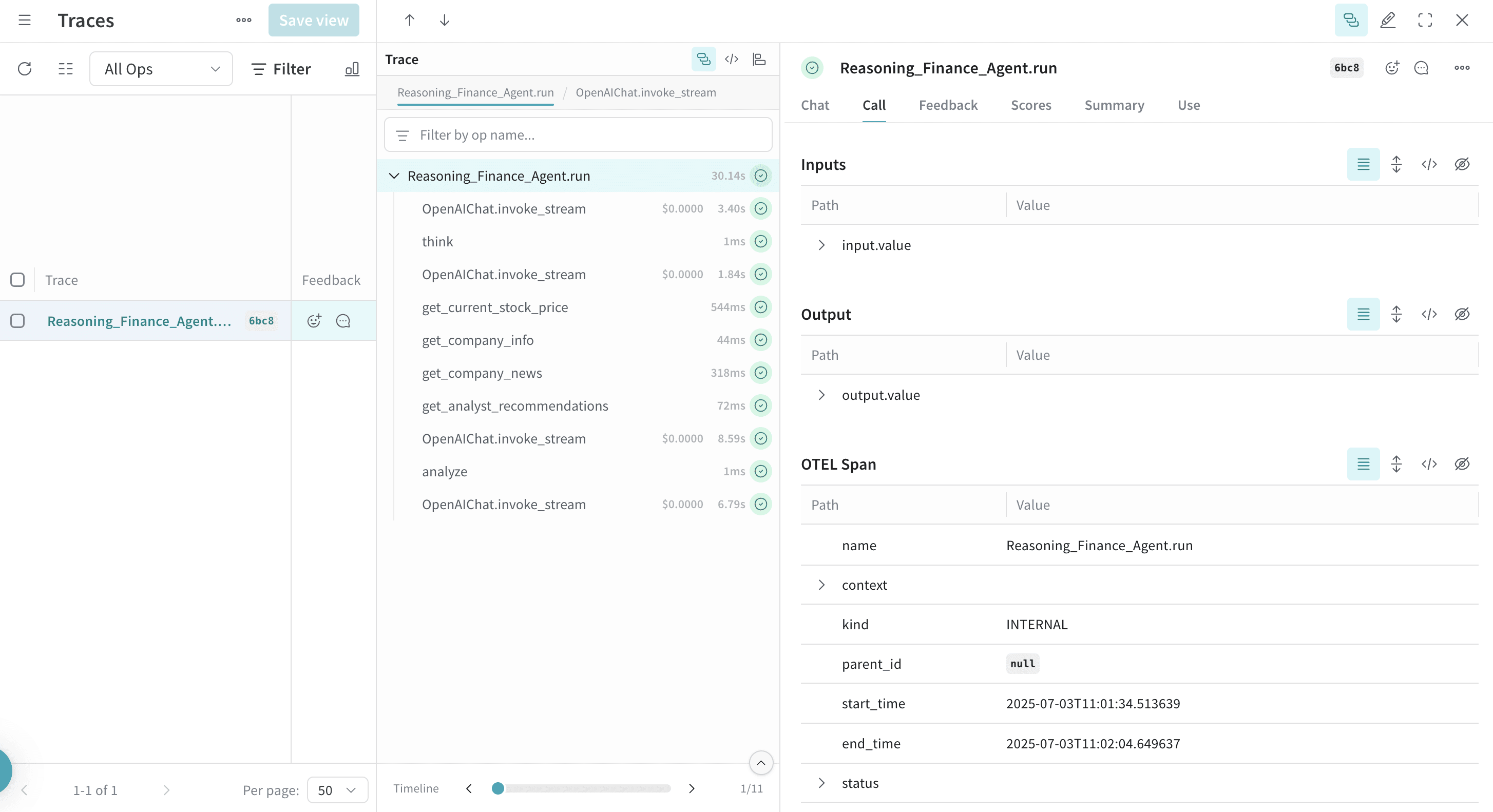
Agno には、エージェントが問題を段階的に考え進められるよう支援する組み込みの推論機能が備わっています。これらの推論プロセスは トレース にも記録されます。
from agno.agent import Agent
from agno.models.openai import OpenAIChat
from agno.tools.reasoning import ReasoningTools
from agno.tools.yfinance import YFinanceTools
from dotenv import load_dotenv
load_dotenv()
# tracin.py ファイルから AgnoInstrumentor を読み込む
from tracing import AgnoInstrumentor
# Agno のインストルメンテーションを開始する
AgnoInstrumentor().instrument()
# 推論エージェントを作成する
reasoning_agent = Agent(
name="Reasoning Finance Agent",
model=OpenAIChat(id="gpt-4o"),
tools=[
ReasoningTools(add_instructions=True),
YFinanceTools(
stock_price=True,
analyst_recommendations=True,
company_info=True,
company_news=True
),
],
instructions="Use tables to display data and show your reasoning process",
show_tool_calls=True,
markdown=True,
)
# 推論エージェントを使用する
reasoning_agent.print_response(
"Should I invest in Apple stock right now? Analyze the current situation and provide a reasoned recommendation.",
stream=True
)
推論の各ステップは トレース 上に表示され、エージェントが複雑な問題をどのように分解し、どのように意思決定しているかがわかります。
Agno エージェントはメモリを保持し、ナレッジベースへアクセスできます。これらの操作もトレース対象です。
from agno.agent import Agent
from agno.models.openai import OpenAIChat
from agno.memory import AgentMemory
from agno.storage.sqlite import SqliteStorage
from dotenv import load_dotenv
load_dotenv()
# AgnoInstrumentor を tracing.py ファイルから読み込む
from tracing import AgnoInstrumentor
# Agno のインストルメンテーションを開始する
AgnoInstrumentor().instrument()
# メモリを持つエージェントを作成する
memory_agent = Agent(
name="Memory Agent",
model=OpenAIChat(id="gpt-4o-mini"),
memory=AgentMemory(),
storage=SqliteStorage(
table_name="agent_sessions",
db_file="agent_memory.db"
),
instructions="Remember our conversation history",
show_tool_calls=True,
markdown=True,
)
# 最初のインタラクション
memory_agent.print_response("My name is John and I'm interested in AI investing strategies.")
# 2 回目のインタラクション - エージェントは前のコンテキストを記憶している
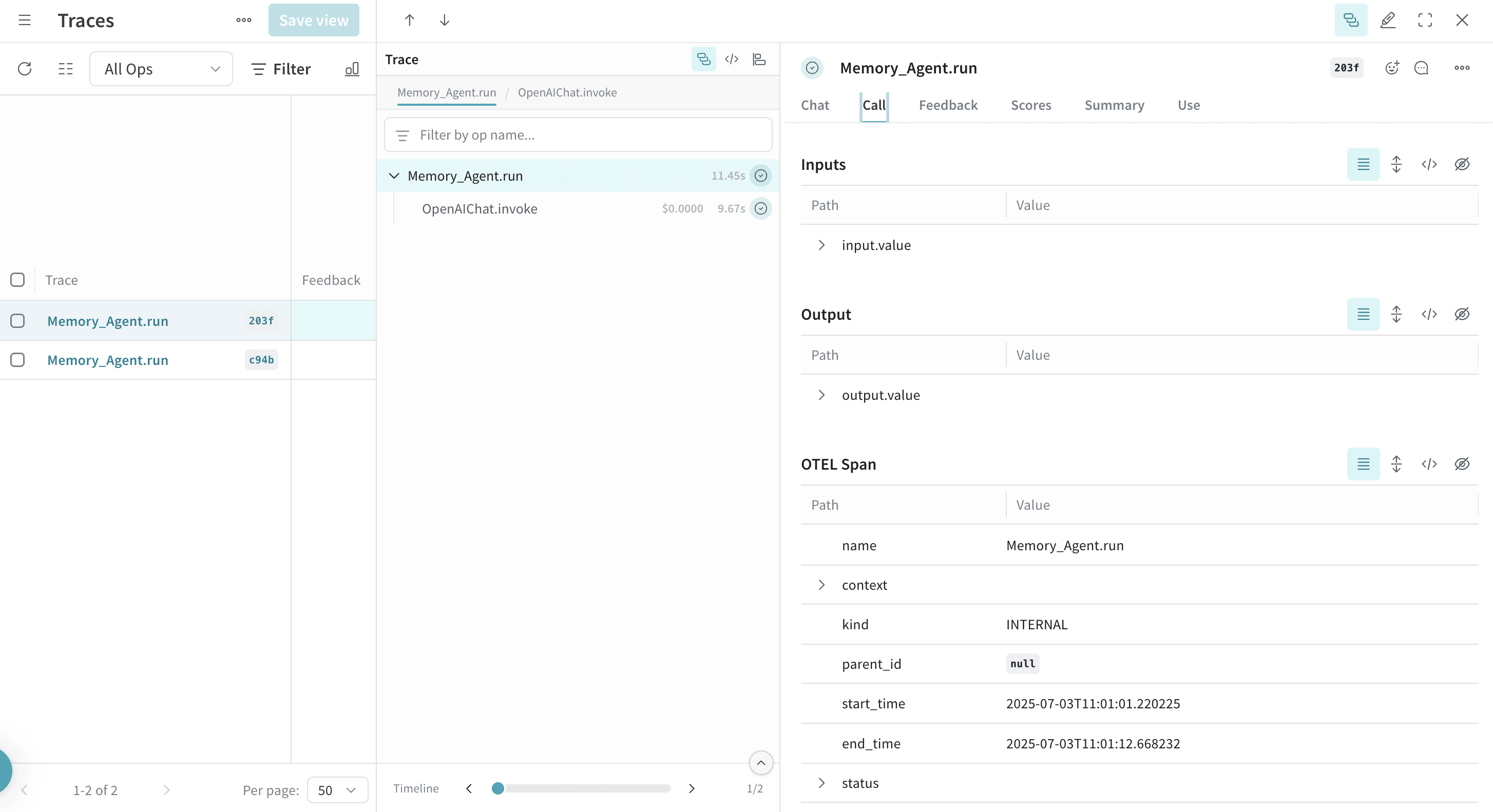
memory_agent.print_response("What specific AI companies would you recommend for my portfolio?")
会話履歴の保存や取得といったメモリ操作は、トレースに表示されます。