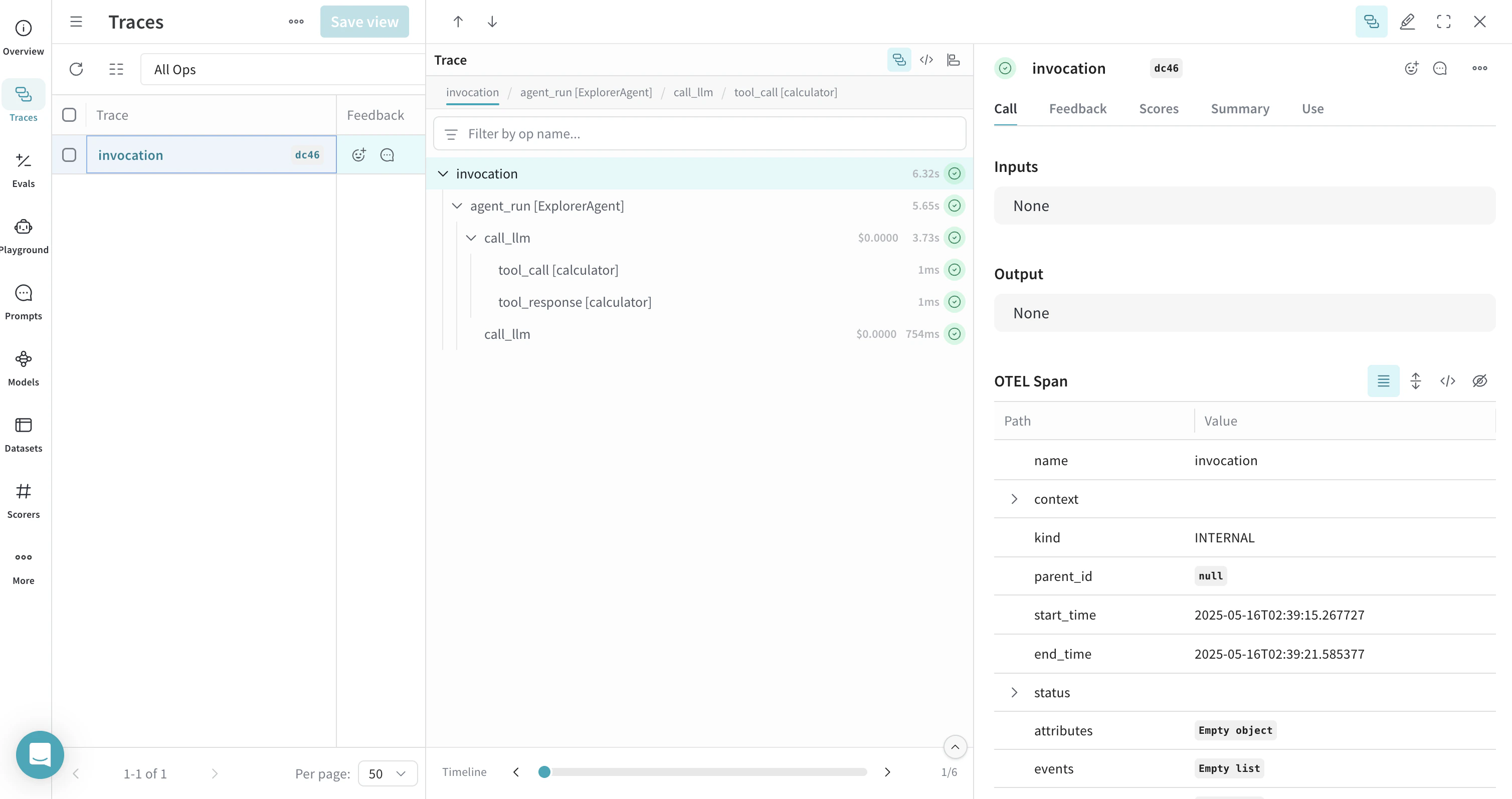
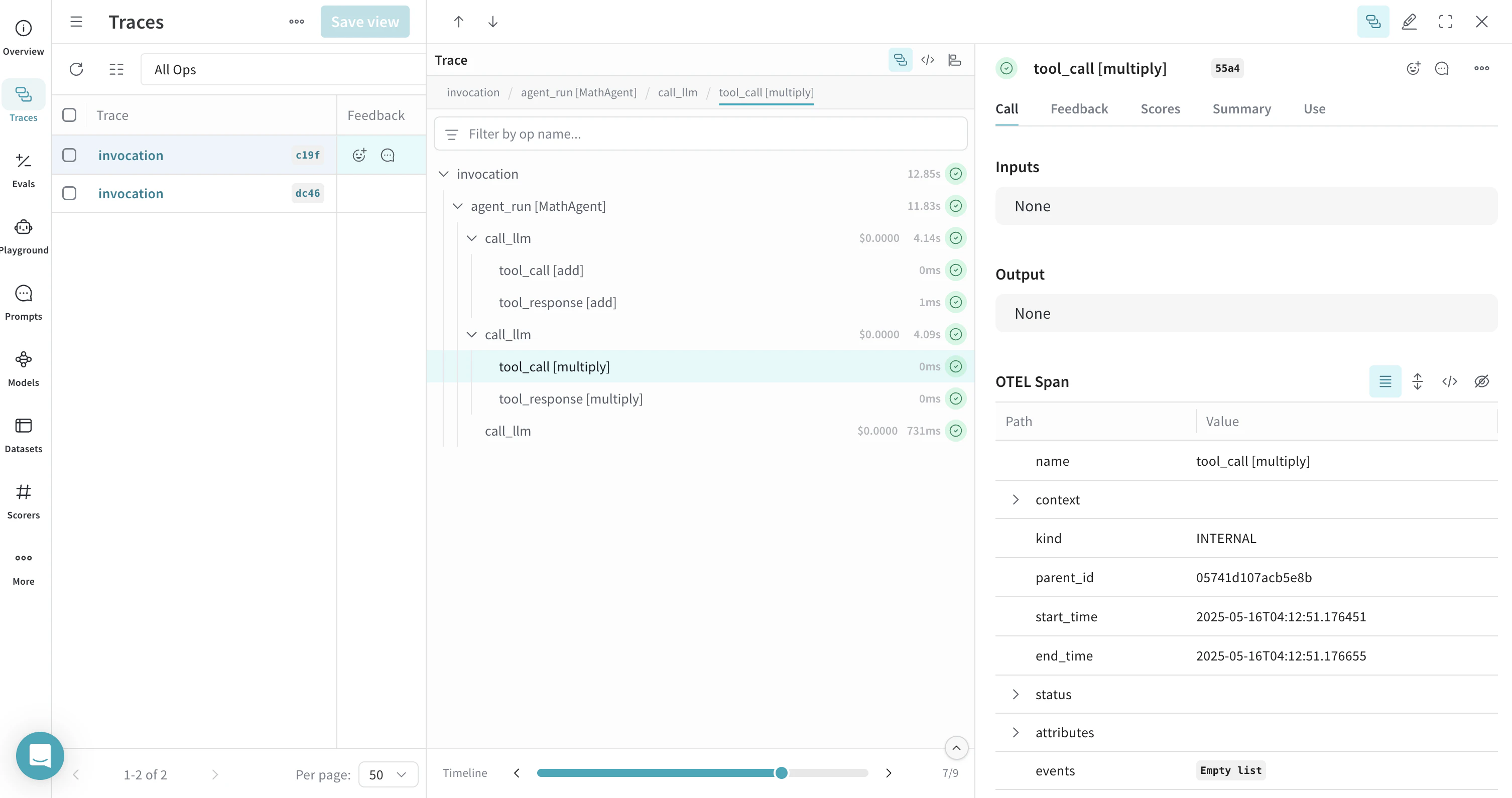
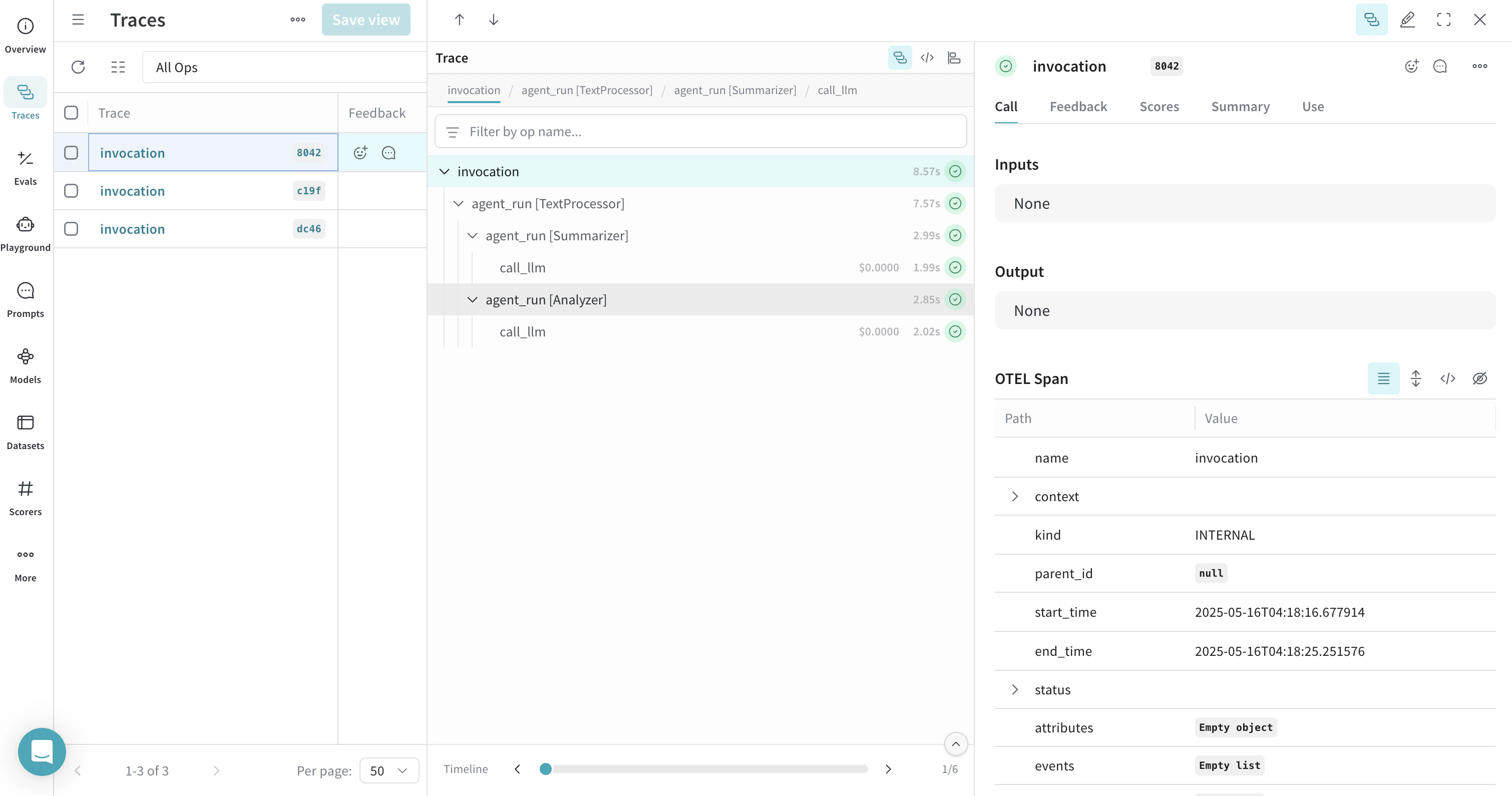
OpenTelemetry (OTEL) を使用すると、Weave で Google Agent Development Kit (ADK) のエージェントとツール呼び出しをトレースできます。ADK は、AI エージェントの開発とデプロイのための柔軟でモジュール式のフレームワークです。Gemini と Google エコシステム向けに最適化されていますが、ADK は特定のモデルやデプロイ環境に依存しません。シンプルなタスクから複雑なワークフローまで、エージェント アーキテクチャの作成、デプロイ、オーケストレーションを行うためのツールを提供します。
このガイドは、ADK でエージェントを構築しており、エージェントの推論、ツール呼び出し、マルチエージェント ワークフローをエンドツーエンドで可観測にしたい開発者を対象としています。OTEL を使用して ADK のエージェントとツール呼び出しをトレースし、そのトレースを Weave で可視化する方法を説明します。必須の依存関係をインストールし、データを Weave に送信する OTEL トレーサーを設定して、ADK のエージェントとツールを計装する方法を学べます。Weave でトレースを確認できれば、エージェントの動作をデバッグし、パフォーマンスを監視し、データがエージェントやツール内をどのように流れるかを把握できます。
-
必須の依存関係をインストールします。
pip install google-adk opentelemetry-sdk opentelemetry-exporter-otlp-proto-http
-
Google APIキーを環境変数に設定します。
export GOOGLE_API_KEY=[YOUR-API-KEY]
-
Weave で OTEL トレースを設定する。
ADK から Weave にトレースを送信するには、TracerProvider と OTLPSpanExporter を使用して OTEL を設定します。エクスポーターには、認証とプロジェクトの識別に必要な正しいエンドポイントと HTTP ヘッダーを設定してください。
APIキーやプロジェクト情報などの機密性の高い環境変数は、環境ファイル (例: .env) に保存し、os.environ を使って読み込んでください。これにより、認証情報を安全に保ち、コードベースに含めずに済みます。
- Endpoint:
https://trace.wandb.ai/otel/v1/traces。Dedicated Weave インスタンスを使用している場合、URL は代わりに次のパターンになります: [YOUR-WEAVE-HOST]/traces/otel/v1/traces。
- Headers:
Authorization: W&B APIキーを使用する Basic 認証。project_id: あなたの W&B entity/プロジェクト名 (例: myteam/myproject)。
ADK から Weave に OTEL トレースを送信する
Weave が ADK を適切にトレースできるようにするには、コード内で ADK コンポーネントを使用する 前に、グローバル トレーサープロバイダー を設定してください。
import base64
import os
from opentelemetry.exporter.otlp.proto.http.trace_exporter import OTLPSpanExporter
from opentelemetry.sdk import trace as trace_sdk
from opentelemetry.sdk.trace.export import SimpleSpanProcessor
from opentelemetry import trace

# 環境変数から機密情報を読み込む
WANDB_BASE_URL = "https://trace.wandb.ai"
# W&B の entity/project 名(例: "myteam/myproject")
PROJECT_ID = os.environ.get("WANDB_PROJECT_ID")
# W&B APIキーは https://wandb.ai/settings で作成してください
WANDB_API_KEY = os.environ.get("WANDB_API_KEY")

OTEL_EXPORTER_OTLP_ENDPOINT = f"{WANDB_BASE_URL}/otel/v1/traces"
AUTH = base64.b64encode(f"api:{WANDB_API_KEY}".encode()).decode()

OTEL_EXPORTER_OTLP_HEADERS = {
    "Authorization": f"Basic {AUTH}",
    "project_id": PROJECT_ID,
}

# エンドポイントとヘッダーを指定して OTLP span exporter を作成する
exporter = OTLPSpanExporter(
    endpoint=OTEL_EXPORTER_OTLP_ENDPOINT,
    headers=OTEL_EXPORTER_OTLP_HEADERS,
)

# トレーサープロバイダー を作成し、exporter を追加する
tracer_provider = trace_sdk.TracerProvider()
tracer_provider.add_span_processor(SimpleSpanProcessor(exporter))

# ADK をインポート/使用する前に、グローバル トレーサープロバイダー を設定する
trace.set_tracer_provider(tracer_provider)
from google.adk.agents import LlmAgent
from google.adk.runners import InMemoryRunner
from google.adk.tools import FunctionTool
from google.genai import types
import asyncio

# デモ用のシンプルなツールを定義する
def calculator(a: float, b: float) -> str:
    """Add two numbers and return the result.

    Args:
        a: First number
        b: Second number

    Returns:
        The sum of a and b
    """
    return str(a + b)

calculator_tool = FunctionTool(func=calculator)

async def run_agent():
    # LLMエージェントを作成する
    agent = LlmAgent(
        name="MathAgent",
        model="gemini-2.0-flash",  # 必要に応じて別のモデルに変更できます
        instruction=(
            "You are a helpful assistant that can do math. "
            "When asked a math problem, use the calculator tool to solve it."
        ),
        tools=[calculator_tool],
    )

    # ランナーを設定する
    runner = InMemoryRunner(agent=agent, app_name="math_assistant")
    session_service = runner.session_service

    # セッションを作成する
    user_id = "example_user"
    session_id = "example_session"
    await session_service.create_session(
        app_name="math_assistant",
        user_id=user_id,
        session_id=session_id,
    )

    # ツール使用をトリガーするメッセージでエージェントを実行する
    async for event in runner.run_async(
        user_id=user_id,
        session_id=session_id,
        new_message=types.Content(
            role="user", parts=[types.Part(text="What is 5 + 7?")]
        ),
    ):
        if event.is_final_response() and event.content:
            print(f"Final response: {event.content.parts[0].text.strip()}")

# 非同期関数を実行する
asyncio.run(run_agent())
from google.adk.agents import LlmAgent
from google.adk.runners import InMemoryRunner
from google.adk.tools import FunctionTool
from google.genai import types
import asyncio

# 複数のツールを定義する
def add(a: float, b: float) -> str:
    """Add two numbers.

    Args:
        a: First number
        b: Second number

    Returns:
        The sum of a and b
    """
    return str(a + b)

def multiply(a: float, b: float) -> str:
    """Multiply two numbers.

    Args:
        a: First number
        b: Second number

    Returns:
        The product of a and b
    """
    return str(a * b)

# 関数ツールを作成する
add_tool = FunctionTool(func=add)
multiply_tool = FunctionTool(func=multiply)

async def run_agent():
    # 複数のツールを持つ LLM エージェントを作成する
    agent = LlmAgent(
        name="MathAgent",
        model="gemini-2.0-flash",
        instruction=(
            "You are a helpful assistant that can do math operations. "
            "When asked to add numbers, use the add tool. "
            "When asked to multiply numbers, use the multiply tool."
        ),
        tools=[add_tool, multiply_tool],
    )

    # ランナーを設定する
    runner = InMemoryRunner(agent=agent, app_name="math_assistant")
    session_service = runner.session_service

    # セッションを作成する
    user_id = "example_user"
    session_id = "example_session"
    await session_service.create_session(
        app_name="math_assistant",
        user_id=user_id,
        session_id=session_id,
    )

    # ツールの使用をトリガーするメッセージでエージェントを実行する
    async for event in runner.run_async(
        user_id=user_id,
        session_id=session_id,
        new_message=types.Content(
            role="user", parts=[types.Part(text="First add 5 and 7, then multiply the result by 2.")]
        ),
    ):
        if event.is_final_response() and event.content:
            print(f"Final response: {event.content.parts[0].text.strip()}")

# 非同期関数を実行する
asyncio.run(run_agent())
SequentialAgent を使用します。
from google.adk.agents import LlmAgent, SequentialAgent
from google.adk.runners import InMemoryRunner
from google.genai import types
import asyncio

async def run_workflow():
    # 2つのLLMエージェントを作成する
    summarizer = LlmAgent(
        name="Summarizer",
        model="gemini-2.0-flash",
        instruction="Summarize the given text in one sentence.",
        description="Summarizes text in one sentence",
        output_key="summary"  # state['summary']に出力を保存する
    )

    analyzer = LlmAgent(
        name="Analyzer",
        model="gemini-2.0-flash",
        instruction="Analyze the sentiment of the given text as positive, negative, or neutral. The text to analyze: {summary}",
        description="Analyzes sentiment of text",
        output_key="sentiment"  # state['sentiment']に出力を保存する
    )

    # 逐次ワークフローを作成する
    workflow = SequentialAgent(
        name="TextProcessor",
        sub_agents=[summarizer, analyzer],
        description="Executes a sequence of summarization followed by sentiment analysis.",
    )

    # ランナーを設定する
    runner = InMemoryRunner(agent=workflow, app_name="text_processor")
    session_service = runner.session_service

    # セッションを作成する
    user_id = "example_user"
    session_id = "example_session"
    await session_service.create_session(
        app_name="text_processor",
        user_id=user_id,
        session_id=session_id,
    )

    # ワークフローを実行する
    async for event in runner.run_async(
        user_id=user_id,
        session_id=session_id,
        new_message=types.Content(
            role="user",
            parts=[types.Part(text="The product exceeded my expectations. It worked perfectly right out of the box, and the customer service was excellent when I had questions about setup.")]
        ),
    ):
        if event.is_final_response() and event.content:
            print(f"Final response: {event.content.parts[0].text.strip()}")

# 非同期関数を実行する
asyncio.run(run_workflow())