메인 콘텐츠로 건너뛰기
Weave는 여러 AI 공급자의 파운데이션 모델을 통합 API로 제공하는 AWS의 관리형 서비스인 Amazon Bedrock를 통해 이루어지는 LLM 호출을 자동으로 추적하고 기록합니다. 이 인테그레이션을 사용해 Bedrock 파운데이션 모델 상호작용과 converse API 사용을 캡처하면 Bedrock 기반 애플리케이션을 디버그하고, 평가하고, 모니터링할 수 있습니다. Amazon Bedrock에서 Weave로 LLM 호출을 기록하는 방법은 여러 가지가 있습니다. weave.op를 사용해 Bedrock 모델에 대한 모든 호출을 추적하는 재사용 가능한 오퍼레이션을 만드세요. Anthropic 모델을 사용하는 경우에는 선택적으로 Weave에 내장된 Anthropic 인테그레이션을 사용할 수도 있습니다.
최신 튜토리얼은 W&B on Amazon Web Services에서 확인하세요.

트레이스

클라이언트를 패치하면 Weave는 Bedrock API 호출에 대한 트레이스를 자동으로 캡처합니다. Weave를 초기화하고 클라이언트를 패치한 다음에는 평소처럼 Bedrock 클라이언트를 사용하세요:
import weave
import boto3
import json
from weave.integrations.bedrock.bedrock_sdk import patch_client

weave.init("my_bedrock_app")

# Bedrock 클라이언트 생성 및 패치
client = boto3.client("bedrock-runtime")
patch_client(client)

# 평소처럼 클라이언트 사용
response = client.invoke_model(
    modelId="anthropic.claude-3-5-sonnet-20240620-v1:0",
    body=json.dumps({
        "anthropic_version": "bedrock-2023-05-31",
        "max_tokens": 100,
        "messages": [
            {"role": "user", "content": "What is the capital of France?"}
        ]
    }),
    contentType='application/json',
    accept='application/json'
)
response_dict = json.loads(response.get('body').read())
print(response_dict["content"][0]["text"])
같은 방식으로 패치한 클라이언트는 converse API를 사용할 때도 트레이스를 캡처합니다:
messages = [{"role": "user", "content": [{"text": "What is the capital of France?"}]}]

response = client.converse(
    modelId="anthropic.claude-3-5-sonnet-20240620-v1:0",
    system=[{"text": "You are a helpful AI assistant."}],
    messages=messages,
    inferenceConfig={"maxTokens": 100},
)
print(response["output"]["message"]["content"][0]["text"])

직접 정의한 op로 Call 래핑하기

관련 로직을 그룹화하고, 맞춤형 입력을 캡처하고, 애플리케이션 전반에서 동일한 추적 함수를 재사용할 수 있도록 Bedrock Call을 직접 정의한 op로 래핑하세요. @weave.op() 데코레이터를 사용해서 재사용 가능한 연산을 만들 수 있습니다. 다음 예시는 invoke_modelconverse API를 모두 사용하는 방법을 보여 줍니다.
@weave.op
def call_model_invoke(
    model_id: str,
    prompt: str,
    max_tokens: int = 100,
    temperature: float = 0.7
) -> dict:
    body = json.dumps({
        "anthropic_version": "bedrock-2023-05-31",
        "max_tokens": max_tokens,
        "temperature": temperature,
        "messages": [
            {"role": "user", "content": prompt}
        ]
    })

    response = client.invoke_model(
        modelId=model_id,
        body=body,
        contentType='application/json',
        accept='application/json'
    )
    return json.loads(response.get('body').read())

@weave.op
def call_model_converse(
    model_id: str,
    messages: str,
    system_message: str,
    max_tokens: int = 100,
) -> dict:
    response = client.converse(
        modelId=model_id,
        system=[{"text": system_message}],
        messages=messages,
        inferenceConfig={"maxTokens": max_tokens},
    )
    return response
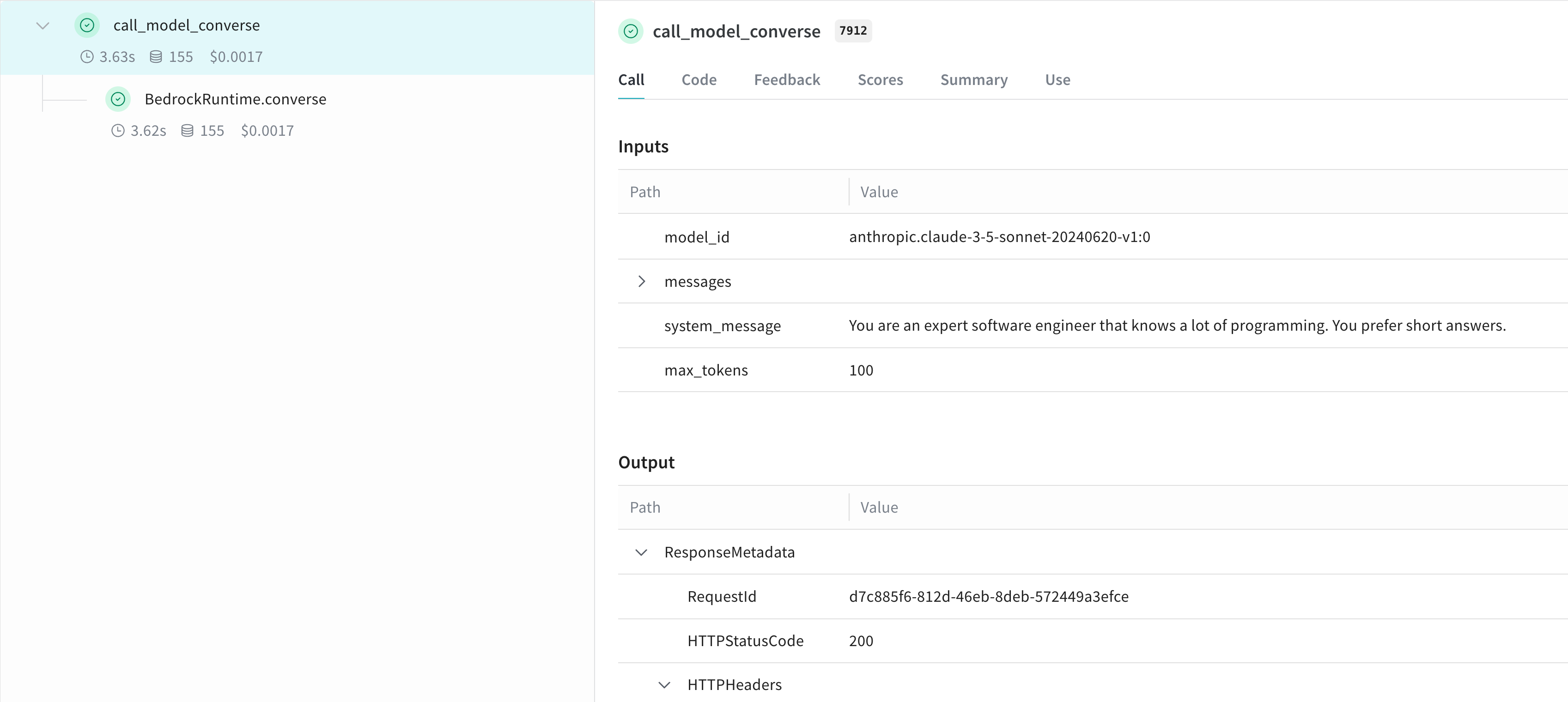
Weave와 Bedrock Converse 인테그레이션, API Call 트레이스와 응답 데이터

더 쉽게 실험할 수 있도록 Model 만들기

Weave Model은 설정과 예측 로직을 함께 묶어, 매개변수를 반복적으로 조정하고 Runs를 나란히 비교할 수 있게 해줍니다. 실험을 더 체계적으로 정리하고 매개변수를 캡처하려면 Weave Model을 만드세요. 다음 예시에서는 converse API를 사용합니다:
class BedrockLLM(weave.Model):
    model_id: str
    max_tokens: int = 100
    system_message: str = "You are a helpful AI assistant."

    @weave.op
    def predict(self, prompt: str) -> str:
        "Generate a response using Bedrock's converse API"
        
        messages = [{
            "role": "user",
            "content": [{"text": prompt}]
        }]

        response = client.converse(
            modelId=self.model_id,
            system=[{"text": self.system_message}],
            messages=messages,
            inferenceConfig={"maxTokens": self.max_tokens},
        )
        return response["output"]["message"]["content"][0]["text"]

# 모델 생성 및 사용
model = BedrockLLM(
    model_id="anthropic.claude-3-5-sonnet-20240620-v1:0",
    max_tokens=100,
    system_message="You are an expert software engineer that knows a lot of programming. You prefer short answers."
)
result = model.predict("What is the best way to handle errors in Python?")
print(result)
이 방식을 사용하면 실험을 버전 관리하고 Bedrock 기반 애플리케이션의 다양한 설정을 추적할 수 있습니다.

더 알아보기

다음 리소스에서는 Weave로 Amazon Bedrock을 더 자세히 살펴보고 평가할 수 있는 추가 방법을 제공합니다.

Weave Playground에서 Bedrock을 사용해 보기

별도 설정 없이 Weave UI에서 Amazon Bedrock 모델을 실험하려면 LLM Playground를 사용해 보세요.

리포트: Weave로 Amazon Bedrock에서 텍스트 요약용 LLM 비교

Evaluating LLMs on Amazon Bedrock 리포트는 Bedrock과 Weave를 함께 사용하여 텍스트 요약 작업을 위한 LLM을 평가하고 비교하는 방법을 설명합니다. 리포트에는 코드 샘플이 포함되어 있습니다.