메인 콘텐츠로 건너뛰기
Open In Colab
설정 없이 Weave 에서 Groq 모델로 실험해보고 싶으신가요? LLM Playground 을 시도해 보세요.
Groq 은 빠른 AI 인퍼런스를 제공하는 AI 인프라 기업입니다. Groq 의 LPU™ Inference Engine 은 뛰어난 연산 속도, 품질 및 에너지 효율성을 제공하는 하드웨어 및 소프트웨어 플랫폼입니다. Weave 는 Groq 채팅 완성 (chat completion) 호출을 사용한 모든 호출을 자동으로 추적하고 로그를 남깁니다.

Tracing

개발 및 프로덕션 단계 모두에서 언어 모델 애플리케이션의 트레이스 (traces) 를 중앙 위치에 저장하는 것이 중요합니다. 이러한 트레이스는 디버깅에 유용하며, 애플리케이션 개선에 도움이 되는 데이터셋으로 활용될 수 있습니다. Weave 는 Groq 에 대한 트레이스를 자동으로 캡처합니다. 트래킹을 시작하려면 weave.init(project_name="<YOUR-WANDB-PROJECT-NAME>") 을 호출하고 평소처럼 라이브러리를 사용하세요.
import os
import weave
from groq import Groq

# Weave 초기화 및 프로젝트 설정
weave.init(project_name="groq-project")

client = Groq(
    api_key=os.environ.get("GROQ_API_KEY"),
)
# 채팅 완성 호출 시 자동으로 트레이스 생성
chat_completion = client.chat.completions.create(
    messages=[
        {
            "role": "user",
            "content": "Explain the importance of fast language models",
        }
    ],
    model="llama3-8b-8192",
)
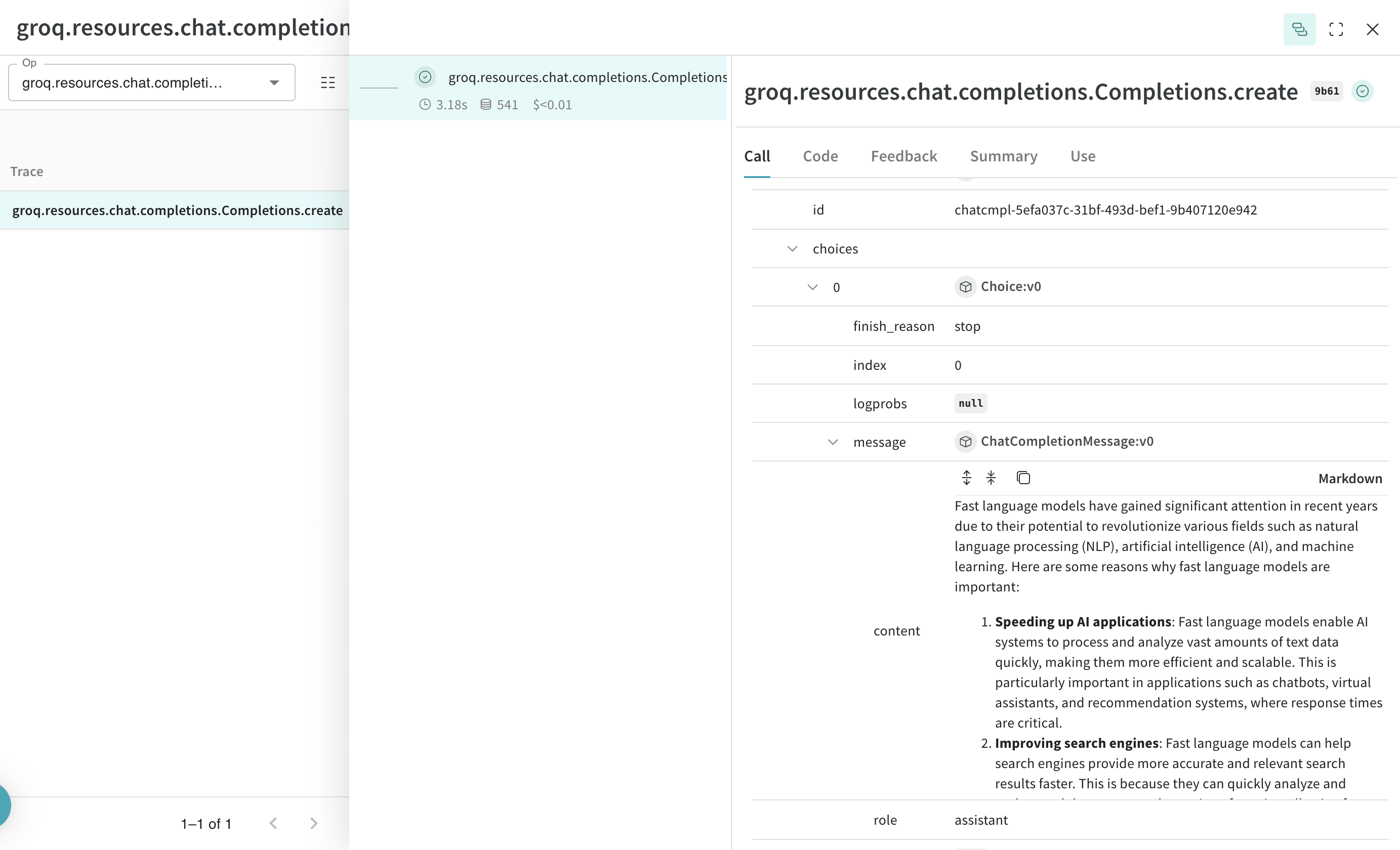
Weave 는 이제 Groq 라이브러리를 통해 이루어지는 모든 LLM 호출을 트래킹하고 로그를 남깁니다. Weave 웹 인터페이스에서 트레이스를 확인할 수 있습니다.

직접 작성한 op 트래킹하기

함수를 @weave.op 로 감싸면 입력, 출력 및 앱 로직을 캡처하기 시작하여 앱을 통해 데이터가 어떻게 흐르는지 디버깅할 수 있습니다. op 를 깊게 중첩하여 트래킹하려는 함수의 트리 구조를 구축할 수 있습니다. 또한 git 에 커밋되지 않은 임시 세부 사항을 캡처하기 위해 실험 중에 코드의 버전을 자동으로 관리하기 시작합니다. @weave.op 데코레이터가 적용된 함수를 만들기만 하면 됩니다. 아래 예시에서 recommend_places_to_visit 함수는 특정 도시에서 방문할 장소를 추천하는 함수로, @weave.op 로 감싸져 있습니다.
import os
import weave
from groq import Groq


weave.init(project_name="groq-test")

client = Groq(
    api_key=os.environ.get("GROQ_API_KEY"),
)

@weave.op()
def recommend_places_to_visit(city: str, model: str="llama3-8b-8192"):
    chat_completion = client.chat.completions.create(
        messages=[
            {
                "role": "system",
                "content": "You are a helpful assistant meant to suggest places to visit in a city",
            },
            {
                "role": "user",
                "content": city,
            }
        ],
        model="llama3-8b-8192",
    )
    return chat_completion.choices[0].message.content


# 호출 시마다 입력, 출력 및 내부 Groq 호출이 트래킹됩니다.
recommend_places_to_visit("New York")
recommend_places_to_visit("Paris")
recommend_places_to_visit("Kolkata")
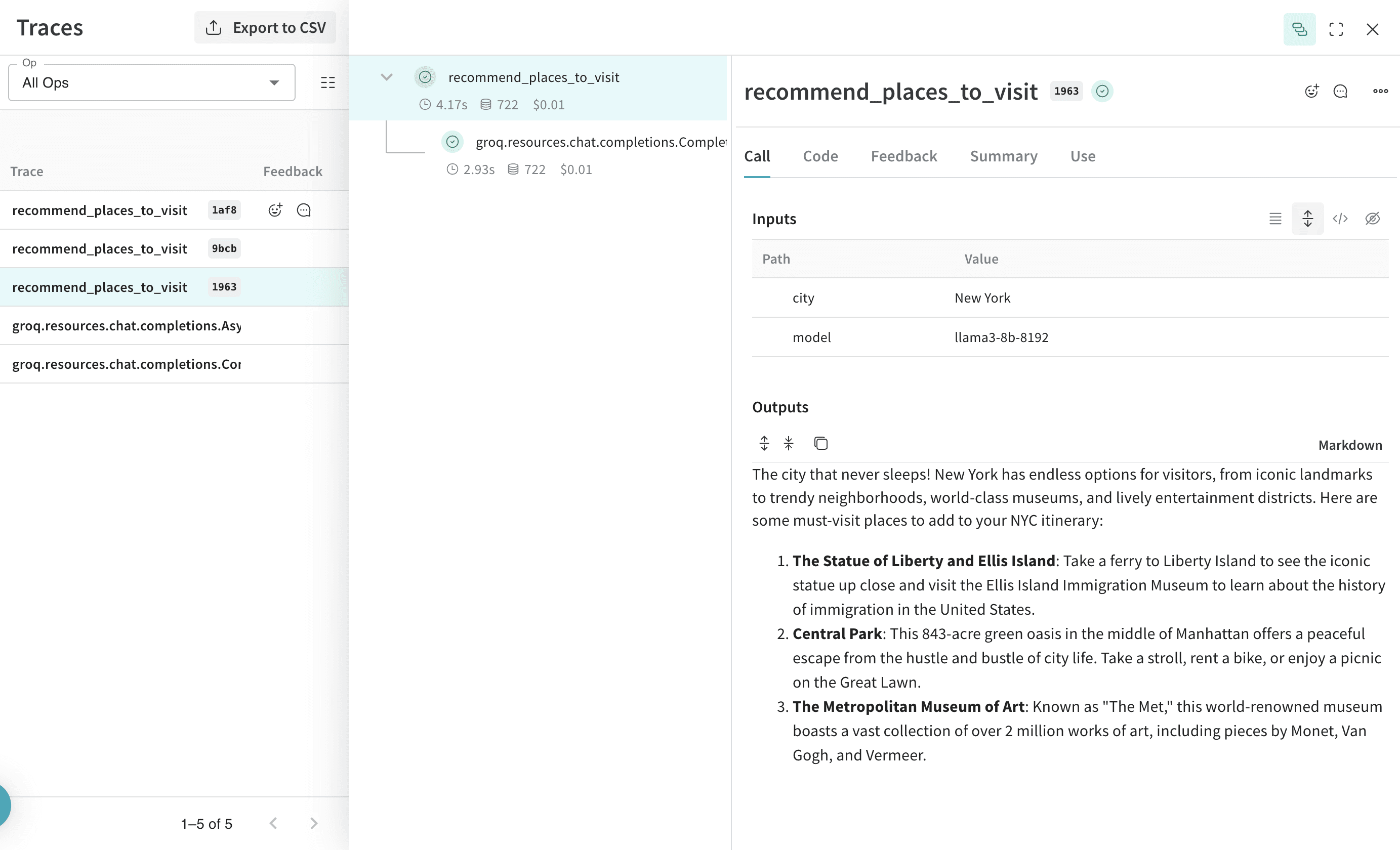
recommend_places_to_visit 함수에 @weave.op 를 적용하면 입력, 출력 및 함수 내부에서 이루어진 모든 LLM 호출을 추적합니다.

더 쉬운 실험을 위해 Model 만들기

움직이는 부분이 많을 때는 실험을 체계화하기가 어렵습니다. Model 클래스를 사용하면 시스템 프롬프트나 사용 중인 모델과 같은 앱의 실험적 세부 사항을 캡처하고 정리할 수 있습니다. 이는 앱의 다양한 반복 (iterations) 을 구성하고 비교하는 데 도움이 됩니다. 코드의 버전 관리 및 입력/출력 캡처 외에도, Model 은 애플리케이션의 행동을 제어하는 구조화된 파라미터를 캡처하여 어떤 파라미터가 가장 잘 작동했는지 쉽게 찾을 수 있게 해줍니다. 또한 Weave Models 를 serveEvaluation 과 함께 사용할 수 있습니다. 아래 예시에서 GroqCityVisitRecommender 를 사용하여 실험할 수 있습니다. 이 중 하나를 변경할 때마다 GroqCityVisitRecommender 의 새로운 버전 이 생성됩니다.
import os
from groq import Groq
import weave


class GroqCityVisitRecommender(weave.Model):
    model: str
    groq_client: Groq

    @weave.op()
    def predict(self, city: str) -> str:
        system_message = {
            "role": "system",
            "content": """
You are a helpful assistant meant to suggest places to visit in a city
""",
        }
        user_message = {"role": "user", "content": city}
        chat_completion = self.groq_client.chat.completions.create(
            messages=[system_message, user_message],
            model=self.model,
        )
        return chat_completion.choices[0].message.content


weave.init(project_name="groq-test")
city_recommender = GroqCityVisitRecommender(
    model="llama3-8b-8192", groq_client=Groq(api_key=os.environ.get("GROQ_API_KEY"))
)
print(city_recommender.predict("New York"))
print(city_recommender.predict("San Francisco"))
print(city_recommender.predict("Los Angeles"))
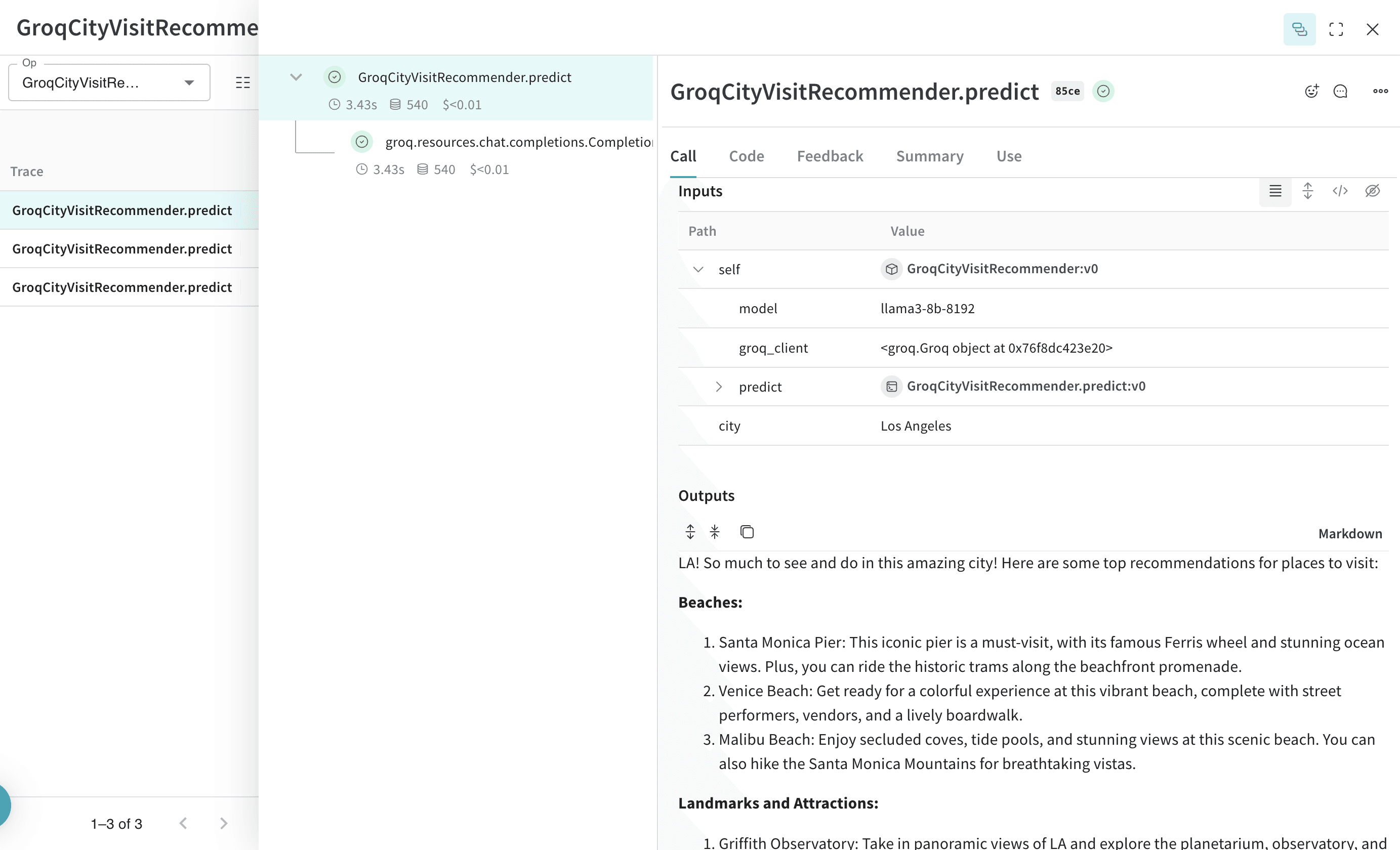
Model 을 사용하여 호출 트래킹 및 버전 관리하기

Weave Model 서빙하기

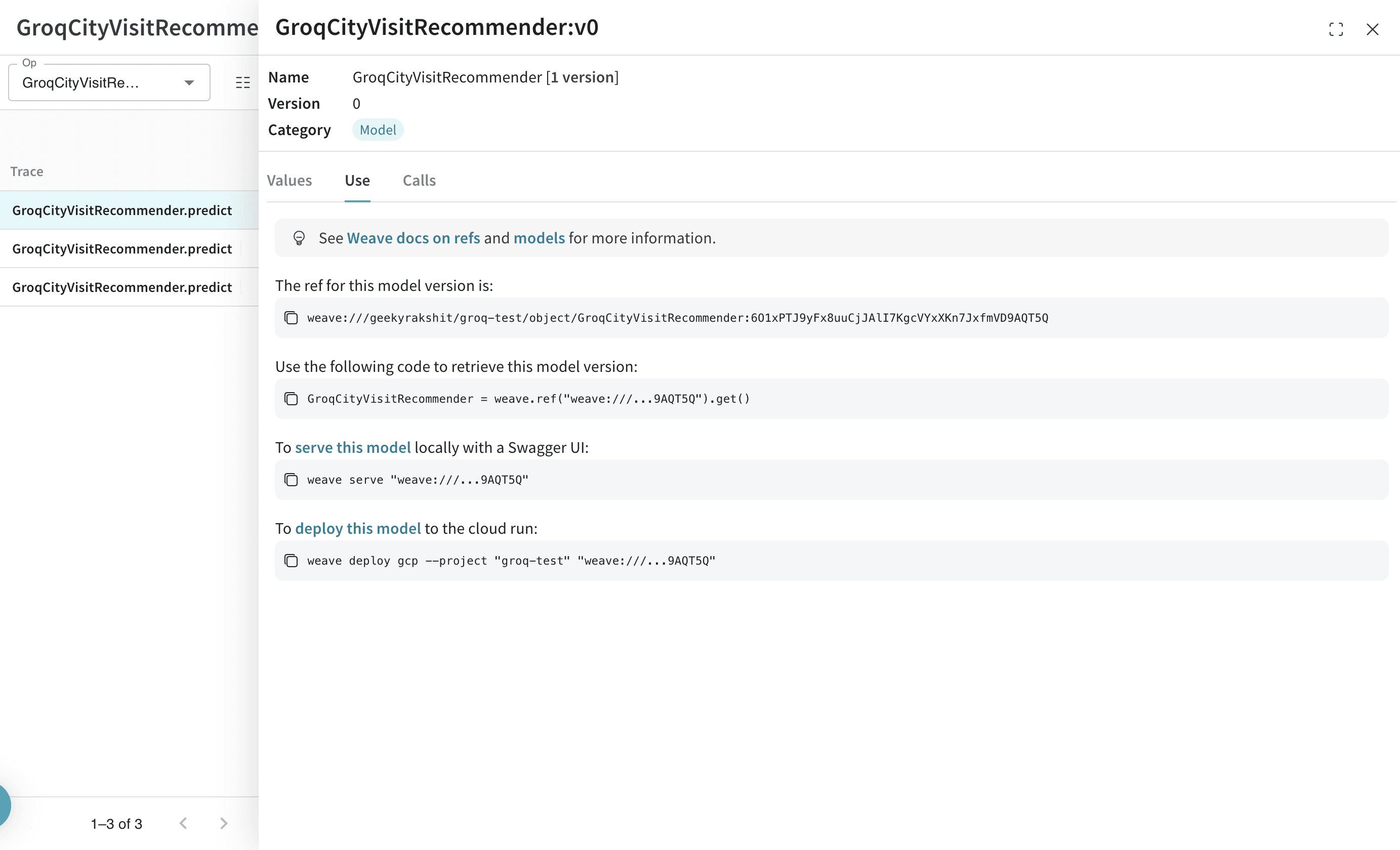
모든 weave.Model 오브젝트에 대한 Weave 참조 (reference) 가 있으면 fastapi 서버를 띄워 서빙 (serve) 할 수 있습니다.
dspy_weave_model_serve.png
모델로 이동하여 UI 에서 복사하면 모든 WeaveModel 의 Weave 참조를 찾을 수 있습니다.
터미널에서 다음 코맨드를 사용하여 모델을 서빙할 수 있습니다.
weave serve weave://your_entity/project-name/YourModel:<hash>