Notice: The Weights & Biases domain will change on September 30. This includes all websites and services that use a W&B domain. No action is needed today.
Anthropic SDK를 통해 이루어지는 LLM Call를 Weave로 자동으로 추적하고 로깅하세요
코드에 Weave를 통합하면 Python과 TypeScript에서 Anthropic SDK를 통해 이루어지는 LLM Call를 자동으로 추적하고 로깅합니다. Weave는 Anthropic의 Messages.create()를 자동으로 호출해 이를 수행합니다.이 가이드에서는 트레이스를 캡처하고, 자체 함수를 ops로 래핑하고, 실험용으로 재사용 가능한 Model을 구축하고, Anthropic SDK로 작업할 때 도구 사용을 추적하는 방법을 설명합니다. 이러한 패턴을 활용하면 맞춤형 로깅 코드를 작성하지 않고도 Claude 기반 애플리케이션을 디버그하고, 비교하고, 반복적으로 개선할 수 있습니다.”
코드에 weave.init("your-team-name/your-project-name")를 추가하면 Weave가 Anthropic SDK의 트레이스를 자동으로 캡처합니다. weave.init()에서 팀 이름을 인수로 지정하지 않으면 Weave는 출력을 기본 W&B entity에 기록합니다. 프로젝트 이름을 지정하지 않으면 Weave를 초기화할 수 없습니다.다음 예제는 Anthropic에 대한 기본적인 call에 Weave를 통합하는 방법을 보여줍니다.
Python
TypeScript
import weave # 평소처럼 anthropic 라이브러리를 사용합니다import osfrom anthropic import Anthropicweave.init("anthropic_project")client = Anthropic(api_key=os.environ.get("ANTHROPIC_API_KEY"),)message = client.messages.create(max_tokens=1024,messages=[{"role": "user","content": "Tell me a joke about a dog",}],model="claude-3-opus-20240229",)print(message.content)
importAnthropic from '@anthropic-ai/sdk';import * asweave from 'weave';import { wrapAnthropic } from 'weave';awaitweave.init('anthropic_project');// 트레이싱을 활성화하려면 Anthropic 클라이언트를 래핑합니다constclient =wrapAnthropic(newAnthropic());constmessage = awaitclient.messages.create({max_tokens: 1024,messages: [ {role: 'user',content: 'Tell me a joke about a dog', } ],model: 'claude-3-opus-20240229',});console.log(message.content);
코드에 weave.init()를 포함하면 Weave가 트레이싱 정보를 자동으로 캡처하고 링크를 출력합니다. 링크를 클릭하면 Weave UI에서 트레이스를 확인할 수 있습니다.
weave.init()만으로도 Anthropic SDK Call을 캡처할 수 있지만, 직접 만든 함수에 ops를 데코레이터로 적용하면 각 모델 Call을 둘러싼 애플리케이션 로직까지 포함하는 더 풍부한 트레이스를 얻을 수 있습니다.Weave ops는 실험하면서 코드를 자동으로 버전 관리하고 입력과 출력을 캡처합니다. Python에서는 @weave.op() 데코레이터를 사용하고, TypeScript에서는 weave.op()으로 래핑해 Anthropic.messages.create()를 호출하면 Weave가 입력과 출력을 대신 추적합니다.다음 예제에서는 함수를 추적하는 방법을 보여줍니다.
개별 Call을 추적하기 시작했다면, 다음 단계는 관련 매개변수를 함께 정리해 서로 다른 설정을 비교할 수 있도록 하는 것입니다.
weave.Model 클래스는 Weave Python SDK에서만 사용할 수 있습니다. TypeScript에서는 weave.op() 래퍼를 사용해 구조화된 매개변수로 함수를 추적하세요.
여러 요소가 동시에 바뀌면 실험을 체계적으로 정리하기가 어렵습니다. Model 클래스를 사용하면 시스템 프롬프트나 사용 중인 모델처럼 앱 실험과 관련된 세부 정보를 캡처하고 정리할 수 있습니다. 이렇게 하면 앱의 다양한 반복 버전을 정리하고 비교하는 데 도움이 됩니다.Model은 코드를 버전 관리하고 입력과 출력을 캡처하는 것에 더해, 애플리케이션의 동작을 제어하는 구조화된 매개변수도 캡처합니다. 이를 통해 어떤 매개변수가 가장 효과적인지 찾는 데 도움이 될 수 있습니다. 또한 Weave Models를 serve 및 evaluations와 함께 사용할 수도 있습니다.다음 예제에서는 model과 temperature를 바꿔 가며 실험할 수 있습니다:
import weave # anthropic 라이브러리를 평소처럼 사용합니다import osfrom anthropic import Anthropicweave.init('joker-anthropic')class JokerModel(weave.Model): # `weave.Model`로 변경 model: str temperature: float @weave.op() def predict(self, topic): # `predict`로 변경 client = Anthropic() message = client.messages.create( max_tokens=1024, messages=[ { "role": "user", "content": f"Tell me a joke about {topic}", } ], model=self.model, temperature=self.temperature ) return message.content[0].textjoker = JokerModel( model="claude-3-haiku-20240307", temperature = 0.1)result = joker.predict("Chickens and Robots")print(result)
이 값 중 하나를 변경할 때마다 Weave는 JokerModel의 새 버전을 생성하고 추적합니다. 이를 통해 트레이스 데이터를 코드 변경 사항과 연결할 수 있으며, 어떤 설정이 사용 사례에 가장 적합한지 확인하는 데 도움이 됩니다.
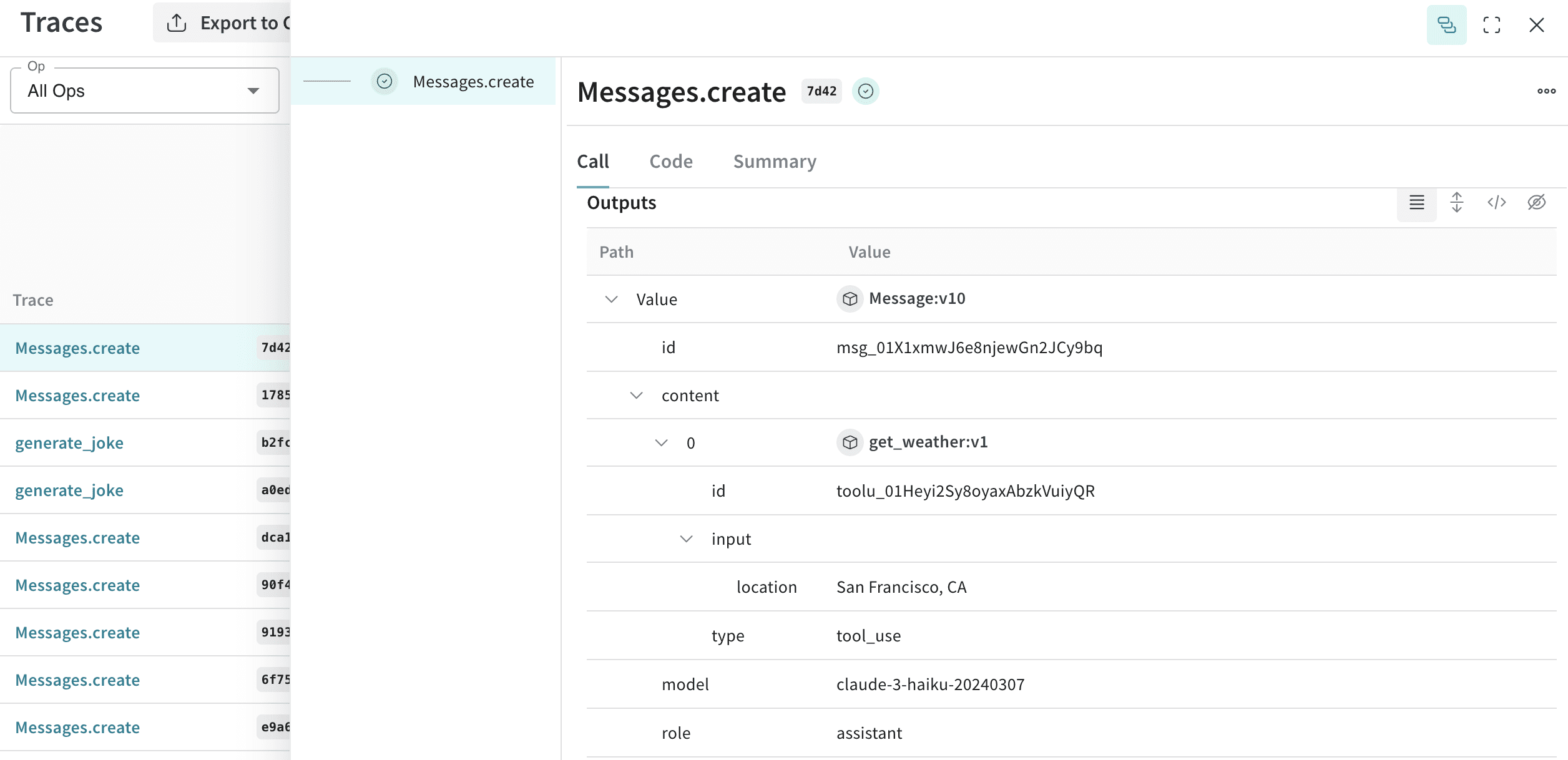
표준 메시지 외에도 Weave는 Anthropic의 도구 사용 인터페이스를 계측하여 에이전트 워크플로를 엔드투엔드로 트레이스할 수 있게 합니다.Anthropic은 Claude가 함수 호출을 요청할 수 있도록 tools 인터페이스를 제공합니다. Weave는 대화 전반에서 도구 정의, 도구 사용 요청, 도구 결과를 자동으로 추적합니다.다음의 축약된 예시는 Anthropic 도구 설정을 보여줍니다.
Python
TypeScript
message = client.messages.create( max_tokens=1024, messages=[ { "role": "user", "content": "What's the weather like in San Francisco?", } ], tools=[ { "name": "get_weather", "description": "Get the current weather in a given location", "input_schema": { "type": "object", "properties": { "location": { "type": "string", "description": "The city and state, e.g. San Francisco, CA", } }, "required": ["location"], }, }, ], model=model,)print(message)
constmessage = awaitclient.messages.create({max_tokens: 1024,messages: [ {role: 'user',content: "What's the weather like in San Francisco?", } ],tools: [ {name: 'get_weather',description: 'Get the current weather in a given location',input_schema: {type: 'object',properties: {location: {type: 'string',description: 'The city and state, e.g. San Francisco, CA', } },required: ['location'], }, }, ],model: 'claude-3-opus-20240229',});console.log(message);
Weave는 대화의 각 step에서 도구 정의, Claude의 도구 사용 요청, 도구 결과를 자동으로 캡처합니다.


 코드에 Weave를 통합하면 Python과 TypeScript에서 Anthropic SDK를 통해 이루어지는 LLM Call를 자동으로 추적하고 로깅합니다. Weave는 Anthropic의