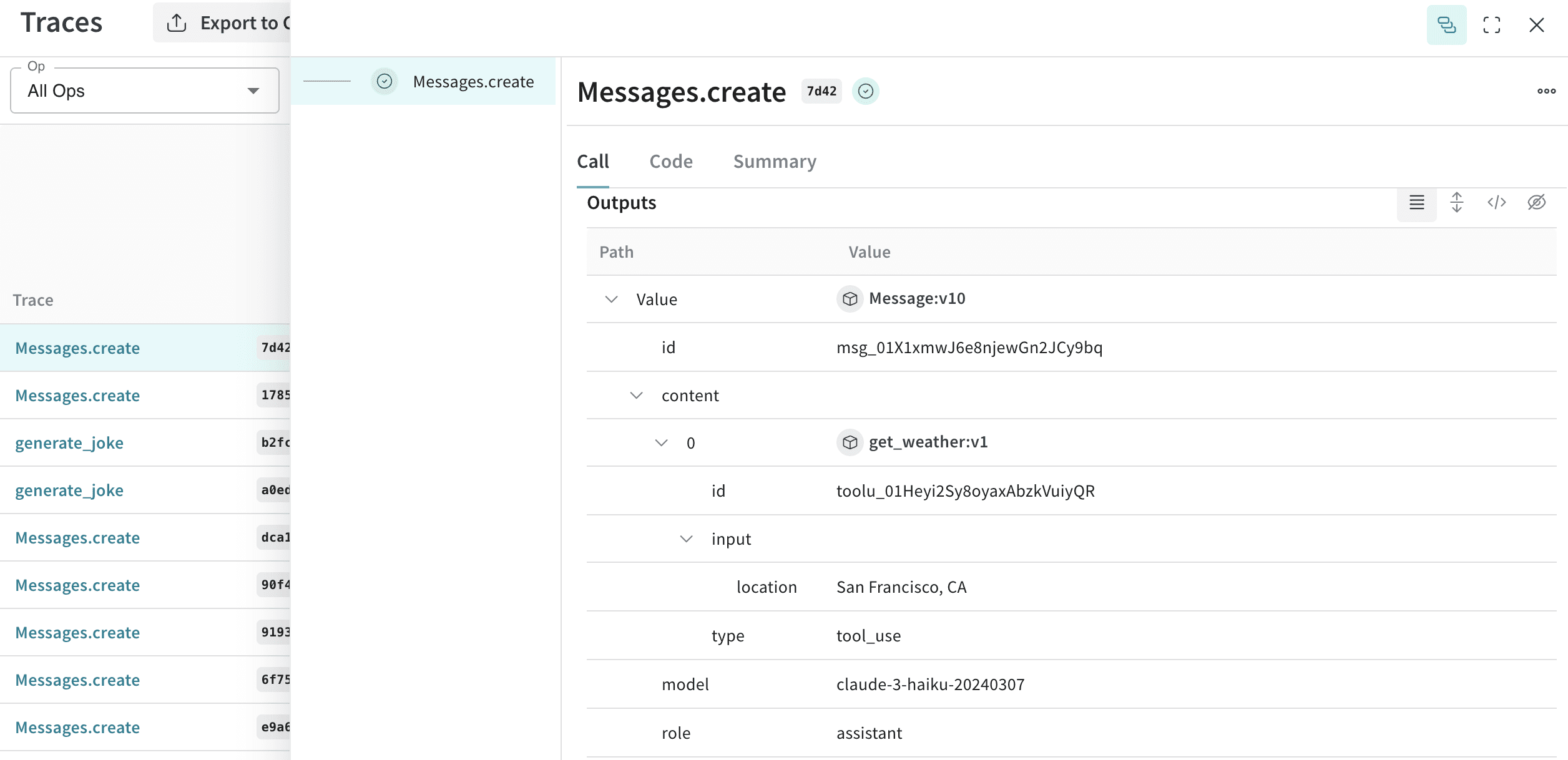
Weave をコードに統合すると、Python と TypeScript の両方で、Anthropic SDK を使用した LLM 呼び出しが自動的にトラッキングされ、ログされます。Weave は、Anthropic の Messages.create() メソッドを自動的に呼び出すことでこれを実現します。
コードに weave.init("your-team-name/your-project-name") を追加すると、Weave は Anthropic SDK のトレースを自動的に取得します。weave.init() で引数としてチーム名を指定しない場合、Weave は出力をデフォルトの W&B entityにログします。プロジェクト名を指定しない場合、Weave は初期化に失敗します。
以下の例は、Anthropic への基本的な call に Weave を統合する方法を示しています。
import weave
# 通常どおり anthropic ライブラリを使用する
import os
from anthropic import Anthropic
weave.init("anthropic_project")
client = Anthropic(
api_key=os.environ.get("ANTHROPIC_API_KEY"),
)
message = client.messages.create(
max_tokens=1024,
messages=[
{
"role": "user",
"content": "Tell me a joke about a dog",
}
],
model="claude-3-opus-20240229",
)
print(message.content)
import Anthropic from '@anthropic-ai/sdk';
import * as weave from 'weave';
import { wrapAnthropic } from 'weave';
await weave.init('anthropic_project');
// トレースを有効にするため、Anthropic クライアントをラップします
const client = wrapAnthropic(new Anthropic());
const message = await client.messages.create({
max_tokens: 1024,
messages: [
{
role: 'user',
content: 'Tell me a joke about a dog',
}
],
model: 'claude-3-opus-20240229',
});
console.log(message.content);
コードに weave.init() を含めると、Weave はトレース情報を自動的に取得してリンクを出力します。リンクをクリックすると、Weave UI でトレースを表示できます。
Weave の ops は、実験を進める中でコードを自動的にバージョン管理し、入力と出力を取得します。Anthropic.messages.create() を呼び出す関数を、Python では @weave.op() でデコレートし、TypeScript では weave.op() でラップすると、Weave がその入力と出力をトラッキングします。
以下の例は、関数をトラッキングする方法を示しています。
import weave
import os
from anthropic import Anthropic
weave.init("anthropic_project")
client = Anthropic(
api_key=os.environ.get("ANTHROPIC_API_KEY"),
)
@weave.op()
def call_anthropic(user_input:str, model:str) -> str:
message = client.messages.create(
max_tokens=1024,
messages=[
{
"role": "user",
"content": user_input,
}
],
model=model,
)
return message.content[0].text
@weave.op()
def generate_joke(topic: str) -> str:
return call_anthropic(f"Tell me a joke about {topic}", model="claude-3-haiku-20240307")
print(generate_joke("chickens"))
print(generate_joke("cars"))
import Anthropic from '@anthropic-ai/sdk';
import * as weave from 'weave';
import { wrapAnthropic } from 'weave';
await weave.init('anthropic_project');
const client = wrapAnthropic(new Anthropic());
const callAnthropic = weave.op(async function callAnthropic(
userInput: string,
model: string
): Promise<string> {
const message = await client.messages.create({
max_tokens: 1024,
messages: [
{
role: 'user',
content: userInput,
}
],
model: model,
});
const content = message.content[0];
return content.type === 'text' ? content.text : '';
});
const generateJoke = weave.op(async function generateJoke(
topic: string
): Promise<string> {
return callAnthropic(`Tell me a joke about ${topic}`, 'claude-3-haiku-20240307');
});
console.log(await generateJoke('chickens'));
console.log(await generateJoke('cars'));
関数を weave.op() でデコレートまたはラップすると、Weave はその関数のコード、入力、出力を取得します。ops を使用すれば、ネストされた関数を含め、トラッキングしたい任意の関数をトラッキングできます。
weave.Model クラスは Weave Python SDK でのみ利用できます。TypeScript では、weave.op() ラッパーを使用して、構造化されたパラメーターを持つ関数をトラッキングします。
要素が多いと、実験を整理するのは難しくなります。Model クラスを使用すると、system prompt や使用しているモデルなど、アプリの実験に関する詳細を取得して整理できます。これにより、アプリの異なるイテレーションを整理して比較しやすくなります。
Model は、コードのバージョン管理や入力/出力の取得に加えて、アプリケーションの挙動を制御する構造化されたパラメーターも取得します。これにより、どのパラメーターが最も効果的かを検索しやすくなります。Weave Models は、serve や Evaluation と組み合わせて使用することもできます。
次の例では、model と temperature を使って実験できます。
import weave
# anthropic ライブラリを通常通り使用する
import os
from anthropic import Anthropic
weave.init('joker-anthropic')
class JokerModel(weave.Model): # `weave.Model` に変更する
model: str
temperature: float
@weave.op()
def predict(self, topic): # `predict` に変更する
client = Anthropic()
message = client.messages.create(
max_tokens=1024,
messages=[
{
"role": "user",
"content": f"Tell me a joke about {topic}",
}
],
model=self.model,
temperature=self.temperature
)
return message.content[0].text
joker = JokerModel(
model="claude-3-haiku-20240307",
temperature = 0.1)
result = joker.predict("Chickens and Robots")
print(result)
これらの値のいずれかを変更するたびに、Weave は JokerModel の新しいバージョンを作成してトラッキングします。これにより、Trace Data をコードの変更に関連付けることができ、どの設定がユースケースに最も適しているかを判断するのに役立ちます。
Anthropic は、Claude が関数呼び出しをリクエストできる tools インターフェースを提供しています。Weave は、会話全体を通じて、ツール定義、ツール使用のリクエスト、ツールの実行結果を自動的にトラッキングします。
以下の抜粋した例は、Anthropic のツール設定を示しています。
message = client.messages.create(
max_tokens=1024,
messages=[
{
"role": "user",
"content": "What's the weather like in San Francisco?",
}
],
tools=[
{
"name": "get_weather",
"description": "Get the current weather in a given location",
"input_schema": {
"type": "object",
"properties": {
"location": {
"type": "string",
"description": "The city and state, e.g. San Francisco, CA",
}
},
"required": ["location"],
},
},
],
model=model,
)
print(message)
const message = await client.messages.create({
max_tokens: 1024,
messages: [
{
role: 'user',
content: "What's the weather like in San Francisco?",
}
],
tools: [
{
name: 'get_weather',
description: 'Get the current weather in a given location',
input_schema: {
type: 'object',
properties: {
location: {
type: 'string',
description: 'The city and state, e.g. San Francisco, CA',
}
},
required: ['location'],
},
},
],
model: 'claude-3-opus-20240229',
});
console.log(message);
Weave は、会話の各 step で、ツール定義、Claude のツール使用リクエスト、ツールの実行結果を自動的に取得します。