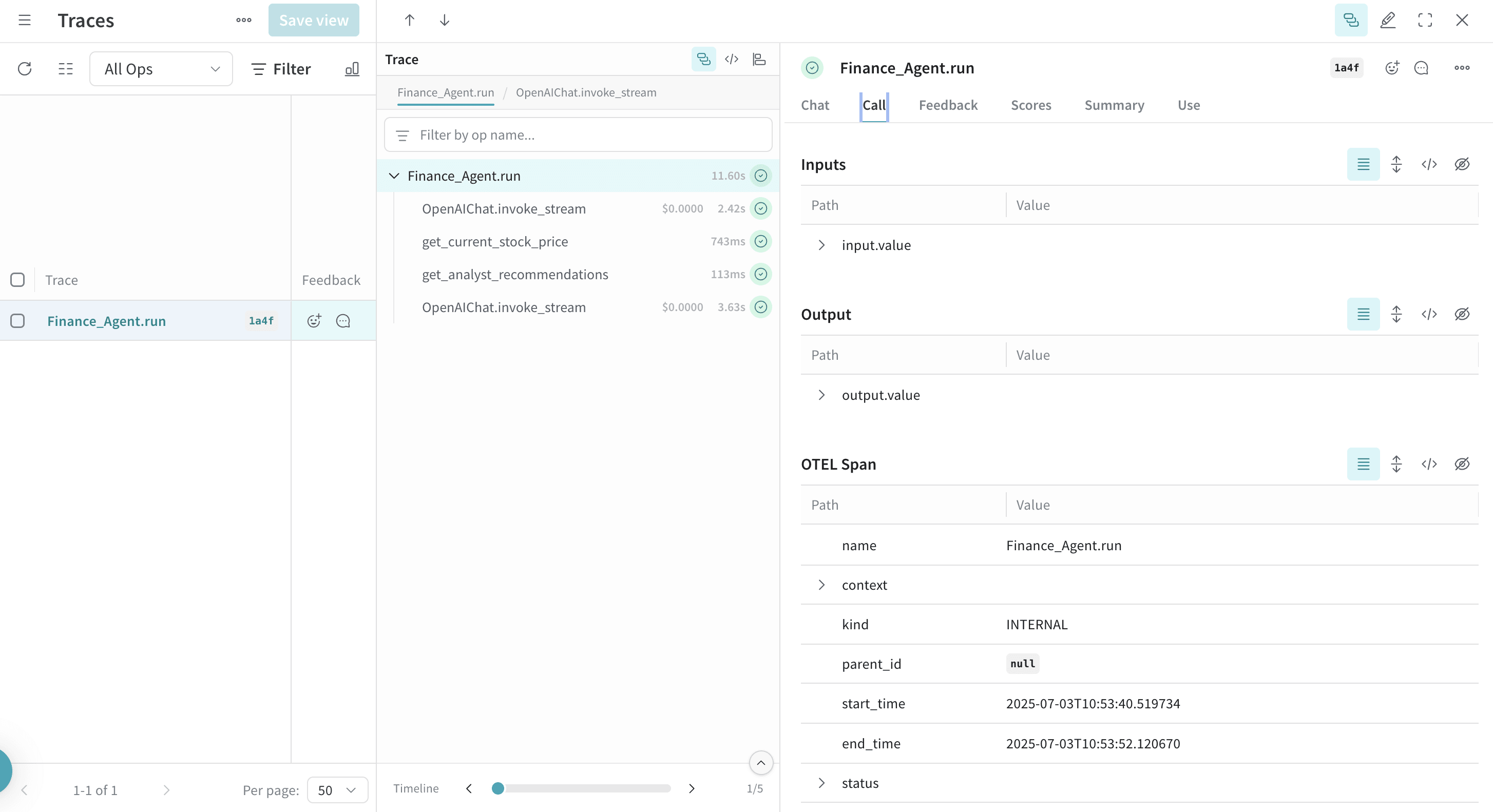
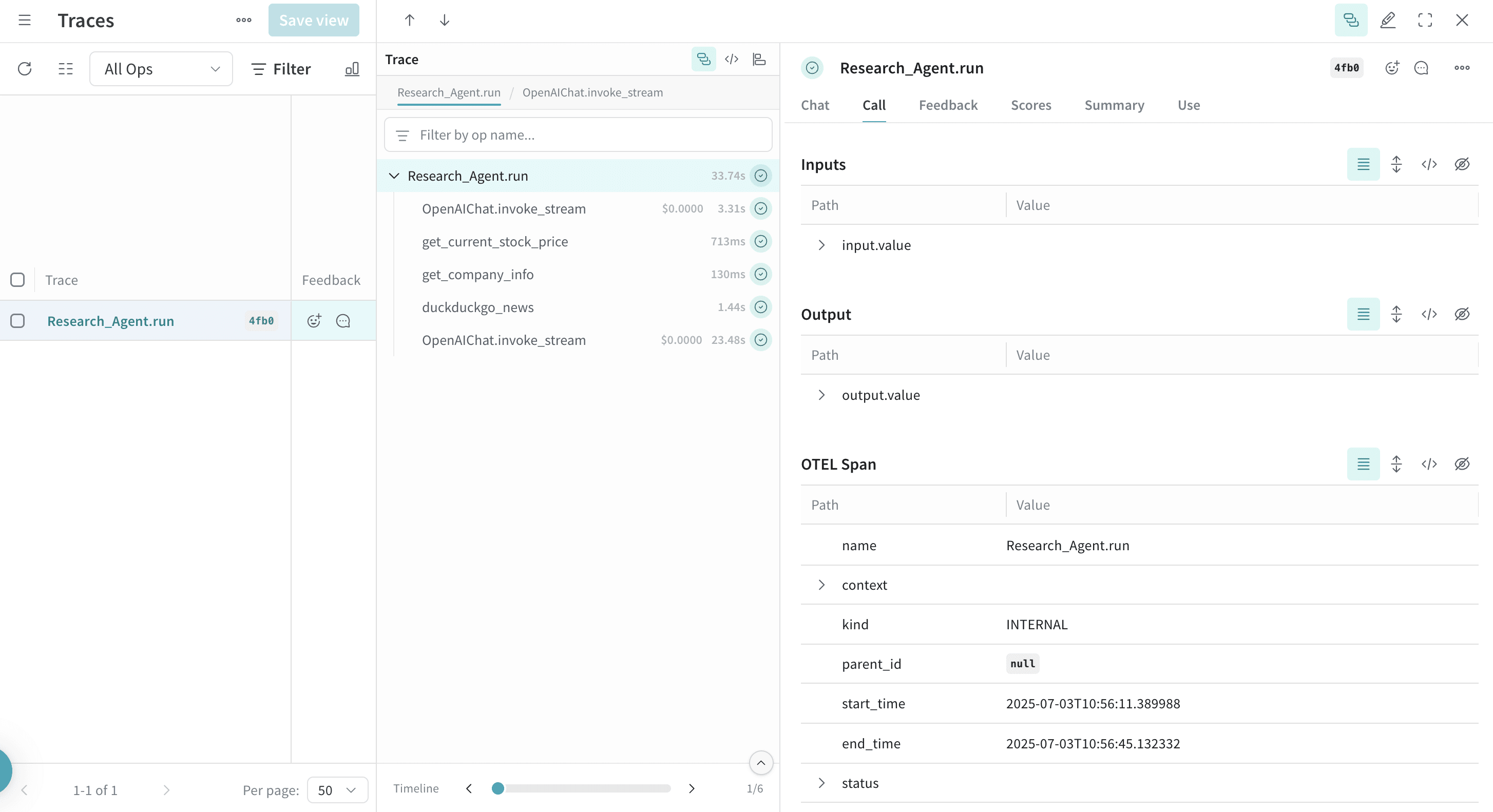
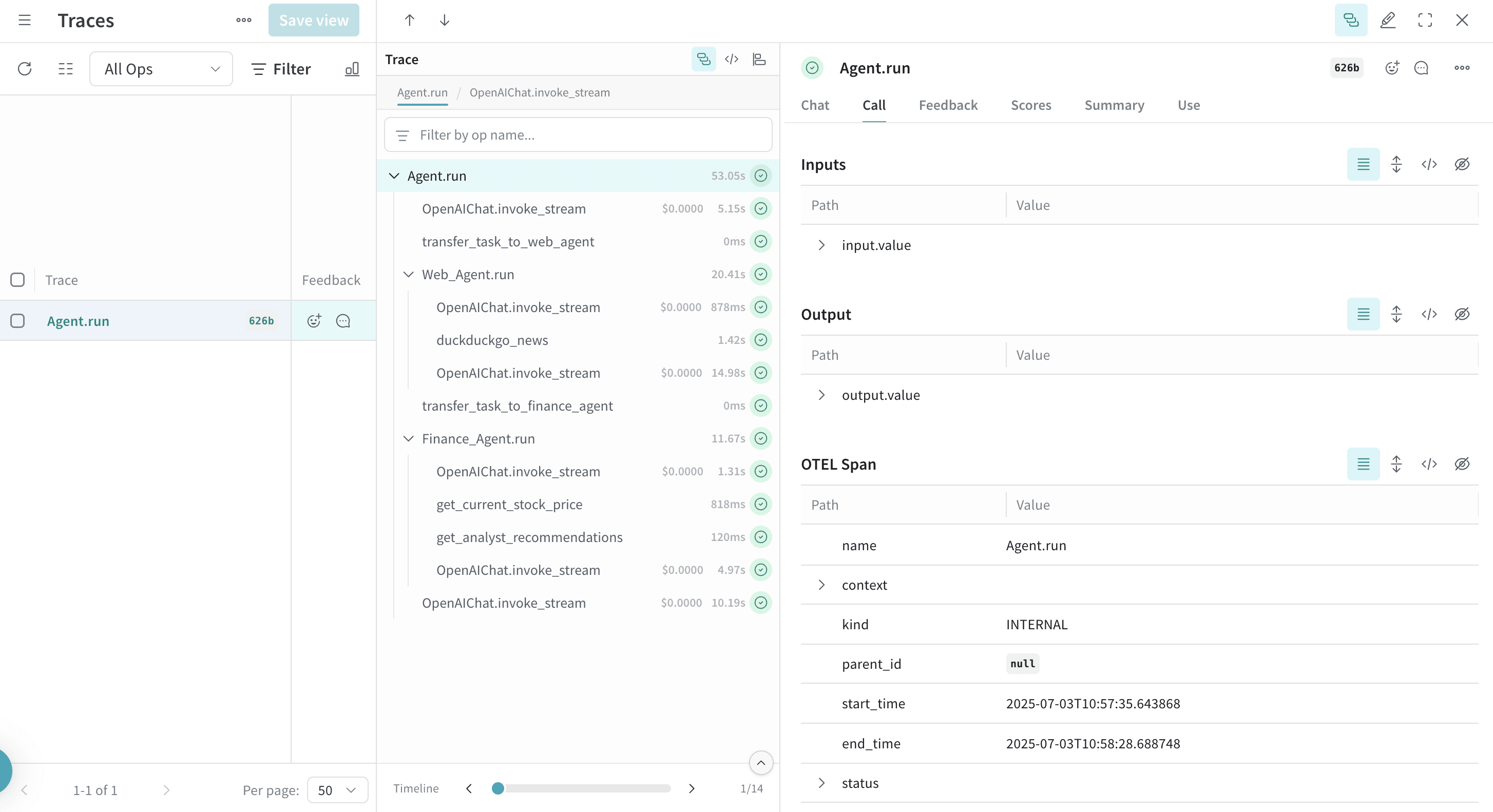
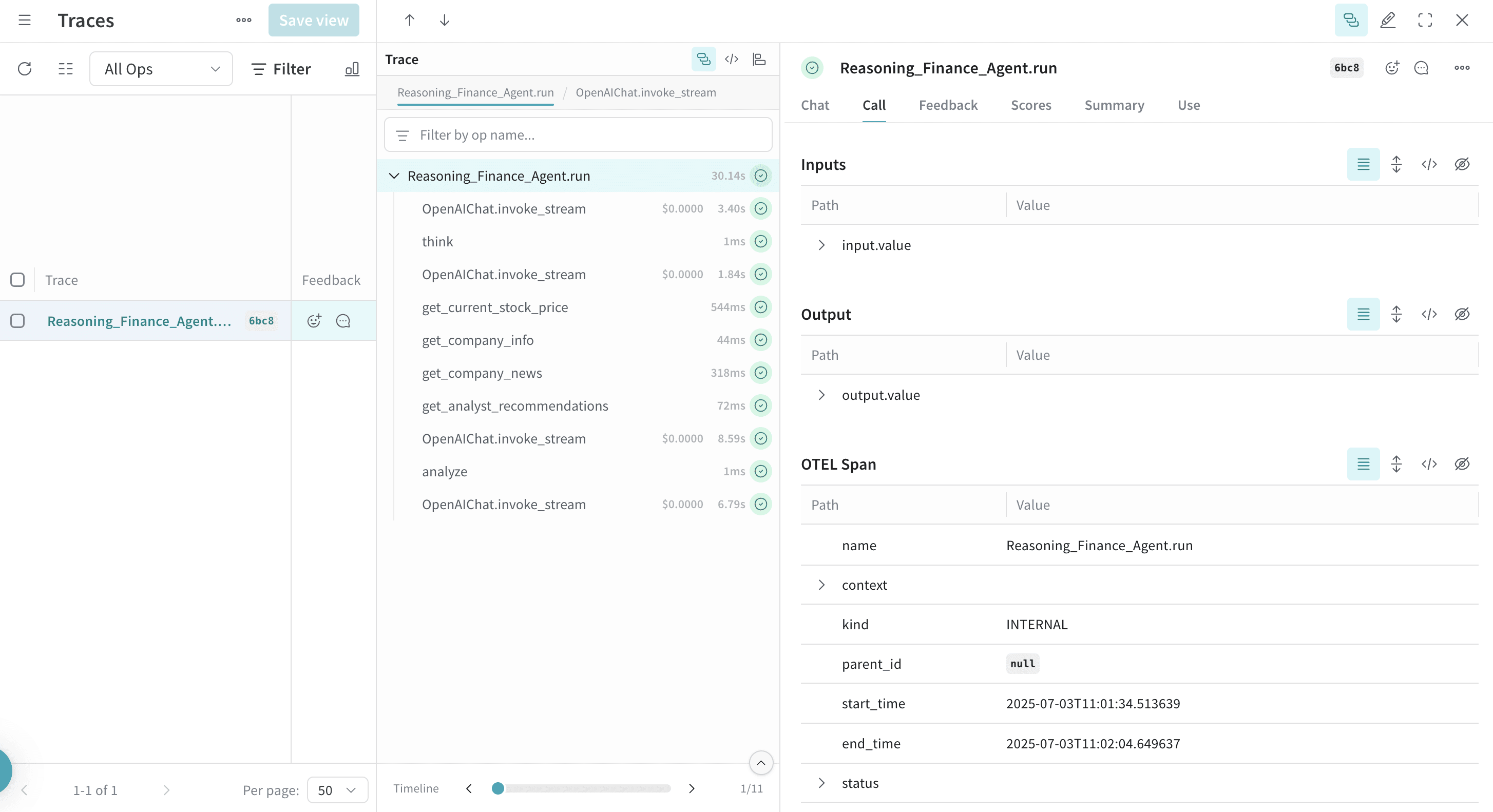
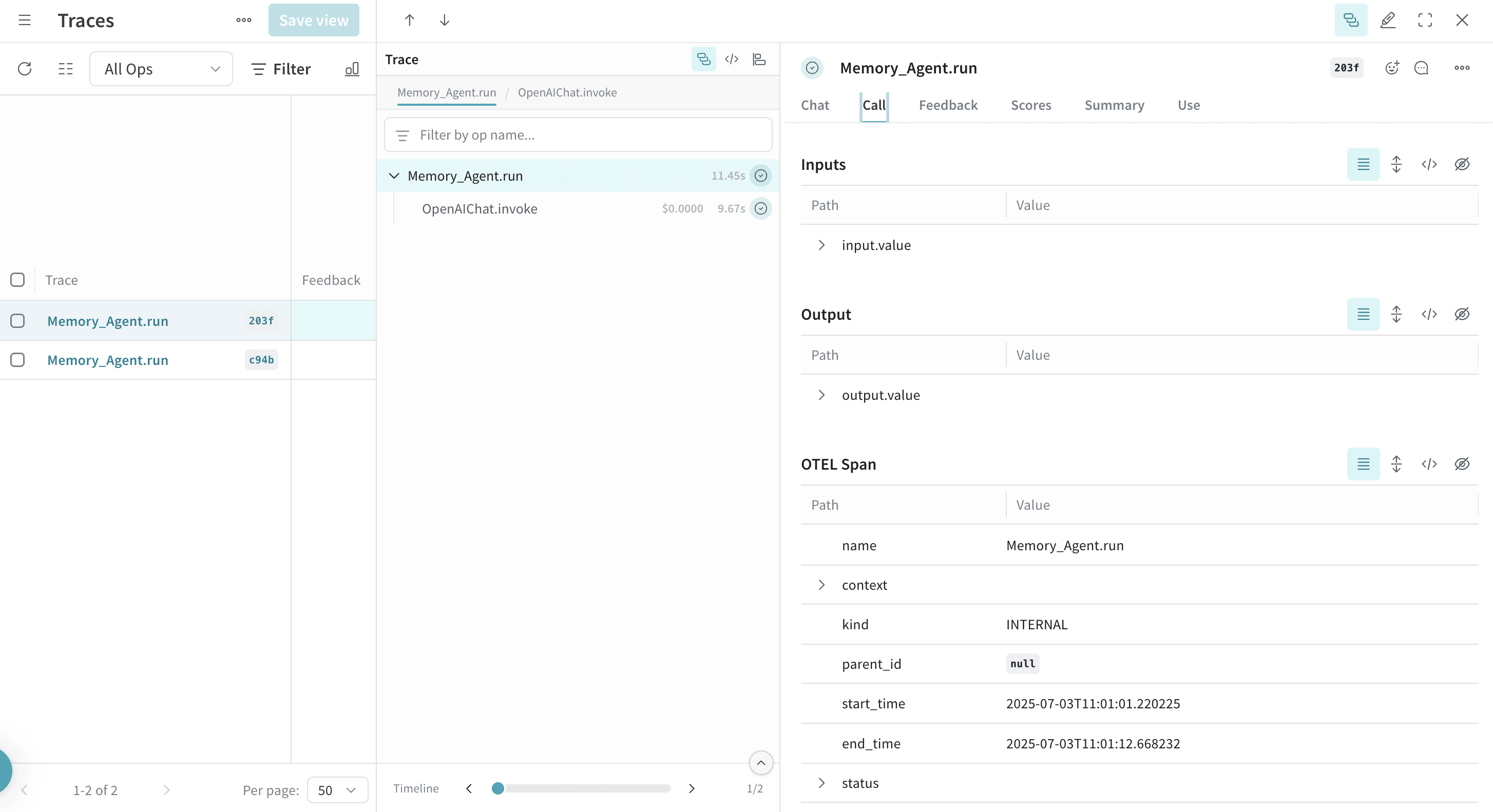
OpenTelemetry (OTEL)를 사용하여 Weave에서 Agno 에이전트 및 툴 호출을 추적할 수 있습니다. Agno는 공유 메모리, 지식 및 추론 능력을 갖춘 멀티 에이전트 시스템을 구축하기 위한 Python 프레임워크입니다. 가볍고 모델에 구애받지 않으며(model-agnostic) 고성능을 발휘하도록 설계되었으며 텍스트, 이미지, 오디오 및 비디오 처리를 포함한 멀티모달 기능을 지원합니다.
이 가이드는 OTEL을 사용하여 Agno 에이전트 및 툴 호출을 추적하고, 해당 추적 결과를 Weave에서 시각화하는 방법을 설명합니다. 필요한 종속성 설치, Weave로 데이터를 전송하기 위한 OTEL tracer 설정, 그리고 Agno 에이전트 및 툴의 계측(instrument) 방법을 배우게 됩니다.
Prerequisites
-
필요한 종속성을 설치합니다:
pip install agno openinference-instrumentation-agno opentelemetry-sdk opentelemetry-exporter-otlp-proto-http
-
OpenAI API 키(또는 다른 모델 제공업체)를 환경 변수로 설정합니다:
export OPENAI_API_KEY=your_api_key_here
-
Weave에서 OTEL 추적 설정을 진행합니다.
Agno에서 Weave로 추적 데이터를 보내려면 TracerProvider 및 OTLPSpanExporter로 OTEL을 설정해야 합니다. 엑스포터가 인증 및 프로젝트 식별을 위한 올바른 엔드포인트와 HTTP 헤더를 사용하도록 설정하세요.
Required configuration
- Endpoint:
https://trace.wandb.ai/otel/v1/traces
- Headers:
Authorization: W&B API 키를 사용한 기본 인증(Basic auth)
project_id: W&B Entity / Project 이름 (예: myteam/myproject)
Send OTEL traces from Agno to Weave
Prerequisites를 완료하면 Agno에서 Weave로 OTEL 추적 데이터를 보낼 수 있습니다. 다음 코드 조각은 Agno 애플리케이션에서 Weave로 OTEL 추적을 보내기 위해 OTLP span 엑스포터와 tracer provider를 설정하는 방법을 보여줍니다.
Weave가 Agno를 올바르게 추적할 수 있도록 코드에서 Agno 컴포넌트를 사용하기 _전_에 글로벌 tracer provider를 설정하세요.
# tracing.py
import base64
import os
from openinference.instrumentation.agno import AgnoInstrumentor
from opentelemetry.exporter.otlp.proto.http.trace_exporter import OTLPSpanExporter
from opentelemetry.sdk import trace as trace_sdk
from opentelemetry.sdk.trace.export import SimpleSpanProcessor
from opentelemetry import trace
# 환경 변수에서 민감한 값 로드
WANDB_BASE_URL = "https://trace.wandb.ai"
# W&B Entity / Project 이름 (예: "myteam/myproject")
PROJECT_ID = os.environ.get("WANDB_PROJECT_ID")
# https://wandb.ai/settings 에서 W&B API 키 생성
WANDB_API_KEY = os.environ.get("WANDB_API_KEY")
OTEL_EXPORTER_OTLP_ENDPOINT = f"{WANDB_BASE_URL}/otel/v1/traces"
AUTH = base64.b64encode(f"api:{WANDB_API_KEY}".encode()).decode()
OTEL_EXPORTER_OTLP_HEADERS = {
"Authorization": f"Basic {AUTH}",
"project_id": PROJECT_ID,
}
# 엔드포인트와 헤더를 사용하여 OTLP span 엑스포터 생성
exporter = OTLPSpanExporter(
endpoint=OTEL_EXPORTER_OTLP_ENDPOINT,
headers=OTEL_EXPORTER_OTLP_HEADERS,
)
# tracer provider 생성 및 엑스포터 추가
tracer_provider = trace_sdk.TracerProvider()
tracer_provider.add_span_processor(SimpleSpanProcessor(exporter))
# Agno를 임포트하거나 사용하기 전에 글로벌 tracer provider 설정
trace.set_tracer_provider(tracer_provider)
Trace Agno agents with OTEL
tracer provider를 설정한 후에는 자동 추적 기능이 활성화된 Agno 에이전트를 생성하고 실행할 수 있습니다. 다음 예제는 툴을 가진 간단한 에이전트를 생성하는 방법을 보여줍니다:
from agno.agent import Agent
from agno.models.openai import OpenAIChat
from agno.tools.yfinance import YFinanceTools
from dotenv import load_dotenv
load_dotenv()
# 위에서 생성한 파일에서 AgnoInstrumentor 로드
from tracing import AgnoInstrumentor
# Agno 계측 시작
AgnoInstrumentor().instrument()
# 금융 에이전트 생성
finance_agent = Agent(
name="Finance Agent",
model=OpenAIChat(id="gpt-4o-mini"),
tools=[
YFinanceTools(
stock_price=True,
analyst_recommendations=True,
company_info=True,
company_news=True
)
],
instructions=["Use tables to display data"],
show_tool_calls=True,
markdown=True,
)
# 에이전트 사용 - 이 작업은 자동으로 추적됩니다
finance_agent.print_response(
"What is the current stock price of Apple and what are the latest analyst recommendations?",
stream=True
)
모든 에이전트 작업은 자동으로 추적되어 Weave로 전송되므로 실행 흐름, 모델 호출, 추론 단계 및 툴 호출을 시각화할 수 있습니다.
Agno에서 툴을 정의하고 사용하면 이러한 툴 호출도 추적 데이터에 캡처됩니다. OTEL 인테그레이션은 에이전트의 추론 프로세스와 개별 툴 실행을 모두 자동으로 계측하여 에이전트의 행동에 대한 포괄적인 뷰를 제공합니다.
다음은 여러 툴을 사용하는 예제입니다:
from agno.agent import Agent
from agno.models.openai import OpenAIChat
from agno.tools.duckduckgo import DuckDuckGoTools
from agno.tools.yfinance import YFinanceTools
from dotenv import load_dotenv
load_dotenv()
# 위에서 생성한 파일에서 AgnoInstrumentor 로드
from tracing import AgnoInstrumentor
# Agno 계측 시작
AgnoInstrumentor().instrument()
# 여러 툴을 가진 에이전트 생성
research_agent = Agent(
name="Research Agent",
model=OpenAIChat(id="gpt-4o-mini"),
tools=[
DuckDuckGoTools(),
YFinanceTools(stock_price=True, company_info=True),
],
instructions=[
"Search for current information and financial data",
"Always include sources",
"Use tables to display financial data"
],
show_tool_calls=True,
markdown=True,
)
# 에이전트 사용 - 툴 호출이 추적됩니다
research_agent.print_response(
"Research Tesla's recent performance and news. Include stock price and any recent developments.",
stream=True
)
Trace multi-agent teams with OTEL
Agno의 강력한 멀티 에이전트 아키텍처를 사용하면 협업하고 컨텍스트를 공유하는 에이전트 팀을 구성할 수 있습니다. 이러한 팀 상호 작용도 완전히 추적됩니다:
from agno.agent import Agent
from agno.models.openai import OpenAIChat
from agno.tools.duckduckgo import DuckDuckGoTools
from agno.tools.yfinance import YFinanceTools
from dotenv import load_dotenv
load_dotenv()
# tracing.py 파일에서 AgnoInstrumentor 로드
from tracing import AgnoInstrumentor
# Agno 계측 시작
AgnoInstrumentor().instrument()
# 특화된 에이전트 생성
web_agent = Agent(
name="Web Agent",
role="Search the web for information",
model=OpenAIChat(id="gpt-4o-mini"),
tools=[DuckDuckGoTools()],
instructions="Always include sources",
show_tool_calls=True,
markdown=True,
)
finance_agent = Agent(
name="Finance Agent",
role="Get financial data",
model=OpenAIChat(id="gpt-4o-mini"),
tools=[YFinanceTools(stock_price=True, analyst_recommendations=True)],
instructions="Use tables to display data",
show_tool_calls=True,
markdown=True,
)
# 에이전트 팀 구성
agent_team = Agent(
team=[web_agent, finance_agent],
model=OpenAIChat(id="gpt-4o"),
instructions=["Always include sources", "Use tables to display data"],
show_tool_calls=True,
markdown=True,
)
# 팀 사용 - 모든 에이전트 상호 작용이 추적됩니다
agent_team.print_response(
"What's the current market sentiment around NVIDIA? Include both news analysis and financial metrics.",
stream=True
)
이 멀티 에이전트 추적은 Weave에서 서로 다른 에이전트 간의 조정을 보여주며, 태스크가 에이전트 팀 전체에 걸쳐 어떻게 분산되고 실행되는지에 대한 가시성을 제공합니다.
Work with Reasoning Agents
Agno는 에이전트가 문제를 단계별로 생각할 수 있도록 돕는 내장 추론 기능을 제공합니다. 이러한 추론 프로세스 역시 추적 데이터에 캡처됩니다:
from agno.agent import Agent
from agno.models.openai import OpenAIChat
from agno.tools.reasoning import ReasoningTools
from agno.tools.yfinance import YFinanceTools
from dotenv import load_dotenv
load_dotenv()
# tracing.py 파일에서 AgnoInstrumentor 로드
from tracing import AgnoInstrumentor
# Agno 계측 시작
AgnoInstrumentor().instrument()
# 추론 에이전트 생성
reasoning_agent = Agent(
name="Reasoning Finance Agent",
model=OpenAIChat(id="gpt-4o"),
tools=[
ReasoningTools(add_instructions=True),
YFinanceTools(
stock_price=True,
analyst_recommendations=True,
company_info=True,
company_news=True
),
],
instructions="Use tables to display data and show your reasoning process",
show_tool_calls=True,
markdown=True,
)
# 추론 에이전트 사용
reasoning_agent.print_response(
"Should I invest in Apple stock right now? Analyze the current situation and provide a reasoned recommendation.",
stream=True
)
추적 결과에서 에이전트가 복잡한 문제를 어떻게 분해하고 결정을 내리는지 보여주는 추론 단계를 확인할 수 있습니다.
Work with memory and knowledge
Agno 에이전트는 메모리를 유지하고 지식 베이스(knowledge bases)에 엑세스할 수 있습니다. 이러한 작업도 추적됩니다:
from agno.agent import Agent
from agno.models.openai import OpenAIChat
from agno.memory import AgentMemory
from agno.storage.sqlite import SqliteStorage
from dotenv import load_dotenv
load_dotenv()
# tracing.py 파일에서 AgnoInstrumentor 로드
from tracing import AgnoInstrumentor
# Agno 계측 시작
AgnoInstrumentor().instrument()
# 메모리 기능이 있는 에이전트 생성
memory_agent = Agent(
name="Memory Agent",
model=OpenAIChat(id="gpt-4o-mini"),
memory=AgentMemory(),
storage=SqliteStorage(
table_name="agent_sessions",
db_file="agent_memory.db"
),
instructions="Remember our conversation history",
show_tool_calls=True,
markdown=True,
)
# 첫 번째 상호 작용
memory_agent.print_response("My name is John and I'm interested in AI investing strategies.")
# 두 번째 상호 작용 - 에이전트가 이전 컨텍스트를 기억합니다
memory_agent.print_response("What specific AI companies would you recommend for my portfolio?")
대화 기록 저장 및 검색을 포함한 메모리 작업이 추적 결과에 표시됩니다.
Learn more